How to Create a Domain Name API Key (Step-by-Step Guide)
Managing domain operations manually is time-consuming and prone to errors. With Domain Name API, you can automate domain registration, transfers, and DNS management from a single Domain API integration point. This guide walks you through creating your API key and storing it securely, step by step.
What is Domain Name API?
Domain Name API is a Domain API infrastructure built for resellers and developers who want to automate domain registration, transfer and management. It provides access to 800+ TLDs from a single Domain API integration point.
An API Key is the authentication credential used to securely access the Domain API. It must be sent alongside your Reseller ID with every Domain API request.
Who is this guide for?
Resellers who want to automate domain registration for clients.
Providers bundling domain registration with hosting packages.
Developers integrating domain management into their products.
Agencies building domain automation systems for clients.
What Can You Do with Your API Key?
Query domain availability in real time via the Domain API.
Automate domain registration for clients via the Domain API.
Programmatically add and update A, MX, CNAME records.
Access domain ownership data directly through the Domain API.
For the full endpoint list covering domain registration, transfer, renewal, DNS management and Whois queries, visit the API Library section in your reseller panel.
1. Accessing the Integration Details Page
- Log in to the reseller panel
Go to dm.domainnameapi.com and sign in with your reseller account. - Open the left menu
Expand the "My Account" section in the left navigation bar. - Click "Reseller Settings"
Select "Reseller Settings" under the "My Account" section. - Select the "Integration Details" tab
The Reseller Settings page has three tabs. Click on "Integration Details".
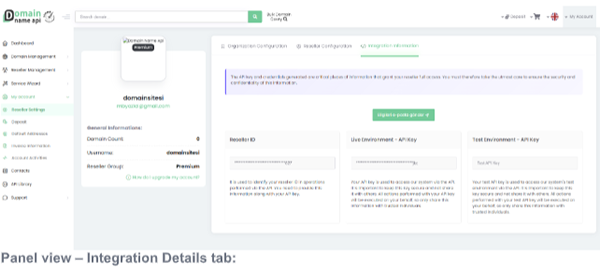
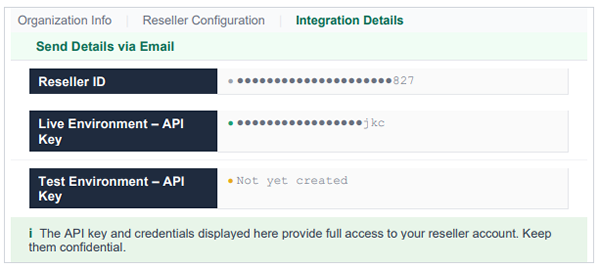
i The API key and credentials displayed here provide full access to your reseller account. Keep them confidential.
✓ Click "Send Details via Email" to send your Reseller ID and API keys to your registered email address.
2. Integration Details Fields
The Integration Details tab contains three main fields:
| Field | Description |
|---|---|
| Reseller ID | Identifies your reseller account in Domain API requests. Must be sent with every request. |
| Live Environment – API Key | Used for real domain operations. All transactions are billed against your reseller account. |
| Test Environment – API Key | Used for development and integration testing. Not billed and does not create real registrations. |
! When developing a new Domain API integration, always start with the test environment key. Only switch to the live key once your tests pass.
3. "Send Details via Email" Feature
When you click "Send Details via Email", a notification is sent to your registered email address in the following format:
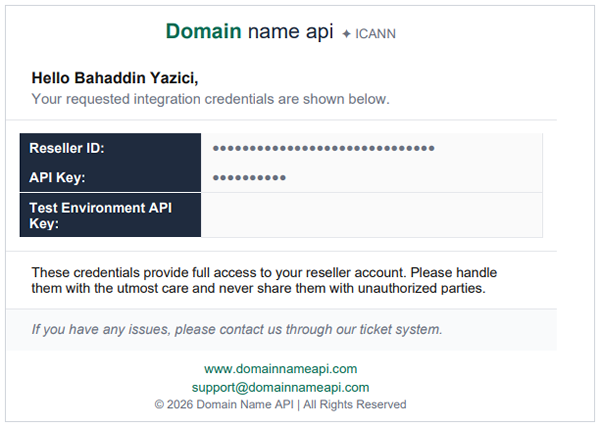
Information included in the email:
- Reseller ID – Used for authentication in Domain API requests.
- API Key (Live Environment) – Your key for real domain operations.
- Test Environment API Key – Your key for development (shown only if configured).
⚠ Store this email securely. Do not share it with third parties — it contains credentials that provide full access to your reseller account.
4. Best Practices for Storing Your API Key Securely
Your API key grants full privileged access to the Domain API. Follow these practices to keep it secure:
4.1 Do's
- Store the API key in your application's environment variables (.env); never hard-code it in source code.
- Add .gitignore to your repository to prevent the .env file from being committed.
- For server-side apps, use environment variables or an encrypted secrets manager (HashiCorp Vault, AWS Secrets Manager, Azure Key Vault).
- Restrict Domain API calls to trusted IP addresses; create an IP whitelist where possible.
- Rotate your Domain API key on a regular basis.
4.2 Don'ts
! Warning: The following mistakes can lead to your account being compromised.
- Never share your key via email, messaging apps, or screenshots.
- Never commit files containing your Domain API key to public repositories. Bots can detect exposed keys within minutes.
- Never embed the Domain API key in client-side JavaScript or mobile app bundles.
- Do not share the same Domain API key across multiple applications or teams.
⚠ If you suspect your Domain API key has been compromised: Contact support immediately, request a key rotation and update all applications.
5. Example Usage (PHP)
PHP example showing how to securely read the Domain API key from environment variables:
// Wrong - hard-coding the key
$apiKey = 'abc123secret'; // NOT SECURE!

// Correct - reading from environment variables
$apiKey     = getenv('DOMAINNAMEAPI_KEY');
$resellerId = getenv('DOMAINNAMEAPI_RESELLER_ID');

// Example: domain availability check
$response = $client->checkDomain([
    'resellerId' => $resellerId,
    'apiKey'     => $apiKey,
    'domain'     => 'exampledomain.com'
]);
6. Frequently Asked Questions
I lost my API key. What should I do?
Go to Reseller Settings > Integration Details or use the "Send Details via Email" button to resend it to your registered email.
What should I do if my key has been compromised?
Contact support immediately, request a Domain API key rotation and update all applications.
What is the Reseller ID used for?
The Reseller ID identifies your account and must be sent with every Domain API request alongside your key.
Where can I find the Domain API documentation?
Visit the "API Library" section in the left navigation menu of your reseller panel for all endpoints and integration docs.
What is the difference between live and test environments?
Domain API transactions in the test environment are not billed and do not create real registrations.
Why choose Domain Name API?
Domain Name API offers the following advantages for resellers and developers building domain API automation:
- 800+ TLD support: .com, .net, .io, .co.uk and hundreds more from a single Domain API integration point.
- 40,000+ active resellers: Proven, scalable Domain API infrastructure.
- REST & SOAP Domain API: Compatible with PHP, .NET, Python and any technology stack.
- Ready-made WHMCS module: Domain API integration in just a few steps.
- 24/7 technical support: Dedicated support team via ticket system.
Apply for resellership and learn more: www.domainnameapi.com
7. Related Articles
[ Test ]
Domain Name API Test Platform
Access the test environment, login credentials and platform features.
[ WHMCS ]
How to Install WHMCS?
Install the WHMCS module and complete your Domain API integration.
[ Deposit ]
How to Add a Deposit?
Add balance to your account and start processing domain orders.