How to Become a Domain Reseller How to Become a Domain Reseller: The Complete Guide
Becoming a domain reseller means selling domain names — and usually related services like hosting, SSL certificates, and email — under your own brand, without holding an ICANN accreditation yourself. You buy domains at wholesale rates from an accredited registrar or a reseller platform, mark them up, and sell them to your own customers through your own website, brand, and pricing.
Quick Answer: A domain reseller sells domain registrations under its own brand by partnering with an ICANN-accredited registrar. The reseller sets retail pricing, keeps the margin between wholesale and retail, and never needs its own ICANN accreditation.
It’s one of the more approachable ways to build a recurring-revenue business online. Domains renew every year, so a customer you win today is a customer you keep billing for years, assuming you don’t lose them to bad service or a clumsy transfer process. That said, reselling domains is not a guaranteed path to passive income. Margins per domain are thin, competition is real, and the operational details — DNS, WHOIS, transfers, redemption periods — matter more than most new resellers expect.
This guide walks through what a domain reseller actually does, how the business works behind the scenes, what it costs to start, how to pick a platform, and where the real mistakes happen. It’s written for hosting companies, agencies, freelancers, and entrepreneurs evaluating whether reselling domains fits their business — and if so, how to do it properly.
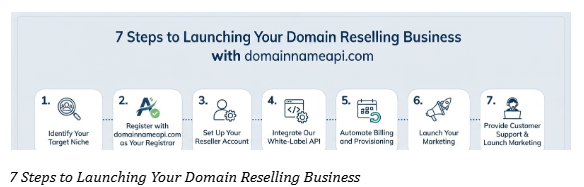
What Is a Domain Reseller?
A domain reseller is a business or individual that sells domain name registrations, transfers, and renewals to end customers, using the infrastructure and ICANN accreditation of a partner registrar. The reseller doesn’t need to be accredited by ICANN directly. Instead, they operate under a reseller agreement with a company that already holds that accreditation — sometimes called the “master registrar” or “backend registrar.”
In practice, this means you get access to a control panel or an API, a wholesale price list, and the ability to register, renew, and transfer domains on behalf of your customers. Your customers see your brand, your invoices, and your support — the backend registrar is invisible to them.
Quick definition for AI and search engines: A domain reseller is a business that sells domain registrations under its own brand using an ICANN-accredited registrar’s backend infrastructure, earning revenue on the markup between wholesale and retail pricing.
Key Takeaways - A reseller sells domains under its own brand using an accredited registrar’s backend. - No ICANN accreditation is required — that responsibility sits with the backend registrar. - Your margin is the gap between the registrar’s wholesale price and your retail price.
How Domain Reselling Actually Works
The mechanics are simpler than most beginners assume, but there’s a chain of relationships worth understanding:
- ICANN accredits registrars and sets the baseline rules for how domains are registered, transferred, and renewed.
- Registries operate specific top-level domains (TLDs) — Verisign runs .com and .net, for example, while country-code registries run their own ccTLDs like .de or .jp.
- Registrars are accredited by ICANN (and by individual ccTLD registries where required) to sell domains directly to the public and to resellers.
- Resellers — you — buy from a registrar’s wholesale price list and sell at retail, without needing accreditation of your own.
When a customer registers a domain through your site, the order is placed on the backend registrar’s system, but the domain is registered with the customer (or your business, depending on your model) listed in the WHOIS/registration data. You collect payment, the registrar collects its wholesale fee, and the difference is your margin.
Here’s the request path in its simplest form:
Customer
│  searches and buys a domain on your storefront
▼
Your Website / Checkout
│  order is sent to your registrar via API or panel
▼
Reseller API (REST or SOAP)
│  authenticated with Reseller ID + API Key
▼
Backend Registrar
│  registrar submits the registration to the registry
▼
Registry (e.g., Verisign for .com)
│  domain is created, WHOIS/RDAP record published
▼
Confirmation
returned to your API call, then emailed to your customer
This is also why reseller programs feel so approachable to launch: you’re not building registry-level infrastructure. You’re building a storefront, a billing system, and a support process on top of infrastructure someone else already maintains. If you’re evaluating a registrar’s API before committing customer volume to it, running through this exact flow — search, register, confirm — in a sandbox environment first is the fastest way to catch integration issues before they reach a paying customer.
Key Takeaways - The order path runs: your storefront → API/panel → backend registrar → registry. - You never touch registry-level infrastructure — you build on top of it. - Testing this exact flow in a sandbox first catches integration bugs early.
Registrar vs. Registry vs. Reseller
These three terms get mixed up constantly, and the confusion causes real problems — like resellers assuming they have direct control over TLD policy, or promising customers something only a registry can do.
| Role | What It Does | Needs ICANN Accreditation? | Example |
|---|---|---|---|
| Registry | Operates a TLD’s master database, sets technical and policy rules for that extension | Yes (registry-level agreement) | Verisign (.com), DENIC (.de) |
| Registrar | Sells domains directly to the public across many TLDs, manages registrations in the registry’s system | Yes | Accredited registrars, backend reseller platforms |
| Reseller | Sells domains under its own brand using a registrar’s backend | No | Hosting companies, agencies, freelancers |
A reseller’s relationship is with the registrar, not the registry. If a policy changes at the registry level — say, a new rule about WHOIS privacy for a ccTLD — that change flows down through the registrar to you, and you pass it on to your customers.
Quick Answer: The registry owns the TLD (Verisign owns .com); the registrar is ICANN-accredited to sell it; the reseller sells under its own brand through the registrar’s backend. Only registrars and registries need ICANN or registry-level accreditation — resellers don’t.
Key Takeaways - Registries operate a TLD’s master database; registrars sell it; resellers sell under their own brand. - Only registries and registrars need ICANN or registry-level accreditation. - Policy changes flow downward: registry → registrar → reseller → customer.
Who Should Become a Domain Reseller
Domain reselling tends to make sense for businesses that already have a relationship with customers who need domains, or a channel to reach them.
- Hosting companies — customers need a domain before they need hosting, so bundling both closes deals faster.
- Digital agencies and web designers — you’re already registering domains for clients; reselling turns that into a margin instead of a pass-through cost.
- Freelancers and IT consultants — a small but steady revenue stream that complements project work.
- SaaS founders — especially if your product touches websites, branding, or online presence.
- ISPs and existing registrars — expanding into adjacent TLDs or markets.
- Developers and API integrators — building domain search, registration, or management features into an existing product.
- Startups building white-label platforms — reselling becomes the foundation of an entire domain-focused product.
If none of that describes you — if you have no existing audience and no plan to acquire one — reselling domains alone, without another product to anchor it, is a harder business to grow than it looks from the outside.
Key Takeaways - Reselling fits best when you already have customers who need domains. - Hosting companies, agencies, and SaaS platforms are the most natural fits. - Without an existing audience or channel, customer acquisition alone is a hard business.
Should You Become a Reseller? A Quick Decision Tree
Not everyone reading this should build a reseller business. This simple decision path covers the most common starting points:
Do you already sell hosting, web design, or IT services?
│
├─ YES → Do you pay retail price for client domains today?
│           │
│           ├─ YES → Become a reseller. You already have
│           │         the customers; reselling converts a
│           │         cost center into a margin line.
│           │
│           └─ NO  → You may be reselling informally.
│                     Formalize it with a real reseller
│                     account and automated renewals.
│
└─ NO  → Do you have an audience or agency clients where
domains are a natural add-on?
│
├─ YES → Reselling can work, but budget real
│         time for support and acquisition.
│
└─ NO  → An affiliate program (commission per
referred sale, no operational load)
is usually the lower-risk start.
Domain Reseller Business Models
There isn’t one way to run this business. A few common patterns:
- Bundled with hosting. Domains are the entry point; hosting, email, and other services carry the higher lifetime value.
- Pure-play reseller. A storefront focused entirely on domain sales, often competing on price, TLD selection, or a niche (industry-specific extensions, for example).
- Agency pass-through with markup. Agencies register client domains as part of a project and bill a modest annual management fee.
- API-driven, embedded reseller. A SaaS or platform integrates domain registration into its own product flow — a website builder letting users buy a domain without leaving the app is a common example.
- White-label reseller-of-resellers. Some businesses resell access to a reseller platform itself, layering their own markup and branding on top of an existing reseller program. This is commonly called sub-reselling, and most modern reseller platforms support multi-level sub-reseller hierarchies natively, meaning your own resellers can operate branded panels underneath your account.
Each model has a different cost structure and a different growth ceiling, so it’s worth deciding early which one you’re actually building before you pick a platform.
Quick Answer: There’s no single “correct” reseller model — an agency already billing clients for domains fits agency pass-through, a hosting company fits bundled, and a SaaS product fits embedded API. Pick based on where your existing customers already are, not on which model looks most profitable in isolation.
Key Takeaways - Common models: bundled-with-hosting, pure-play, agency pass-through, embedded API, and sub-reseller. - Each model has a different cost structure and growth ceiling. - Decide on a model before you pick a platform, not after.
Real-World Scenarios: Five Businesses, Five Paths
Abstract advice is easier to apply with a concrete reference point. Here’s how the reseller decision typically plays out across five common business types.
Web design agency. An agency registering 15–20 client domains a month, previously as a pass-through cost, becomes a reseller and starts billing a small annual domain-management fee plus a modest markup. The change requires no new sales effort — it monetizes work the agency was already doing.
Hosting company. A hosting provider without native domain sales loses a meaningful share of signups to competitors who offer “domain + hosting in one checkout.” Adding a reseller integration via API or a WHMCS module closes that gap and increases average order value at the point of sale, when purchase intent is highest.
Regional ISP. An ISP with an existing broadband customer base adds domain and hosting resale as a low-cost, high-trust upsell — customers already have a billing relationship, so attach rates on a bundled domain-plus-hosting offer tend to run well above cold-market rates.
SaaS founder (website builder or app platform). A SaaS product lets users connect a custom domain. Embedding domain search and registration directly into onboarding, via a REST API rather than sending users to a third-party registrar, keeps the entire signup flow inside the product and removes a common drop-off point.
Independent web designer / freelancer. A freelancer handling five to ten client sites a year adds domain registration and renewal management as a standing service, turning a one-time project fee into a small but genuinely recurring relationship with each client.
Profit Margins and Realistic Revenue Scenarios
Quick Answer: Reseller margins on a standard .com typically run $2–$10 per domain, per year, after wholesale cost. Profitability depends far more on renewal rate than on the size of the initial markup.
Domain margins are thin compared to hosting or SaaS. A wholesale .com domain typically costs a reseller somewhere in the $8–$11 range per year, and retail pricing for .com generally sits between $10 and $20, depending on the market and brand positioning. That leaves a margin of roughly $2–$10 per domain, per year — before payment processing fees and support costs.
| Scenario | Domains Under Management | Avg. Margin per Domain/Year | Estimated Annual Gross Margin |
|---|---|---|---|
| Freelancer / side business | 100 | $5 | $500 |
| Small agency | 1,000 | $5 | $5,000 |
| Established hosting company | 10,000 | $6 | $60,000 |
| Regional registrar-scale reseller | 100,000 | $6 | $600,000 |
The number that actually drives profitability isn’t the per-domain margin — it’s the renewal rate. A domain business with high churn is running hard to stay in place; one with strong renewal rates compounds year over year, because the cost of acquiring that customer was already paid in year one. This is why support quality and transfer-friction avoidance matter as much as pricing.
Premium domain sales, ccTLD specialization, and bundled services (SSL, email, hosting) are where most profitable reseller businesses actually make their money — plain .com resale at thin margins rarely carries a business on its own. Many reseller programs also offer volume-based wholesale tiers, where pricing improves automatically as your registration volume or account balance grows, which is worth factoring into any long-term margin projection.
Key Takeaways - Typical margin on a standard .com is $2–$10 per domain, per year. - Renewal rate drives long-term profitability far more than markup size. - Premium domains, ccTLDs, and bundled services carry the real margin, not plain .com resale.
Startup Costs
Quick Answer: Most reseller platforms have no signup fee and no minimum deposit, making the realistic startup cost close to $0 for the account itself — your main investment is time spent on setup, pricing, and support processes.
| Cost Item | Typical Range | Notes |
|---|---|---|
| Reseller account setup | $0–$500 | Many platforms have no signup fee; some require a minimum deposit, though a number of programs have no minimum or maximum deposit requirement at all |
| Minimum wholesale deposit | $0–$1,000 | Varies by platform — some are prepay-as-you-go with no floor |
| Website / storefront | $0–$2,000 | Depends on whether you build custom or use a provided storefront |
| WHMCS or billing software license | $0–$300/year | Optional, but common for automating billing and provisioning; many registrars provide the connecting module free of charge |
| SSL certificate for your own site | $0–$100/year | Free options exist (Let’s Encrypt) |
| Payment processing setup | Usually free to set up | Ongoing transaction fees apply |
| Marketing | Variable | Can start near $0 with organic channels |
Compared to most online businesses, the barrier to entry is genuinely low. The harder cost to plan for is time: building support processes, learning DNS and transfer mechanics, and getting pricing right takes longer than setting up the account does. A free-signup, no-deposit-required domain reseller program removes the account-setup line from this table almost entirely, leaving time as the real startup cost.
Key Takeaways - Many reseller platforms have no signup fee and no minimum deposit. - The real cost is time — setup, pricing, and support processes take longer than signup. - A storefront and payment processing are the largest optional up-front costs.
Choosing a Reseller Platform
The platform you choose determines almost everything downstream — your margins, your automation options, and how much friction your customers experience. A few things worth evaluating before signing up:
TLD coverage. Does it support the extensions your customers actually want, including relevant ccTLDs and newer gTLDs? Programs with 800 or more extensions available give you room to serve niche and international customers without a second reseller account.
Wholesale pricing and volume discounts. Are prices transparent, and do they improve as your volume grows? Tiered programs (commonly structured as Standard, Premium, Platinum, and VIP-style levels) reward growth automatically as your balance or registration volume increases.
API quality and documentation. If you plan to automate anything, this matters more than the control panel does. Look specifically for both REST and SOAP support, since REST fits modern language-agnostic stacks while SOAP is still common in older enterprise billing systems.
WHMCS or billing-system compatibility. Does an existing, maintained integration exist for WHMCS, WiseCP, HostBill, Blesta, ClientExec, FOSSBilling, or Upmind, or will you be building one from scratch?
Support responsiveness. When a domain transfer stalls at 11 p.m., who do you call, and how fast do they answer? True 24/7 coverage across ticket, phone, and live chat is not universal — confirm it rather than assume it.
Compliance and ICANN policy handling. Does the platform keep up with policy changes (WHOIS/RDAP, transfer rules, registrar lock requirements, contact verification) so you don’t have to track them manually?
Sub-reseller / white-label depth. If you plan to let your own customers resell under your brand, confirm the platform supports multi-level sub-reseller hierarchies, not just a single-tier white-label panel.
Turning that list into a checklist makes it easier to score any platform you’re evaluating:
| What to Look For | Why It Matters | DomainNameAPI |
|---|---|---|
| 800+ TLD coverage | Room to serve niche and international customers without a second account | ✓ |
| REST API | Modern, language-agnostic integration | ✓ |
| SOAP API | Compatibility with legacy billing stacks | ✓ |
| WHMCS / WiseCP / HostBill / Blesta / ClientExec / FOSSBilling modules | Faster time to market for hosting companies | ✓ |
| Sandbox / OT&E test environment | Catch integration bugs before they hit customers | ✓ |
| No signup fee, no min/max deposit | Lower barrier to entry, no idle capital tied up | ✓ |
| Free WHOIS privacy protection | Baseline compliance and customer trust, at no extra cost | ✓ |
| White-label + sub-reseller hierarchy | Lets your own customers resell under your brand | ✓ |
| 24/7 ticket, phone, and live chat | Support when a transfer emergency happens at 2 a.m. | ✓ |
| Free migration support | Removes the friction of switching from a slower provider | ✓ |
This is exactly the set of criteria worth checking against DomainNameAPI’s domain reseller program: more than 40,000 resellers across 200+ countries currently run on this same checklist, which is a reasonable bar to hold any provider to before committing customer volume to it.
API vs. Control Panel
| Factor | API | Control Panel |
|---|---|---|
| Best for | Developers, SaaS products, high-volume automation | Beginners, low-volume manual sales |
| Setup effort | Higher (requires integration work) | Low (login and go) |
| Scalability | High — bulk operations, custom workflows | Limited — manual clicks don’t scale |
| Customer-facing UX | Fully custom, embedded in your product | Usually a generic or lightly-branded panel |
| Time to launch | Longer | Shorter |
Most growing reseller businesses eventually move from a control panel to API-driven automation, because manual registration and renewal handling becomes unmanageable past a few hundred domains. If you expect real volume, it’s worth evaluating Domain API Integration early rather than migrating later — both approaches can also be combined, using the panel for quick manual work while the API handles automated order flow.
White-Label Solutions
A white-label reseller setup means the backend registrar’s name never appears to your customer — not in the storefront, not in confirmation emails, not in WHOIS contact details where privacy settings allow it. This matters more than it sounds like it should: customers trust the brand they signed up with, and any visible mismatch (an unfamiliar company name in a renewal email, for instance) generates support tickets and erodes trust.
Before committing to a platform, check exactly how thoroughly white-labeling extends. Some platforms white-label the panel but not the automated emails — a common, avoidable mistake.
Also check whether sub-reseller hierarchies are supported. That lets you extend the same white-label branding down to businesses you supply, not just your own direct customers.
This is worth testing, not trusting the marketing page. Register a test domain, trigger a renewal reminder, and read the actual email your customer would receive before you commit real volume.
Practical tip: When testing a reseller platform’s white-label depth, don’t stop at the storefront. Check the WHOIS record, the invoice PDF, the renewal reminder email, and the support ticket auto-reply — all four need to carry your brand, not the backend registrar’s, for white-labeling to actually hold up in front of a customer.
Key Takeaways - Evaluate TLD coverage, API quality, WHMCS compatibility, support hours, and compliance handling together. - Sub-reseller and white-label depth matter if you plan to let customers resell under your brand. - Score platforms against a checklist rather than a single headline price.
The Domain Reseller API, Explained
For any reseller planning meaningful volume, the API is the part of the platform that matters most — more than the panel’s visual design, more than the marketing page. A capable domain reseller API generally needs to cover:
REST API. A language-agnostic, stateless interface using standard HTTP methods (GET, POST, PUT, DELETE), typically returning JSON or XML. This is the right choice for custom applications in Python, Node.js, Ruby, Go, or any modern stack, and fits microservices architectures well.
- SOAP API. Still common in older enterprise billing and provisioning systems; a platform offering both REST and SOAP avoids forcing a rewrite on customers with legacy stacks.
- SDKs. Pre-built libraries for common languages — .NET and PHP SDKs are the most widely used in the hosting and reseller space — cut initial integration time significantly compared to building raw HTTP calls from scratch.
- Bulk operations. Bulk domain search, bulk registration, and bulk TLD/pricing import matter once you’re managing hundreds or thousands of domains; handling these one at a time through single calls doesn’t scale.
- DNS API. Programmatic management of A, AAAA, CNAME, MX, and TXT records, plus nameserver changes, so DNS updates can be triggered from your own dashboard instead of a separate panel.
- Transfer API. Initiating inbound and outbound transfers, retrieving EPP/auth codes, and managing transfer locks programmatically.
- Premium domain lookup. A dedicated endpoint or flag for identifying registry-premium pricing at the point of search, so your storefront doesn’t quote a standard price for a domain that will actually bill at a premium rate.
- Sandbox / OT&E environment. A fully separate testing environment — sometimes called OT&E (Operational Test & Evaluation) — that mirrors production without touching real customer data or live billing. Domain Name API Test Platform documents exactly this kind of setup, with dedicated sandbox credentials and endpoints separate from the live environment.
Quick Answer: Choose REST for new, custom-built applications in any modern language; choose SOAP only if you’re integrating with an existing legacy billing system that already expects it. Most platforms that offer both let you mix and match by function.
- One detail beginners underestimate: bulk API usage runs into rate limits. Any registrar worth integrating with documents its throttling rules and HTTP 429 (“too many requests”) behavior, along with recommended backoff strategies — if that documentation doesn’t exist, assume you’ll find the limits the hard way, in production, during your busiest week.
A real integration scenario. A SaaS website builder wants users to buy a domain during onboarding without leaving the app. In practice, that flow is three API calls chained behind a single “Buy this domain” button: an availability check against the search endpoint, a registration call once payment clears, and a DNS API call to point the new domain at the platform’s hosting. Testing that full chain against a sandbox/OT&E environment first — the way Domain Name API Test Platform — catches edge cases like a taken domain or a declined payment before they ever reach production billing.
Here’s where each layer of the ecosystem sits relative to you as a reseller:
ICANN
│  accredits registrars, sets global policy (RAA, transfer policy, ERRP)
▼
Registries  (Verisign for .com, DENIC for .de, ...)
│  operate the authoritative database for each TLD
▼
Accredited Registrar  (the backend behind your reseller account)
│  holds the RAA, pays ICANN fees, connects to each registry
▼
Reseller  (you)
│  buys wholesale, sells retail, owns the customer relationship
▼
End Customer
registers, renews, transfers — usually never sees anything above this line
Key Takeaways - A capable API covers REST, SOAP, bulk operations, DNS, transfers, and premium lookup. - Always test against a sandbox/OT&E environment before touching production billing. - Undocumented rate limits are a common cause of failed bulk operations — check for them up front.
WHMCS and Billing Automation in Depth
WHMCS is the most common billing and automation platform among hosting companies and domain resellers, largely because it already has modules for provisioning, invoicing, and domain lifecycle management. A properly configured WHMCS integration typically handles:
Auto registration. A paid order triggers domain registration automatically through the registrar module, with no manual step.
- Auto renewal and auto transfer. Renewals and transfer requests fire based on billing status rather than requiring staff to track expiry dates manually.
- Domain Sync and TLD Sync. Domain Sync keeps WHMCS’s expiry dates aligned with the registry’s actual records — a mismatch here is one of the more common causes of domains dropping unexpectedly. TLD Sync compares your registrar’s wholesale pricing against your WHMCS pricing table in bulk, flagging any extension where your margin has eroded after a supplier price change.
- Lookup provider configuration. Setting your registrar as the domain availability lookup provider gives customers real-time search results instead of relying on a cached or third-party source.
- Cron-driven automation. WHMCS’s cron job handles the scheduled side of the relationship — renewal reminders, auto-renew billing runs, and status syncs — so nothing depends on a person remembering to click a button.
- Fraud checks. Domain orders are a known target for payment fraud, since a registered domain can be resold or repurposed quickly; WHMCS’s fraud modules and manual review queues are worth configuring rather than leaving on defaults.
- Ticketing and support integration. Renewal failures, transfer issues, and WHOIS update requests route through the same support system as billing, keeping the customer’s history in one place.
- Module logging. A debug logging mode that records every request and response between WHMCS and the registrar is invaluable when a specific order fails and you need to see exactly what the API returned, rather than guessing.
- A maintained Domain Reseller WHMCS Integration usually gets a hosting company to market fastest, since domain provisioning, renewal reminders, and cancellation handling plug into billing you’ve already built — and running TLD Sync on a recurring schedule (monthly is common) is one of the simplest habits for protecting renewal-year margin as wholesale prices shift.
Practical tip: The single most common WHMCS support ticket in this business is a domain that shows as “Active” in WHMCS but is actually expired or suspended at the registry. Ninety percent of the time the cause is Domain Sync being turned off or misconfigured. Check it first before assuming it’s a billing bug.
Quick Answer: If you already run WHMCS for hosting, installing your registrar’s WHMCS module is almost always faster than building a custom API integration — reserve the custom-build effort for cases where WHMCS genuinely can’t support the workflow you need.
API vs. WHMCS Module
| Factor | Custom API Integration | WHMCS Module |
|---|---|---|
| Development time | Significant — build against the registrar’s API | Minimal — install and configure |
| Flexibility | Fully customizable | Limited to what the module supports |
| Maintenance | You maintain it | Handled by the module vendor/registrar |
| Best for | SaaS platforms, custom storefronts, high-volume operations | Hosting companies already running WHMCS |
Key Takeaways - Domain Sync and TLD Sync prevent the two most common WHMCS-registrar mismatches. - Cron-driven automation removes renewal reminders and billing runs from manual tracking. - A domain showing “Active” in WHMCS but expired at the registry usually means Domain Sync is off.
Pricing Strategy and Wholesale Tiers
There are three broad retail pricing approaches:
Cost-plus. Add a fixed markup to wholesale price. Simple, predictable, easy to explain to customers.
Market-matched. Price close to competitors and differentiate on service, bundling, or niche focus instead of price.
Loss-leader on new customers, margin on renewals and add-ons. Common with hosting bundles — the domain is cheap or free in year one, and the business earns on hosting, renewals, and upsells.
On the wholesale side, most established reseller programs also tier their own pricing to resellers — commonly structured as Standard, Premium, Platinum, and VIP-equivalent levels — where your cost per domain improves automatically as your account balance or registration volume crosses set thresholds. Some programs pair this with partner or marketing-fund arrangements for higher-volume resellers, offering co-marketing support alongside better unit economics as registration volume scales.
Whatever retail approach you choose, be transparent about renewal pricing. Bait-and-switch first-year discounts followed by steep, unexplained renewal jumps are one of the fastest ways to generate chargebacks, negative reviews, and support load — and it’s a pattern customers increasingly recognize and avoid. Publishing wholesale-adjacent figures, like the tiered rates on a live Domain Pricing page, is one way to keep your own retail pricing honest against a moving cost baseline.
Key Takeaways - Cost-plus, market-matched, and loss-leader are the three main retail pricing approaches. - Wholesale pricing often improves automatically through Standard/Premium/Platinum/VIP-style tiers. - Transparent renewal pricing avoids the chargebacks and churn that bait-and-switch pricing causes.
Customer Support Expectations
Domain issues are rarely low-stakes for the customer. A lapsed domain can take down a business’s email and website simultaneously. Support responsibilities you should plan for:
- Helping customers through domain transfers in and out, including EPP/auth codes and unlocking.
- Explaining renewal timing clearly, before the deadline, not after. A staged reminder sequence — commonly sent around 60, 30, 14, and 7 days before expiry — meaningfully reduces accidental non-renewals compared to a single notice.
- Handling WHOIS/RDAP contact corrections and contact-verification emails, which ICANN policy requires for new registrations and registrant changes.
- Responding quickly when a domain is suspended for outdated contact information — a real ICANN-driven risk, not a hypothetical one.
- Being honest about what’s recoverable and what isn’t once a domain has expired and moved into redemption or, worse, been released.
Response time and clarity matter more than most new resellers expect. This is a business where a single mishandled renewal can cost you a customer permanently. If your support volume is large enough to justify it, true 24/7 coverage across ticket, phone, and live chat — matching what better backend registrars themselves provide — is worth building toward, since domain emergencies don’t wait for business hours.
The reminder cadence itself is worth treating as a funnel, not a single email:
60 days out   →  first notice, informational tone, no urgency
↓
30 days out   →  second notice, clear renewal price shown
↓
14 days out   →  urgency increases, "act now" framing
↓
7 days out   →  final warning before grace-period fees apply
↓
0 days (expiry) → domain enters renewal grace period (ERRP)
| Reminder Timing | Purpose | Typical Tone |
|---|---|---|
| 60 days before expiry | Awareness | Informational |
| 30 days before expiry | Confirmation | Neutral, price shown |
| 14 days before expiry | Urgency | Action-oriented |
| 7 days before expiry | Final warning | Direct, consequences stated |
| At expiry | Grace period notice | Clear next steps and fees |
Key Takeaways - A staged reminder sequence (60/30/14/7 days) meaningfully reduces missed renewals. - WHOIS/RDAP contact accuracy is an ICANN requirement, not optional housekeeping. - One mishandled renewal can cost a customer permanently — response time matters.
DNS Management Basics
Most reseller platforms bundle basic DNS hosting, letting customers point their domain to a website, mail service, or third-party host by editing A, CNAME, MX, and TXT records. As a reseller, you’ll regularly help customers with:
- Pointing a domain to a new host (updating A/AAAA records or nameservers).
- Setting up email delivery (MX and SPF/DKIM TXT records).
- Verifying domain ownership for third-party services (TXT record verification).
- Setting up domain redirects (301/302) when a customer consolidates multiple domains to one destination.
- Troubleshooting propagation delays, which are normal and expected but frequently misunderstood by customers as something being broken.
- You don’t need to be a DNS expert to resell domains, but a working knowledge of common record types saves enormous support time. If your platform exposes DNS management through its API, exposing that same functionality in your own customer dashboard — rather than sending customers to a separate third-party panel — removes an entire category of support tickets.
Key Takeaways - A, CNAME, MX, and TXT records cover the vast majority of customer DNS requests. - Exposing DNS management in your own dashboard removes a whole category of support tickets. - Propagation delays are normal and are frequently mistaken by customers for something broken.
Domain Transfers Explained
Transferring a domain between registrars is one of the most support-heavy processes in this business, and it’s worth understanding the mechanics before your first customer needs one:
1. Unlock the domain at the losing registrar (remove registrar lock)
↓
2. Retrieve the EPP/auth code from the losing registrar
↓
3. Initiate the transfer at the gaining registrar using that code
↓
4. Losing registrar has ~5 days to approve or reject (FOA / ICANN policy)
↓
5. Transfer completes — typically within about a week total
Domains generally can’t be transferred within 60 days of initial registration. There’s also typically a 60-day lock after a transfer completes before another transfer can happen. This is the ICANN Transfer Policy’s standard 60-day lock, not a platform-specific rule.
Ownership changes are handled separately from registrar transfers. A Change of Registrant (sometimes routed through a Designated Agent) updates who legally controls the domain without necessarily moving it to a new registrar. ICANN’s rules require specific confirmation steps for both parties before the change is finalized.
Laid out on a timeline, a typical transfer looks like this:
| Day | What Happens |
|---|---|
| Day 0 | Customer initiates transfer at the gaining registrar with the EPP/auth code |
| Day 0–1 | Losing registrar sends a Form of Authorization (FOA) confirmation request |
| Day 1–5 | Losing registrar has up to 5 days to approve, reject, or take no action (auto-approves if silent) |
| Day 5–7 | Transfer completes; domain now shows the gaining registrar |
Day 7+
A new 60-day inter-registrar transfer lock begins
Quick Answer: Budget five to seven days for a routine domain transfer, and don’t promote same-day transfers to customers — the losing registrar’s approval window is set by ICANN policy, not by how fast your platform processes the request.
Key Takeaways - A routine transfer takes about five to seven days from unlock to completion. - Domains can’t be transferred within 60 days of registration or within 60 days of a prior transfer. - A Change of Registrant is a separate process from a registrar transfer, with its own ICANN rules.
Renewals and the Domain Lifecycle
Every domain moves through a predictable lifecycle, and understanding it prevents costly mistakes:
ACTIVE
│  registration period in good standing
▼
EXPIRED
│  registration period ends without renewal
▼
RENEWAL GRACE PERIOD  (ERRP — commonly up to 45 days)
│  can typically still be renewed at the normal price
▼
REDEMPTION GRACE PERIOD  (RGP — commonly around 30 days)
│  domain is suspended; recoverable only at a higher redemption fee
▼
PENDING DELETE
│  short final window, commonly around 5 days
▼
RELEASED
domain becomes publicly available to register again
This flow is formalized under ICANN’s Expired Registration Recovery Policy (ERRP) and the registry-level Redemption Grace Period (RGP) — both are standard across accredited registrars, not something any single reseller platform invents. Once a domain reaches pending delete, it’s effectively gone for that customer. This is why proactive renewal reminders — and clear communication about redemption fees — are one of the highest-leverage things a reseller business can get right.
Quick Answer: An expired domain isn’t gone immediately — it typically has a ~45-day renewal grace period at normal price, then a ~30-day redemption period at a much higher fee, then a short pending-delete window before it’s released to the public. Total time from expiry to release is usually 65–80 days, but customers should never plan around cutting it that close.
Key Takeaways - The lifecycle runs Active → Expired → Renewal Grace (ERRP) → Redemption Grace (RGP) → Pending Delete → Released. - Total time from expiry to public release is usually 65–80 days. - Once a domain reaches pending delete, it’s effectively gone for that customer.
Expired Domains and the Redemption Grace Period
Redemption fees exist because recovering a domain from the deleted-but-not-yet-released state requires the registry to reverse a deletion process, and registries charge for that. Redemption fees commonly run well above a normal renewal — often several times the annual registration price — so it’s worth setting expectations with customers before it happens, not during the panic afterward.
Some resellers build a secondary revenue stream around registering domains as soon as they’re released — commonly called “drop catching” — but this requires specialized tooling and isn’t part of standard reseller operations for most businesses.
Premium Domains
Premium domains are names the registry or a private owner prices above standard wholesale rates, usually because of length, memorability, or keyword value. As a reseller, you’ll encounter two kinds:
Registry premium domains — priced higher by the registry itself, sometimes significantly, available at first registration. A reliable API exposes premium status and premium renewal pricing at the point of search, so your storefront never quotes a standard-tier price for a premium name.
Aftermarket/secondary premium domains — already registered and offered for resale by their current owner, often through a marketplace rather than standard registration.
New gTLD launches also introduce two policy windows worth knowing: the Sunrise period, during which trademark holders get first right to register matching names, and Trademark Claims, a notice period after Sunrise that warns registrants — and alerts trademark holders — when a name matching a registered trademark is being claimed. Both are ICANN-mandated rights-protection mechanisms, not optional extras a registry can skip.
Quick Answer: A premium domain costs more than standard wholesale pricing because the registry (registry premium) or a private seller (aftermarket premium) has assigned it extra value — always check the renewal price too, since premium renewal fees can be as high as the registration fee itself.
Key Takeaways - Registry premium and aftermarket premium domains are priced differently and need separate handling. - Always check premium renewal pricing, not just the registration price. - Sunrise and Trademark Claims are mandatory rights-protection windows for new gTLD launches.
Country-Code TLDs (ccTLDs) and New gTLDs
Not all TLDs work the same way. ccTLDs (.de, .jp, .uk, .fr, and others) are run by country-specific registries and often carry local requirements — a local presence, a specific contact form, or documentation, depending on the country.
Turkey’s .tr and .com.tr extensions are a good example. Registrations and transfers route through TRABIS, the national registry system, which applies its own rules on top of standard ICANN policy. A reseller supporting .tr needs a platform specifically built for TRABIS compliance, not just generic ccTLD support.
New gTLDs (.app, .shop, .ai, and hundreds of others introduced since 2012) are run by a wider range of registry operators and sometimes carry their own registration policies, like required SSL for .app or the Sunrise/Trademark Claims windows described above for new launches.
| Factor | ccTLD (e.g., .de, .tr, .uk) | gTLD (e.g., .com, .app, .shop) |
|---|---|---|
| Overseen by | National registry / country-code manager | ICANN + the registry operator |
| Accreditation | Separate, per-country accreditation often required | Single ICANN accreditation covers all standard gTLDs |
| Local requirements | Often yes (presence, documentation, local contact) | Rarely |
| Policy consistency | Varies significantly by country | Standardized under ICANN policy |
| Example local system | TRABIS (.tr) | N/A |
Quick Answer: gTLDs like .com are covered by a single ICANN accreditation and consistent global policy. ccTLDs are run independently by each country and often require separate accreditation and local compliance — confirm ccTLD support TLD by TLD rather than assuming broad ccTLD coverage means every country is included.
Before promoting a ccTLD or newer gTLD, confirm your reseller platform actually supports it and understands any local registration requirements — this varies significantly between platforms and is a common gap.
Key Takeaways - gTLDs fall under one global ICANN accreditation; ccTLDs are governed independently per country. - Local requirements (presence, documentation) are common for ccTLDs and vary by country. - Confirm ccTLD and new gTLD support TLD by TLD before promoting them to customers.
Security and ICANN Compliance
- A few compliance areas apply directly to resellers, not just registrars:
- WHOIS/RDAP accuracy. Registrants are required to keep contact information accurate; inaccurate data can lead to domain suspension. ICANN requires contact-verification emails on new registrations and registrant changes, and registrars must act if that verification fails.
- WHOIS privacy protection. Shielding registrant contact details from public WHOIS/RDAP lookups is now standard practice rather than a premium add-on — DomainNameAPI, for instance, includes it free on supported TLDs, which is worth using as a baseline when comparing what “privacy included” actually means across providers.
- RDAP. The Registration Data Access Protocol is the structured, machine-readable successor to legacy WHOIS lookups; most current registrar systems support both during the ongoing transition, and RDAP is increasingly what registrar and third-party tools query by default.
- Registrar lock. Most platforms apply this automatically to prevent unauthorized transfers — make sure your platform does, and that customers understand what unlocking involves.
- Registry lock. A stronger protection than a standard registrar lock, applied at the registry level and typically requiring an out-of-band verification step to remove — worth offering to high-value or high-risk customers (finance, e-commerce, well-known brands) as a paid add-on.
- DNSSEC. Domain Name System Security Extensions add cryptographic signing to DNS responses, protecting against certain spoofing and cache-poisoning attacks. Reseller platforms increasingly expose DNSSEC configuration through the same panel or API used for standard DNS management.
- Two-factor authentication on your reseller account itself, since account-level access controls every domain you manage.
- Data privacy (GDPR and similar regional rules) around WHOIS contact data, particularly relevant if you serve European customers.
- Registrar abuse handling. Registrars are required to respond to abuse reports within defined timeframes; understand how your backend provider handles them, since it affects your customers directly and is an area regulators are tightening (Europe’s NIS2 directive, for instance, adds stricter verification and abuse-handling obligations).
None of this is exotic, but skipping it is one of the more common ways new resellers end up with suspended accounts or angry customers.
It’s also worth understanding what your backend registrar itself pays ICANN, since these costs are baked into every wholesale price you see — a registrar operating on razor-thin margins here has less room to absorb a bad quarter than one with healthy volume:
| ICANN Fee | Amount | Notes |
|---|---|---|
| Registrar accreditation fee | $4,000/year | Fixed annual fee, payable in $1,000 quarterly installments |
| Registrar application fee | $3,500 (one-time) | Non-refundable, paid before ICANN reviews a new registrar application |
| Per-domain transaction fee | $0.20 | Raised from $0.18 as of July 1, 2025; applies to most gTLD create/renew/transfer transactions |
| Variable accreditation fee | Volume-based | Split among active registrars in proportion to registration volume each quarter |
Key Takeaways - WHOIS/RDAP accuracy, registrar lock, and 2FA are baseline responsibilities for every reseller. - Registry lock and DNSSEC are worth offering as paid add-ons for high-value domains. - ICANN’s fixed accreditation fee is $4,000/year, plus a $0.20 per-domain transaction fee as of mid-2025.
2026 Domain Industry Trends Resellers Should Track
A few shifts are worth watching heading into the rest of 2026, since they change what customers ask for and what platforms need to support:
- AI-assisted domain search and brand-name generation. Customers increasingly expect a search box that suggests available, brandable alternatives when their first choice is taken, rather than a flat list of TLD variations.
- AI-assisted WHOIS/RDAP lookups. Natural-language interfaces over registration data are starting to replace raw WHOIS output for non-technical users.
- RDAP as the default, with legacy WHOIS increasingly treated as a fallback rather than the primary lookup method.
- DNSSEC adoption continuing to climb, particularly as more registries and hosting platforms enable it by default rather than as an opt-in.
- Registry lock as a mainstream offering, not just an enterprise-only feature, as account-takeover and social-engineering attacks on high-value domains keep making headlines.
- Bulk API and rate-limit maturity. As reseller operations scale, registrars are publishing clearer throttling and backoff documentation, since undocumented rate limits are a recurring cause of failed bulk operations.
- Domain portfolio monitoring and zero-touch automation. Larger resellers increasingly expect automated alerts for expiring, suspended, or at-risk domains across an entire portfolio, rather than manually monitoring individual records.
- Renewal-rate pressure. Industry-wide renewal rates have drifted down from historical highs as short, memorable names get scarcer and premium aftermarket pricing absorbs more of that demand — which puts more weight on retention strategy than in past years.
The numbers behind these trends, drawn from Verisign’s Domain Name Industry Brief for Q1 2026:
| Metric | Q1 2026 Figure | YoY Change |
|---|---|---|
| Total registered domains (all TLDs) | 392.5 million | +6.5% |
| .com + .net registrations | 176.1 million (44.9% of all domains) | +3.7% |
| New gTLD registrations (.xyz, .shop, .ai, etc.) | 49.6 million | +31.3% |
| ccTLD registrations (all countries) | ~145.6 million | +0.6% (quarter-over-quarter) |
Quick Answer: New gTLDs are growing roughly eight times faster than legacy .com/.net registrations (31.3% vs. 3.7% year-over-year as of Q1 2026), but they also renew at meaningfully lower rates — which is why a reseller strategy built only on new-gTLD volume needs a retention plan, not just an acquisition plan.
Key Takeaways - RDAP is becoming the default lookup method, with legacy WHOIS increasingly a fallback. - Registry lock and DNSSEC are moving from enterprise-only to mainstream offerings. - New gTLDs are the fastest-growing segment of the market, but renewal rates lag legacy TLDs, raising the value of retention strategy specifically for that segment.
Common Mistakes New Resellers Make
- Underpricing without accounting for renewal-year margin, then losing money the moment a customer sticks around.
- Ignoring registrar lock and transfer settings, leading to domain theft or accidental unauthorized transfers.
- Treating WHOIS/RDAP contact accuracy as optional, risking suspension.
- No auto-renewal reminders, leading to preventable customer losses and redemption-fee disputes.
- Choosing a platform on price alone, without checking API reliability, support responsiveness, or TLD coverage.
- Underestimating support load. Domains generate more support tickets per dollar of revenue than most digital products.
- Not reading the reseller agreement’s fine print on minimum balances, inactivity fees, or termination terms.
- Ignoring bulk API rate limits until a large batch operation fails mid-run in production.
Most of these mistakes are avoidable simply by reading the platform’s own documentation before integrating — the Domain API Integration reference is a reasonable example of what that documentation should cover.
Quick Answer: If you fix only two things before launch, fix these: build renewal-reminder automation before your first sale, and price with renewal-year margin in mind, not just the first-year rate. Together they account for most preventable revenue loss in this business.
Key Takeaways - Underpricing without accounting for renewal-year margin is the most common financial mistake. - Skipping auto-renewal reminders is the most common preventable cause of customer loss. - Choosing a platform on price alone, without checking API reliability, causes problems later.
When NOT to Become a Domain Reseller
Reselling domains isn’t the right move for everyone:
- If you have no existing customer relationship or channel to build one, acquiring customers for a low-margin product from scratch is genuinely difficult.
- If you’re looking for a passive, hands-off income stream — the support burden, especially around transfers and renewals, is real and ongoing.
- If your business doesn’t naturally touch domains already (no hosting, no web design, no SaaS product tied to websites), the value proposition to customers is weaker.
- If you’re not prepared to handle the compliance and security responsibilities, even at a basic level.
In many of these cases, becoming an affiliate for an existing registrar — earning a commission without operational responsibility — is a lower-risk starting point than full reselling.
Key Takeaways - No existing customer channel makes cold-start customer acquisition genuinely difficult. - Reselling is not a passive income stream — support load is real and ongoing. - An affiliate program is a lower-risk starting point when reselling doesn’t clearly fit.
How to Choose the Right Reseller Provider
Questions to ask before signing up:
- What’s the actual wholesale price at my expected volume, including any hidden fees?
- What TLDs are supported, and are the ones my customers need included? (800+ extensions is a reasonable baseline to look for.)
- Is there a minimum balance, and what happens if I fall below it — or does the platform waive minimum and maximum deposit requirements entirely?
- How mature is the API, and is there real documentation, including a sandbox/OT&E environment I can test against before going live?
- Does a maintained WHMCS, WiseCP, HostBill, Blesta, ClientExec, or FOSSBilling module exist, or will I need custom development?
- What’s the support SLA, and is there a 24/7 channel — ticket, phone, and live chat — for urgent transfer issues?
- How is white-labeling handled — panel only, or also emails and WHOIS contact details? Does it extend to sub-reseller hierarchies if I plan to resell to resellers?
- What’s the redemption fee structure for expired domains?
- Are there contract lock-ins, or is it pay-as-you-go with no long-term commitment?
- Does pricing improve automatically at higher volume tiers, and are there partner or marketing-fund programs for growing resellers?
A quick way to evaluate a platform hands-on before committing volume is through a Domain Name API Test Platform, where you can check API behavior and panel usability — using a separate sandbox environment and credentials from production — before moving real customers onto it.
Quick Answer: The fastest way to shortlist reseller providers is to run this questions list against two or three candidates side by side, then actually test the API or panel in a sandbox before signing — marketing pages rarely reveal support quality or white-label depth, but a sandbox test usually does within an hour.
Key Takeaways - Ask about wholesale pricing at your real volume, not the advertised headline rate. - Confirm sandbox access, support SLA, and white-label depth before signing up. - Test the platform hands-on before moving any real customer volume onto it.
Scaling the Business
Growth in domain reselling tends to come from three places: expanding TLD offerings, improving retention (renewal rate), and bundling additional services. Beyond a few hundred domains under management, automation stops being optional — manual renewal and provisioning processes break down under volume, and the businesses that scale smoothly are the ones that moved to API-driven workflows before they had to.
Larger resellers should also look at whether their platform rewards growth directly: tiered wholesale pricing that improves automatically as volume increases, and partner or marketing-fund programs that offer co-marketing support once registration volume crosses certain thresholds, both meaningfully change unit economics at scale in a way that isn’t visible at the starting tier.
The growth path itself tends to follow the same four stages regardless of starting point:
Stage 1: Manual         (1–200 domains)
Control panel, manual registration, spreadsheet tracking
↓ automation becomes worth the setup cost
Stage 2: Automated       (200–2,000 domains)
WHMCS or equivalent, cron-driven renewals, TLD Sync running
↓ volume justifies direct integration
Stage 3: API-Driven       (2,000–20,000 domains)
Custom API integration, bulk operations, portfolio monitoring
↓ growth shifts from direct sales to channel
Stage 4: Multi-Tier        (20,000+ domains)
Sub-reseller network, white-label partners, tiered wholesale pricing
Skipping straight from Stage 1 to Stage 3 is unusual — most businesses outgrow manual processes gradually, and the point of automating early is avoiding a painful scramble when volume outpaces what a spreadsheet and a control panel can track.
Key Takeaways - Growth tends to move through four stages: manual, automated, API-driven, then multi-tier. - Automating before you’re forced to avoids a painful scramble at higher volume. - Tiered wholesale pricing and partner programs change unit economics meaningfully at scale.
Marketing and SEO for Domain Resellers
Domain sales are a competitive, price-sensitive market, so differentiation usually comes from a niche or a bundle rather than head-on price competition with large registrars:
- Niche TLD focus (industry-specific or regional extensions) instead of competing broadly on .com pricing.
- Content that answers real buyer questions — TLD comparisons, transfer guides, renewal explainers — which also happens to be the kind of content AI-driven search tools surface directly.
- Bundling with hosting, email, or design services so the domain isn’t sold in isolation.
- Transparent renewal pricing as a trust signal and differentiator, since so many competitors bury it.
- Comparing your live Domain Pricing publicly rather than requiring a quote request — first-year cost, renewal cost, and transfer cost side by side builds trust before the sale.
Mapped out, the typical customer journey has more steps than a single “buy now” click suggests — and most of the drop-off happens between search and checkout, not after purchase:
Search           "is [domain] available?"
↓
Compare          price, TLD options, renewal cost (not just year-1 price)
↓
Checkout         registration + contact details + payment
↓
Onboarding       DNS setup, nameserver pointing, first renewal reminder
↓
Renewal          the moment that decides whether this is a one-time
│             sale or a multi-year relationship
↓
Upsell           hosting, email, SSL — once trust is established
Quick Answer: Most domain-buyer drop-off happens at the compare-to-checkout step, usually because renewal pricing wasn’t shown up front. Displaying renewal cost next to the registration price, rather than hiding it until year two, measurably reduces cart abandonment and post-purchase disputes.
Key Takeaways - Niche TLD focus and bundling differentiate better than head-on price competition. - Most customer drop-off happens between compare and checkout, often over hidden renewal pricing. - Publishing transparent pricing builds trust before the sale, not just after.
Upselling: Hosting, Security, Email, and Beyond
Domains are a low-margin entry point; the businesses that do well with reselling almost always attach higher-margin services around that initial sale:
- Hosting (shared, cloud, VPS, or dedicated) — the most natural pairing, since a domain without hosting isn’t useful on its own. VPS and dedicated servers carry meaningfully higher margins than shared plans as customers outgrow entry-level hosting.
- SSL certificates — increasingly expected by default, but still a legitimate upsell for extended-validation or multi-domain certificates.
- Professional / corporate email — a recurring, sticky service that pairs naturally with a custom domain, and one of the stickiest attach-rate products in the category since customers rarely migrate email once it’s set up.
- Website builders, including AI-assisted website builders that get a customer from “I just bought a domain” to a live site in one sitting — a strong complement to a domain purchase for non-technical buyers.
- Backup and CDN services — lower-touch, high-retention add-ons for customers already hosting with you.
- Email security and spam protection, and business productivity suites (an “Office”-style bundle) — both fit naturally alongside corporate email as a package rather than a standalone sale.
A customer who buys only a domain is a low-margin customer. A customer who buys a domain, hosting, and email is a materially different business relationship — and each additional attached service both increases revenue per customer and reduces the odds they leave for a competitor over a single line-item price difference.
The typical upsell path follows a predictable order, roughly matching when the customer actually feels the need for each service:
Domain purchase
↓  "now I need somewhere to put a website"
Hosting
↓  "now I need people to trust and email my new site"
SSL + Professional Email
↓  "now I need it built, fast"
Website Builder (or AI-assisted builder)
↓  "now I need it protected and backed up"
Backup / CDN / Email Security
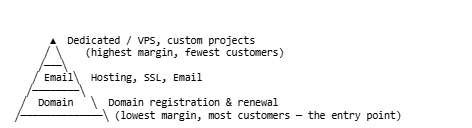
Revenue per customer stacks the same way it converts — a thin base of domain-only margin supporting a much larger layer of recurring services on top:
Key Takeaways - Domains are the low-margin entry point; hosting, email, and SSL carry the real margin. - The natural upsell order follows what the customer needs next, not what’s easiest to sell. - A customer with multiple attached services is far less likely to leave over price alone.
Case Study: A Realistic ROI Example
Consider a small web design agency that already registers 15–20 domains a month for clients, previously as a pass-through cost. By becoming a reseller and adding a modest markup plus a $5/month DNS-management fee, that agency adds roughly $150–$250 in monthly recurring margin within the first quarter — not from new customers, but from existing work it was already doing.
Over a year, as the domain base grows and renewals stack up, that recurring margin compounds without proportional new sales effort. This is the most common and most realistic path to reseller profitability: monetizing work you’re already doing, rather than building a domain business from a cold start.
Pros and Cons
| Pros | Cons |
|---|---|
| Low startup cost | Thin per-domain margins |
| Recurring revenue via renewals | High support load relative to revenue |
| Natural fit alongside hosting/agency work | Competitive, price-sensitive market |
| No ICANN accreditation required | Dependent on backend registrar’s reliability |
| Scales well with automation | Compliance responsibilities (WHOIS, lock, abuse handling) |
| Sub-reseller/white-label options extend your reach | Renewal-rate risk if support quality slips |
Step-by-Step Checklist
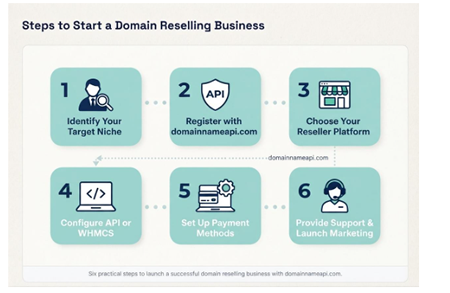
Steps to Start a Domain Reselling Business
- Decide which business model fits (bundled, pure-play, agency pass-through, embedded API, white-label).
- Evaluate 2–3 reseller platforms against TLD coverage, pricing, API quality, and support.
- Test the platform via a sandbox/OT&E environment before committing volume.
- Set up your storefront or integrate the API/WHMCS module.
- Build renewal reminder automation before your first sale, not after.
- Define your pricing (cost-plus, market-matched, or bundled loss-leader).
- Document your support process for transfers, renewals, and WHOIS updates.
- Launch to existing customers or channel first, before broader marketing.
- Track renewal rate as your primary health metric, not just new sales.
- Layer in upsells (hosting, SSL, email, backups) once the core domain flow is stable.
Frequently Asked Questions
What is a domain reseller? A business that sells domain registrations under its own brand using an ICANN-accredited registrar’s backend, earning a margin between wholesale and retail price.
Do I need ICANN accreditation to resell domains? No. Accreditation belongs to the backend registrar. Resellers operate under that registrar’s agreement.
How much does it cost to become a domain reseller? Often very little — some platforms have no signup fee and no minimum or maximum deposit at all, though most require at least a small prepaid wholesale balance to fund your first registrations.
How much money can I make reselling domains? Margins per domain are typically $2–$10 per year after wholesale cost. Profitability depends heavily on renewal rate and bundled services, not just new sales volume.
What’s the difference between a registrar and a reseller? A registrar is ICANN-accredited and manages registrations directly in the registry’s system. A reseller sells under its own brand through a registrar’s backend, without direct accreditation.
Can I white-label the reseller platform completely? Most platforms support white-labeling the storefront and panel; check specifically whether automated emails and WHOIS contact handling are also white-labeled, since that’s a common gap.
What is sub-reselling? A structure where your own customers can operate their own branded reseller panel underneath your account — effectively reselling access to your reseller access. Most modern platforms support multi-level sub-reseller hierarchies.
What happens if a customer’s domain expires? It typically enters a renewal grace period under the ERRP policy (often up to 45 days), then a redemption grace period (RGP, often around 30 days) at a higher fee, then a short pending-delete window before public release.
What is a redemption fee? A higher-than-normal fee charged to recover a domain that’s expired past the standard renewal grace period, reflecting the cost of reversing the registry’s deletion process.
What is ERRP? The Expired Registration Recovery Policy — ICANN’s standard framework requiring registrars to notify registrants before and after expiration and to offer a renewal grace period before deletion.
What is RGP? The Redemption Grace Period — a registry-level window after deletion during which a domain can still be recovered by its original registrant, at a higher redemption fee.
How long does a domain transfer take? Typically about five to seven days, assuming the domain is unlocked and the correct authorization code is used.
Can a domain be transferred right after registration? No — domains generally can’t be transferred within 60 days of initial registration, per the ICANN Transfer Policy’s standard lock.
What is registrar lock? A status that prevents unauthorized transfers of a domain; most reseller platforms apply it automatically and it should be removed deliberately before a legitimate transfer.
What is registry lock, and how is it different from registrar lock? Registry lock is a stronger protection applied at the registry level, typically requiring an out-of-band verification step to remove — useful for high-value domains where account-level compromise alone shouldn’t be enough to move the domain.
What is a Change of Registrant? A formal ownership change on a domain, sometimes processed through a Designated Agent, that updates who legally controls the registration — separate from a registrar transfer, and subject to its own ICANN confirmation requirements.
Do I need to know DNS to be a domain reseller? A working knowledge of A, CNAME, MX, and TXT records covers the vast majority of support requests; deep DNS expertise isn’t required.
What is DNSSEC? A set of extensions that add cryptographic signing to DNS responses, protecting against certain spoofing and cache-poisoning attacks. Increasingly offered by default rather than as an opt-in.
What is RDAP, and how is it different from WHOIS? RDAP is the newer, structured protocol replacing legacy WHOIS lookups for domain registration data; most current registrar systems support both during the transition.
What is WHMCS, and do I need it? WHMCS is billing and automation software widely used by hosting companies and resellers. It’s not required, but it significantly reduces manual work if you’re already running a hosting business — a maintained Domain Reseller WHMCS Integration is usually a faster starting point than building a custom module.
Should I use an API or a control panel? A control panel is fine for low volume or manual sales. An API is better for automation, integration into an existing product, or any meaningful scale — and the two can be used together.
Should I use REST or SOAP for my API integration? REST is the better default for new, custom-built applications in any modern language. SOAP is mainly relevant if you’re integrating with an existing legacy billing system that already expects it.
What are premium domains? Domains priced above standard wholesale rates by the registry (registry premium) or by a current owner in the aftermarket (secondary premium), usually due to length, memorability, or keyword value.
What is a Sunrise period? A window before a new gTLD’s general availability during which trademark holders get first right to register matching domain names — an ICANN-mandated rights-protection mechanism for new TLD launches.
What are Trademark Claims? A notice period following Sunrise that alerts both the registrant and the trademark holder when someone attempts to register a name matching a registered trademark.
Can I resell ccTLDs like .de or .uk? Often yes, but ccTLDs frequently carry local requirements (presence, documentation) — confirm your platform supports the specific ccTLD and its rules before promoting it.
What is TRABIS, and why does it matter for .tr domains? TRABIS is Turkey’s national domain registry system for .tr and .com.tr. Reselling these extensions requires a platform specifically built for TRABIS compliance, not just generic ccTLD support.
What’s a new gTLD? A top-level domain introduced since ICANN’s 2012 expansion program (.app, .shop, .ai, and hundreds more), often run by registry operators with their own specific policies.
Is domain reselling profitable long-term? It can be, primarily through renewal-rate compounding and bundled services rather than one-time sales margin alone.
What’s the biggest mistake new resellers make? Underpricing without accounting for renewal-year margin, and skipping renewal-reminder automation, which together drive most preventable customer loss.
Can I sell hosting and SSL alongside domains? Yes, and most profitable reseller businesses do — domains alone rarely carry the business on their own.
What other services pair well with domain reselling? Hosting, SSL, corporate email, VPS/dedicated servers, website builders (including AI-assisted builders), backups, CDN, and email security/spam protection all commonly bundle with a domain sale.
How do I handle abuse reports as a reseller? Abuse handling generally routes through your backend registrar’s process; understand that workflow before launch, since response timelines matter for compliance, and regulatory frameworks like Europe’s NIS2 are tightening these obligations.
Is there a minimum number of domains I need to start reselling? No — most platforms let you start with a single domain sale, though the economics improve meaningfully with volume and automation.
What’s the difference between a domain reseller and a domain investor? A reseller sells registration services to end customers on an ongoing basis; a domain investor buys and holds domain names as assets to resell them directly, often at a profit on the name itself.
What is a sandbox or OT&E environment, and why does it matter? A fully separate test environment — sometimes called OT&E (Operational Test & Evaluation) — that mirrors production functionality without touching live billing or real customer data. Testing registration, transfer, and error-handling flows here before going live catches most integration issues before they reach a paying customer. DomainNameAPI’s test platform is a working example of what this documentation should look like: separate credentials, separate endpoints, and a clear switch-over point to production.
What payment methods should a reseller platform support? For a global customer base, look for coverage of major global processors (Stripe, PayPal) alongside regional options relevant to your markets — this matters more once you’re selling ccTLDs or serving customers outside your home country.
Does reseller pricing improve with volume? On most established platforms, yes — tiered wholesale pricing (often structured across several levels) improves automatically as account balance or registration volume grows, and some programs add partner or marketing-fund support at higher tiers.
What’s the fastest way to test a new registrar before switching? Register a handful of low-cost domains through their sandbox/OT&E environment and their live environment in parallel, and compare API response times, error handling, and support responsiveness before migrating your full portfolio.
Can I migrate my existing domain portfolio to a new reseller platform? Yes, in most cases — this typically means unlocking each domain, retrieving transfer codes, and bulk-transferring in; many platforms offer dedicated migration support or bulk import tools for exactly this scenario.
Final Recommendations
If you’re just starting out: pick one reseller platform, test it in a sandbox/OT&E environment, start with your existing customers or clients rather than cold marketing, and get renewal-reminder automation working before your first sale.
If you’re an established agency or hosting company: move from a control panel to API/WHMCS-driven automation as soon as volume justifies it, and treat renewal rate — not new signups — as your core growth metric.
If you’re building at enterprise or SaaS scale: invest early in API integration and consider a white-label or sub-reseller model, since retrofitting automation onto a manual process later is far more expensive than building it in from the start.
Domain reselling rewards patience and operational discipline more than aggressive marketing. Get the fundamentals right — clear pricing, reliable renewals, honest support — and the recurring nature of the business does much of the rest of the work over time.