Bulk Domain Transfer Guide: Move Domains at Scale
Moving one domain to a new registrar is an administrative task. Moving four hundred is a project. Portfolios that grew over a decade tend to sit across three or four registrars and several billing accounts, mixing generic extensions with country-code ones, each with its own lock behaviour, expiry date and confirmation flow. The individual steps are not difficult. The difficulty is performing them in the right order, at volume, without taking a customer website or a mail flow offline. This guide covers the preparation, execution, failure handling and verification that a large registrar migration actually requires.

What is a bulk domain transfer?
A bulk domain transfer moves many domain names from one registrar to another in a single coordinated batch. Each domain is still unlocked, authorised with its own transfer code and processed individually by the registry, so success depends on preparation: accurate contact data, valid authorisation codes and eligibility confirmed before submission.
How does a bulk domain transfer work?
| Key takeaways
|
A bulk domain transfer is the submission of multiple inter-registrar transfer requests as one operation, through a registrar panel, an uploaded list, or an API call sequence. The convenience is real, but it operates at the interface layer. Underneath, each domain travels the same path as a single transfer: the gaining registrar sends a transfer request to the registry with the domain’s authorisation code, the registry validates it, the losing registrar has a defined window to respond, and the registry then approves or denies that specific domain.
Three roles matter throughout. The registry operates the extension and holds the authoritative record. The registrar holds the accreditation or contract with that registry and submits requests on your behalf. The Registered Name Holder is the legal holder of the domain. A bulk transfer changes the registrar. It does not change the holder, and it does not change where DNS is hosted unless you change that separately.
This explains most of the surprises teams encounter. A batch of 300 domains returning 274 successes and 26 failures has not partly failed as a batch. It has produced 26 individual denials, each with its own reason code and its own fix.
When should you use a bulk domain transfer?

Bulk transfer earns its overhead once managing the portfolio costs more than moving it: consolidation after an acquisition, leaving a reseller platform whose pricing no longer fits, unifying renewal billing fragmented across expired corporate cards, or an agency formalising control of client domains it has managed informally for years. It is also the moment to fix hygiene that accumulates quietly, from nameservers pointing at decommissioned infrastructure to contacts of record belonging to staff who left two reorganisations ago. A migration forces an inventory, and the inventory is often worth more than the price difference that prompted the move.
Single transfer vs bulk transfer: which to use
The two workflows differ less in mechanics than in where effort and risk concentrate. Individual transfers push effort to the moment of submission. Bulk transfers push it forward into preparation and back into verification.
| Criteria | Individual transfer | Bulk transfer |
| Typical volume | One to roughly ten domains | Dozens to thousands |
| Where the effort sits | At submission, repeated per domain | In inventory, eligibility checks and verification |
| Authorisation codes | Retrieved one at a time when needed | Collected, stored and used within their validity window |
| Error visibility | Immediate and obvious | Needs a tracking sheet or status report to spot partial failures |
| DNS planning | Often handled informally | Must be an explicit workstream with owners and rollback |
| Expiry risk | Low; one date to watch | High; a single overlooked expiry can push a domain into redemption |
| Cost control | Per-domain decision | Renewal pricing across the whole portfolio dominates the outcome |
| Best fit | Ad-hoc moves and one-off corrections | Consolidation, platform migration and portfolio restructuring |
Domain transfer checklist before you begin
Run these checks before submitting anything. Nearly every failed bulk migration traces back to a check on this list that was skipped for part of the portfolio.
| Check | Why it matters | Required action |
| Registrar lock status | A locked domain is refused by the registry regardless of how the request was submitted. | Unlock every domain in the batch and confirm the status changed at the registry, not only in the panel. |
| Valid authorisation code | Most extensions require a code the registry can verify. Codes are commonly time-limited. | Generate codes close to submission, verify each one is complete, and re-request any that have expired. |
| Registered Name Holder data | Approval and policy notices are directed to the holder of record. Terminology has moved on: current ICANN policy work centres on the Registered Name Holder rather than a separate administrative contact. | Confirm the address on record is monitored by someone able to act, and correct it before the batch starts. |
| Recent registration or transfer | Under ICANN transfer policy, gTLDs are commonly restricted for 60 days after registration or a previous transfer, and after certain holder changes. | Flag affected domains and schedule them for a later batch rather than absorbing the denial. |
| Expiry proximity | A domain close to expiry can enter a grace period mid-process and complicate the transfer. | Renew before migrating, or move those names in a separate, closely monitored batch. |
| Domain status codes | Registry and registrar hold statuses block transfers and are invisible unless you look. | Check status codes in WHOIS or RDAP output and resolve holds before submission. |
| DNSSEC | A signed domain breaks validation if the DS records at the registry stop matching the signing chain. | If the DNS provider and keys are unchanged, plan for the gaining registrar to carry the existing DS records. Remove them only where the chain will change or they cannot be carried across. |
| Privacy or proxy services | A proxy contact can sit between the registry and the person who needs to approve. | Check whether the service affects transfer authorisation or approval messages for that extension, and disable it only where the registrar or registry requires it. |
| Account funding | Transfers are chargeable and a declined payment stalls the batch. | Fund the gaining account for the full batch, including any premium or restricted extensions. |
| Extension-specific rules | Country-code registries may require documents, local presence or a registry-side approval step. | Separate these extensions and confirm each registry’s procedure before scheduling. |
How to transfer multiple domains step by step
The sequence below assumes a portfolio of a few hundred domains across more than one losing registrar. Scale the batch sizes to your volume; do not skip the ordering.
1. Build a portfolio inventory. Export every registrar and account into one sheet, recording domain, extension, current registrar, expiry date, nameservers, DNSSEC status, lock status, the Registered Name Holder address and any other contact of record, business owner and criticality.
2. Group the inventory. Sort by extension and by losing registrar. These two dimensions determine which rules apply and which panel you work in, so they define your batches.
3. Classify by criticality. Separate revenue-generating domains, mail-bearing domains, redirect-only names and dormant defensive registrations. The last two make ideal pilot candidates.
4. Clear the blockers. Work through the eligibility checklist for each group: unlock, correct contact data, renew what is close to expiry, and set aside anything inside a restriction window.
5. Run a pilot batch. Submit five to ten low-risk domains from a single extension. The pilot validates your code handling, confirmation routing and status reporting before a mistake can reach anything important.
6. Collect authorisation codes securely. Retrieve codes in the session in which you plan to submit, keep them in a controlled store rather than a shared spreadsheet, and treat them as credentials.
7. Submit in staged batches. Group by extension and losing registrar, keep batches small enough that a single systemic error is contained, and leave a gap so you can react to the first results.
8. Monitor status daily. Track pending, approved and denied states per domain. Do not assume silence means progress; confirmations occasionally sit unopened in a shared mailbox.
9. Verify continuity as each batch lands. Check nameservers, resolve the site, test mail on mail-bearing domains, and confirm certificate renewals that depend on domain validation still work.
10. Complete a post-migration audit. Re-lock, confirm expiry dates and auto-renew settings, and reconcile the final domain count against the original inventory.
Auth code and EPP code: how to prepare them

The authorisation code is the credential that proves the request is legitimate. It appears under several names across panels and documentation: Auth code, EPP code, AuthInfo code, and, in current ICANN policy work, the Transfer Authorization Code or TAC. They refer to the same control, and the handling requirements are identical.
Three properties cause most code-related failures at volume. Codes are frequently time-limited, so a spreadsheet compiled three weeks before submission is partly worthless by the time you use it. Some registrars send the code only to the holder’s address instead of showing it in the panel, which turns an unmonitored mailbox into a hard blocker. And codes are case-sensitive and long enough that copy-paste truncation goes unnoticed until the registry rejects the request.
Handle them as credentials: retrieve them close to the point of use, keep them in a secrets store rather than a shared document, restrict access to the migration team, and delete them once each transfer completes. A leaked set of valid codes for a portfolio is a hijacking toolkit.
How to submit a bulk domain transfer in the panel
Batch submission is usually simpler than the preparation that precedes it. In the Domain Name API reseller panel, domain transfers sit under Domain Management, where two tabs separate the workflows: Transfer Inquiry for a single name, and Bulk Transfer Inquiry for a batch.
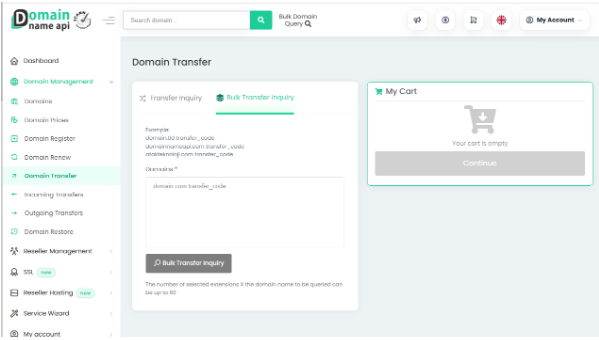
*Bulk Transfer Inquiry in the Domain Name API reseller panel: one domain and its transfer code per line.*
The batch input takes one domain per line, followed by a space and that domain’s transfer code. The panel shows the expected pattern above the field, so a prepared list can be pasted straight in, and the inquiry runs before anything is committed. That format is worth noticing during preparation, because it decides how you build your inventory sheet: keep the domain and its code in adjacent columns in the same row order, and the final export becomes a paste rather than a reconciliation exercise. Batch size and query rules are shown in the panel itself and can change, so confirm the current figures in your own account before planning a large portfolio.
Five things to check before you paste the list
Preparation has a long tail, but a small number of checks catch most of what goes wrong.
- Does the code still work? Codes age. Retrieve them the day you submit, not the week before.
- Is the unlock real? The panel says unlocked. The registry is the one that decides.
- Who receives the approval message? If it is a former employee, that transfer is already blocked.
- What expires in the next thirty days? Renew it now, not mid-transfer.
- Which names carry mail? Those move last, in a small batch, watched.
Ten minutes across the list removes most of the denials you would otherwise spend a week chasing.
Why do domain transfers fail, and how to fix them
Failures cluster into a small number of recurring patterns. The table maps the symptom you will see to its likely cause and the action that resolves it.
| Problem | Likely cause | Recommended resolution |
| Request rejected immediately | Registrar lock still active, or the unlock did not propagate to the registry. | Re-check status in WHOIS or RDAP rather than the panel, unlock again and resubmit. |
| Invalid authorisation code | Code expired, was truncated on copy, or the extension uses a different mechanism. | Regenerate the code, paste it without surrounding whitespace, and confirm the extension’s actual requirement. |
| No confirmation message received | The address of record is stale or filtered, or a proxy service is rerouting the notice. | Update the record, check spam quarantine, and request a resend before changing anything else. |
| Denied due to a restriction window | Domain was registered, transferred or had a holder change within the preceding 60 days. | Record the date the restriction lifts and schedule the domain into a later batch. |
| Transfer stalls near expiry | The domain expired or entered a grace period during the process. Treatment varies by registrar and extension. | Renew at the losing registrar first, allow the renewal to settle, then restart the transfer. |
| Domain unreachable after transfer | DS records at the registry no longer match the signing chain, or nameservers were reset. | Restore nameservers immediately, then reconcile the DS records with the keys actually in use. |
| Country-code domain rejected | The extension uses a registry-specific process rather than a standard authorisation code. | Follow that registry’s published procedure, which may require a tag change, a document or a registry-side approval. |
| Everything blocked on one domain | A dispute, court order or registry hold is attached to the name. | Resolve the underlying matter first; disputed domains should be excluded from the batch. |
| Partial batch silently incomplete | Denials were not surfaced because nobody reconciled the submitted list against the received list. | Reconcile counts after every batch and treat any gap as an open item until it is explained. |
Does a domain transfer affect DNS, website and email?
A registrar transfer moves the registration record, not the services attached to it. Nameserver delegation normally survives the move, which is why most transfers appear uneventful. The exposure appears when the losing registrar was also providing the DNS hosting, because that free zone can be removed once the domain leaves, taking every A, MX, TXT and CNAME record with it.
The safest sequence separates the two changes: move DNS hosting to its final destination first, confirm the zone resolves correctly, let it run for a few days, then transfer the registration. If DNS must move at the same time, export every zone file before you begin and rebuild it at the new provider before switching delegation. Lower TTL values on critical records a day or two ahead, so a mistake is correctable in minutes rather than hours.
Email deserves individual attention because failures there are silent. Confirm that MX records, SPF, DKIM selectors and DMARC policy are reproduced exactly. A missing DKIM selector does not stop mail; it quietly increases the share of outbound messages landing in spam folders, and the connection to the migration is rarely obvious a week later.
DNSSEC needs a decision rather than a reflex. If the DNS provider and the signing keys stay the same, the DS records at the registry stay valid and the sensible plan is to confirm the gaining registrar can carry them across. Removing DS records is the right move only when the signing chain will change, when DNS moves to a provider using different keys, or when the gaining registrar cannot maintain the existing records. In those cases, remove them first, allow the old values to age out, and re-sign after migration. A DS record that no longer matches makes a domain unreachable for every validating resolver, which is the most damaging outcome in this process.
Domain transfer security for large portfolios
A migration concentrates unusual privileges in one place: unlocked domains, valid authorisation codes and elevated account access. Treat the period as a heightened-risk window.
- Enable two-factor authentication on both the losing and gaining accounts before you begin, not afterwards.
- Limit who can request codes or unlock domains, and use named accounts so actions are attributable.
- Distribute codes through a secrets manager. Email and chat threads persist far longer than the codes remain valid.
- Re-lock every domain once its transfer completes. An unlocked portfolio left over from a migration is a standing risk.
- Watch for authorisation code requests you did not initiate. Unexpected code generation during a migration is worth investigating immediately.
If your migration is API-driven, apply the same discipline to credentials. Domain Name API’s guidance on API key security and access errors covers storing keys in environment variables, IP whitelisting, key rotation and what to do if a key is exposed.
gTLD vs ccTLD domain transfer rules
Generic top-level domains such as .com, .net, .org and the newer extensions operate under the ICANN Transfer Policy, which standardises authorisation, response windows and denial reasons across accredited registrars. Country-code extensions are governed by their own registries and are under no obligation to follow the same model.
The differences are structural. Some country-code registries use a mechanism other than an authorisation code: .uk transfers, for example, are completed by changing the IPS tag that identifies the managing registrar. Others require documentary evidence, local presence, or an approval action inside a registry portal. Restriction windows, renewal treatment during transfer and confirmation periods all vary. Treat each such extension as its own mini-project with a named owner and a documented procedure. Generic extensions move as large batches; country-code names usually cannot, and planning as though they can is the most common cause of a migration slipping its schedule.
One policy point is worth stating precisely, because it is widely misquoted: the 60-day restriction is a feature of ICANN transfer policy that applies to eligible gTLD situations, most commonly following a recent registration, a recent transfer, or certain changes to holder data. It is not a universal rule across every extension, and country-code registries set their own equivalents or none at all.
After the transfer: verification checklist
A transfer that shows as complete is not the same as a migration that is finished. Work through this list per batch, while the changes are still fresh enough to correlate.
- Confirm the domain count received matches the count submitted, and account for every gap.
- Verify nameservers on each domain against the intended configuration, not against what happens to resolve.
- Resolve each production hostname and load the site over HTTPS to catch certificate validation problems.
- Send and receive a test message on every mail-bearing domain, then confirm SPF, DKIM and DMARC alignment.
- Check expiry dates. Most generic extensions add a year on transfer; some country-code extensions do not.
- Set auto-renew consistently and confirm a valid payment method is attached to the account.
- Re-enable registrar lock and, where appropriate, restore privacy or proxy services.
- Confirm DNSSEC validates if the domain was signed, and reconcile the DS records with the keys in use.
- Update your asset register and any monitoring so alerts point at the new provider.
Bulk transfer for resellers, agencies and IT teams
Domain resellers and hosting providers
Your constraint is usually the confirmation path rather than the transfer mechanism. Notices go to the holder of record, which in a reseller portfolio means end customers who may not recognise them. Communicate ahead of the batch, stage by customer segment, and configure your billing platform integration before the first batch lands so renewals stay in sync.
Web agencies
Agencies inherit the messiest portfolios: domains under personal accounts, expired client cards and inconsistent ownership. Use the migration to establish clear holder records and documented consent. Anything you cannot evidence ownership of should be resolved before submission, not after.
Corporate portfolio managers and IT departments
Sequencing and evidence matter more than speed. Establish a change window, define rollback conditions, and keep a per-domain record of what changed and when. Defensive and redirect domains move first as a controlled pilot; brand and mail-bearing domains move last, individually monitored.
Domain investors
Expiry management and renewal pricing dominate the economics. Align renewal dates where the extension supports it, and confirm any parked or monetised configuration is reproduced before the old setup is dismantled.
Reseller panel vs API: which to use for migration
Neither approach is inherently better. The right choice depends on how often you will repeat the work and how much of it can be automated safely.
| Use case | Reseller panel | API | Best fit |
| One-off migration under a few hundred domains | Adequate; no development effort | Overhead outweighs the benefit | Panel |
| Recurring migrations for customers | Repetitive and error-prone | Repeatable and auditable | API |
| Mixed country-code portfolio | Handles exceptions and manual steps well | Exception handling needs custom logic | Panel, with API for the standard extensions |
| Status tracking across batches | Manual reconciliation | Programmatic polling and reporting | API |
| Billing platform synchronisation | Manual or export-based | Native through a module or integration | API or module |
| Team without development resource | Immediately usable | Not viable without engineering | Panel |
| Ongoing portfolio operations after migration | Fine at low volume | Scales with the portfolio | API |
If you automate, respect the provider’s throughput rules from the first line of code. Domain Name API publishes a specific API rate limit, throttling and bulk usage policy that separates real-time calls on /api from automated work on /api-bulk, sets a limit of one request per second per API key, and documents the exponential backoff expected after an HTTP 429 response. Building a queue that honours that limit from the start is cheaper than retrofitting one after your access is throttled.
How much does a domain portfolio migration cost?
Transfer pricing is the smallest line in the calculation and the one most often used to make the decision. Model these instead.
- Renewal pricing at the destination across the full portfolio and a realistic holding period. Over three years this dominates every other figure.
- Transfer fees per extension, noting that most generic extensions add a year of registration while some country-code extensions do not.
- Any renewals you must perform at the losing registrar to clear expiry blockers.
- Staff time for inventory, remediation, submission, monitoring and verification. For a few hundred mixed domains this is usually the largest real cost.
- Premium and restricted extension fees, which frequently sit outside standard pricing tables.
Compare the destination’s published domain transfer and renewal pricing across the specific extensions in your portfolio rather than on headline rates for .com alone. Portfolios are rarely composed the way pricing pages are organised.
Bulk domain transfer with Domain Name API
Domain Name API is a domain reseller program operating on the infrastructure of ICANN-accredited registrar Atak Domain. Its published figures are worth checking against your own requirements: access to more than 800 domain extensions, more than 40,000 active resellers across more than 200 countries, and over two decades of operating experience in domain services.
Three things matter for a migration specifically. The reseller panel and REST API both cover registration, transfer, renewal and DNS management, so a portfolio can move through whichever interface suits the team. Billing modules exist for WHMCS, WiseCP, HostBill, Blesta and ClientExec, which matters when invoicing must stay intact. And the published bulk usage policy states what automated throughput is permitted before you write any code, rather than after.
Its reseller page also states that incoming resellers are assisted with migration: you supply the domain list, open the transfer locks and provide the transfer codes, and the support team handles the transfer process. That page identifies the same pain point described earlier, namely that approval messages reach the contacts on record rather than the reseller. No specific batch size limit is published, and none is claimed here.
For portfolios with complex country-code requirements, raise them with support before scheduling. Readers weighing the move can review the domain reseller program and the API and module integration options if this migration is the first step toward ongoing automated portfolio management.
Conclusion
A bulk domain transfer is mostly a preparation exercise. Submission takes minutes; the inventory, eligibility remediation, DNS sequencing and verification are where the work and the risk live. Build the inventory, clear the blockers, pilot with names that cannot hurt you, migrate in controlled batches, and verify each batch before the next goes out.
If you are evaluating a destination for a portfolio move, compare transfer and renewal pricing across your actual mix of extensions, open a reseller account to assess the panel before committing a large batch, and confirm how the provider handles the country-code extensions you depend on.
FAQ
Each answer opens with a direct response, then adds the qualification that makes it accurate. This structure is intentional: it is what allows an answer engine to extract a correct short response without dropping the caveat.
What is a bulk domain transfer?
A bulk domain transfer is the submission of multiple inter-registrar transfer requests as a single coordinated operation. The batching happens at the registrar interface; each domain is still validated and processed individually by its registry.
Can I transfer multiple domains at the same time?
Yes, provided each domain independently meets the requirements for its extension. Domains that are locked, inside a restriction window, close to expiry or missing a valid authorisation code will be denied even when the rest of the batch succeeds.
Does every domain need an Auth or EPP code?
Most extensions require one, but not all. Generic top-level domains use an authorisation code, referred to variously as an Auth code, EPP code, AuthInfo code or Transfer Authorization Code. Some country-code extensions use a different mechanism entirely, such as the IPS tag change used for .uk domains.
How long does a bulk domain transfer take?
It depends on the extension, the losing registrar’s response and whether confirmations are acted on promptly. Generic extensions typically complete within several days once validly submitted; country-code extensions vary widely. No provider can guarantee a single completion time for a mixed portfolio.
Can I transfer an expired domain?
Usually not, and the answer depends on the registrar and the extension. Some registrars will process a transfer while a domain sits in the auto-renew grace period; once it reaches redemption, a transfer is effectively off the table until it is restored. Renewing first is the predictable route.
Does a registrar transfer affect my website?
Not by itself. The registration record moves; the nameserver delegation normally stays as it is. The risk arises when the losing registrar was also hosting the DNS zone, because that zone can be removed after the domain leaves. Export your zone files before migrating.
Can email stop working during a domain transfer?
Yes, if DNS records are lost or rebuilt incorrectly. MX records, SPF, DKIM selectors and DMARC policy must be reproduced exactly. Missing authentication records rarely stop mail outright; they increase spam placement, which is harder to notice and harder to trace back.
What causes a domain transfer to fail?
Most often: an active registrar lock, an invalid or expired authorisation code, an unmonitored address of record, a recent registration or transfer that triggers a restriction window, proximity to expiry, a registry or registrar hold, or a country-code extension that uses a different procedure.
Are ccTLD transfer rules different from gTLD rules?
Yes. Generic top-level domains follow the ICANN Transfer Policy, which standardises authorisation and denial handling across accredited registrars. Country-code registries set their own rules and may require documents, local presence, registry-side approval or a mechanism other than an authorisation code.
Does bulk transfer make individual transfers complete faster?
No. Batching reduces your handling time, not registry processing time. Each domain is still evaluated on its own timeline and against its own eligibility rules.
Should I renew domains before transferring them?
Renew any domain close to expiry before you start. Most generic extensions add a year of registration when a transfer completes, so an early renewal is rarely wasted, and it removes the risk of a domain expiring while a transfer is pending.
Do I need to remove DNSSEC before transferring?
Not automatically. If the DNS provider and the signing keys are unchanged, the existing DS records remain valid and the question is simply whether the gaining registrar can carry them across. Remove and re-establish DNSSEC only when the signing chain changes or the records cannot be maintained at the new registrar.
Is an API necessary for transferring a large portfolio?
No. A reseller panel handles a one-off migration of a few hundred domains adequately. An API becomes worthwhile when migrations recur, when status tracking across batches needs to be programmatic, or when the portfolio will be managed continuously afterwards.