How to Sell a Domain You Own: Free For-Sale Page for Domain Name API Resellers
If you’re a Domain Name API reseller, you don’t need a separate marketplace to sell a domain that’s sitting in your account. Open the domain in your reseller panel, go to the Sale tab and set a fixed price, a minimum offer or both. A free for-sale page goes live at the domain’s address, and buyer requests come straight to you. With the owner’s permission, you can do the same for your customers’ domains.
This guide is about selling an existing domain name to a new owner. If you want to start reselling new domain registrations, see the Domain Name API reseller program instead.
Key takeaways
- The feature lives in the Sale tab of each domain’s edit window in your reseller panel. .tr domains can’t be listed for now.
- The for-sale page is free and created automatically with APIName branding. To serve it, the domain’s nameservers switch to
tr.apiname.comandeu.apiname.com; cancel the listing and the previous nameservers are restored automatically. - Domain Name API charges neither you nor the buyer a commission on a direct sale.
- Every for-sale page shows the AtakDomain Domain Broker option. Buyers who choose it pay a $69.90 upfront fee, plus 10% of the final price if the deal closes. You pay nothing.
- Only list a customer’s domain with the registrant’s written consent.
What does this feature do for resellers?
Most reseller portfolios collect domains that get renewed year after year but never used: names bought for a project, held for brand protection or left over from a client job that ended. The Sale tab is the shortest route to turning them into revenue without moving them to another platform.
The second benefit is on the customer side. Sooner or later, a client asks, “Can I sell my domain?” Instead of sending them elsewhere, you can now say, “We’ll list it for you.” The domain stays in your account and the process stays in your hands.
What should you check before listing?
Start with two questions: Whose domain is it? And is it ready to sell? An ownership or DNS problem that surfaces after the listing goes live can hurt both the sale and your client relationship.
Is the domain yours or your customer’s?
A domain showing up in your reseller panel doesn’t make it yours. Legally, it belongs to the registrant named in its registration data. You can list domains in your own portfolio straight away. For a customer’s domain, get written consent first. At a minimum, it should cover:
- Permission to list the domain and to change its nameservers for the for-sale page
- The sale type and the price or minimum offer
- How and how quickly you’ll forward buyer requests, since they come to you
- Who gets paid and who approves the transfer
Keep the registrant’s written approval and the agreed terms in a clear email thread, so you have a record to point to if there’s ever a dispute.
Is the domain ready to sell?
- Account: The domain must be registered in your Domain Name API reseller account. If it’s with another registrar, transfer it in first. .tr domains aren’t supported at the moment.
- Expiry: Negotiations can drag on. If the expiry date is close, renew now.
- Trademark risk: If the name echoes a well-known brand, search the WIPO Global Brand Database and the relevant national trademark office. For generic extensions such as .com, brand owners can file an ICANN UDRP complaint, which can end with the domain being taken away; country-code extensions have their own dispute rules.
- Website and email: To serve the for-sale page, the domain’s nameservers switch to
tr.apiname.comandeu.apiname.comautomatically. While the listing is live, any website or email on the domain stops working. Don’t list a domain that’s in active use, especially a customer’s, without discussing this first.
How much is the domain worth?
Not what was paid for it, but what a buyer could do with it. According to Verisign’s Domain Name Industry Brief, there were 401.6 million registered domain names worldwide at the end of Q2 2026. Buyers aren’t after just any domain in that crowd; they want a name that works for them. These questions will help you justify a price:
- Is it short and easy to spell? If someone can type it correctly after hearing it once on the phone, that’s a good sign. Hyphens, numbers and long strings of words shrink your pool of buyers.
- Does the extension fit the audience? .com still reaches the widest range of buyers. Newer extensions can be valuable in specific industries, but fewer people are shopping for them.
- Who would use it? If you can say which kind of company would use the name, and for what, it’s much easier to defend your price.
- Is its history clean? A domain once used for spam or malware may have left a trail on blocklists. Check the Wayback Machine and a blocklist lookup tool.
- Does it get traffic? If it has regular visitors or links from other sites, show it with numbers you can back up.
Comparable sales matter most. Look in sales databases such as NameBio for recently sold domains with a similar length, structure and extension. Record-breaking deals are outliers, and automated appraisal tools are a rough starting point, not a price.
Example: turning comparable sales into a price range
The domain and figures below are made up to illustrate the method; they aren’t real market data. Say your portfolio includes brewstop.com: two words, 9 letters, a .com with an obvious industry.
- Filter for true comparables. Search a sales database for two-word .com domains of 7–11 letters, sold in the last two years, in food and drink or a nearby niche. Leave out other extensions, one-word premium names and record sales.
- Pick three that genuinely compare. In our example, they sold for $1,200, $1,800 and $2,500.
- Write down the range. Here, a reasonable range is roughly $1,200 to $2,500. Strengths (shorter, easier to spell) push you toward the top; weaknesses (limited buyer demand, no traffic) push you toward the bottom.
- Choose your sale type from the range. For a fixed price, pick something near the top, say $2,200. If you’re taking offers, you could set a $1,000 minimum to leave room for negotiation. With Price + offer, you do both: a buyer can send a purchase request at the $2,200 fixed price, while others can offer $1,000 or more.
The panel offers three sale types:
- Fixed price: Your price is shown on the for-sale page. Best when you’re confident about the value and don’t want to haggle.
- Accept offers: You set the lowest amount you’d accept, and buyers can’t offer less. Best when the value is hard to pin down.
- Price + offer: You set both a price and a minimum offer. You stay open to negotiation without losing buyers who are ready to decide; for most domains, it’s the most flexible choice.
You can change your sale settings later.
How do you list a domain for sale in the Domain Name API panel?
Everything happens in the reseller panel and takes a few minutes. The panel is available in English and Turkish; the screenshots show the Turkish interface, so each button name is followed by its Turkish label in parentheses.
- Log in to your reseller panel. In the Domain List (Domain Listesi), find the domain you want to sell and click the Edit domain (Domaini Düzenle) pencil icon at the end of the row.

Figure 1: The Edit domain icon in the Domain List. - In the window that opens, switch to the Sale (Satış) tab and click List for sale (Satışa Çıkar).
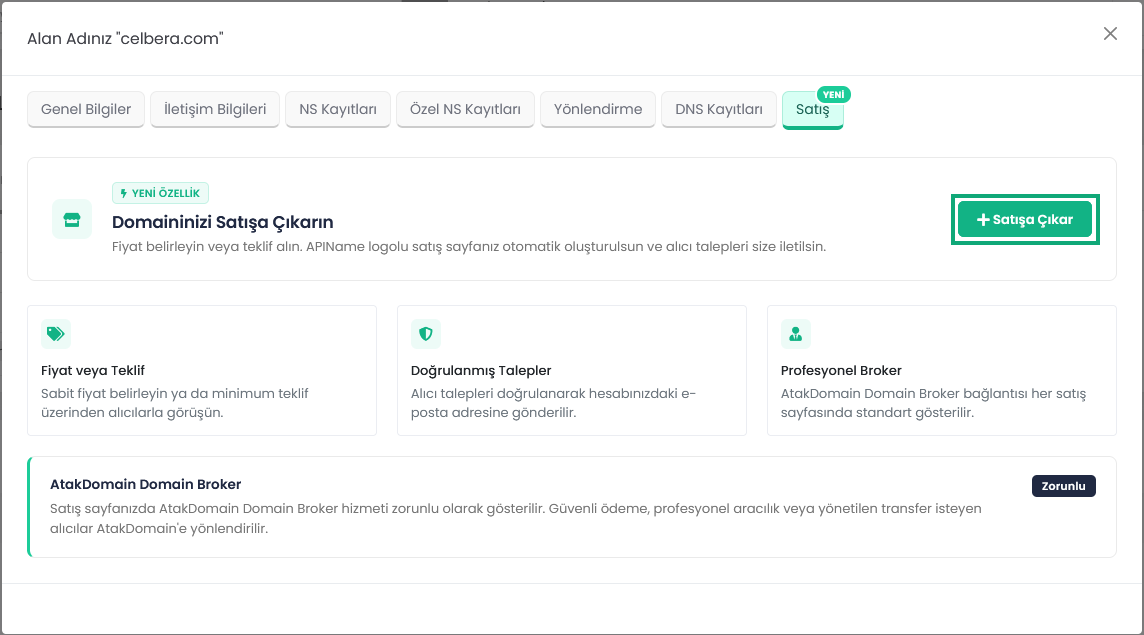
Figure 2: The Sale tab: for-sale page, verified requests and broker details on one screen. - At the Sale type (Satış şekli) step, choose Fixed price (Sabit fiyat), Accept offers (Teklif al) or Price + offer (Fiyat + teklif). Enter the amounts and currency, then click Continue (Devam Et).
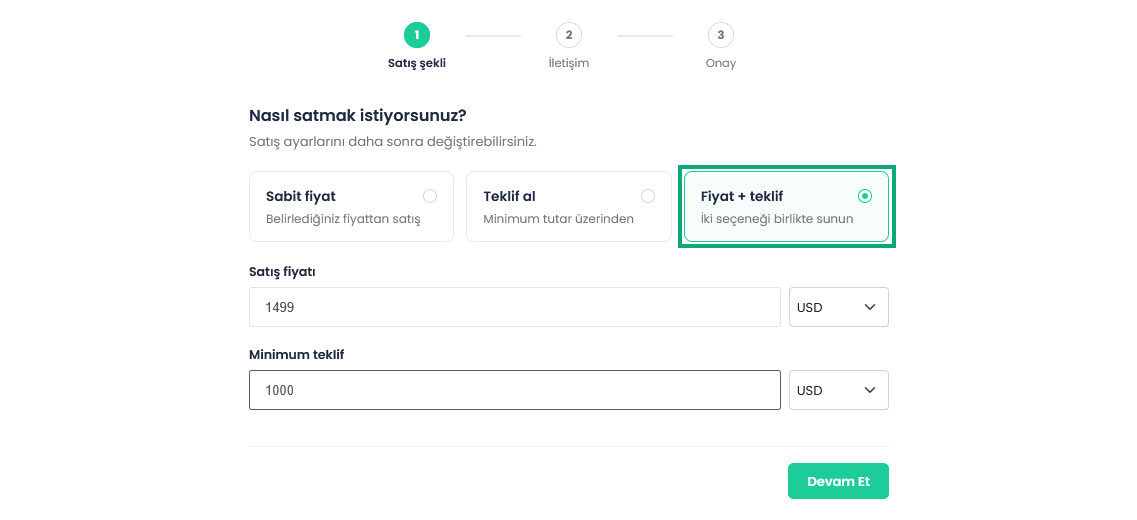
Figure 3: With Price + offer, you enter a sale price and a minimum offer together. - At the Contact (İletişim) step, check the notification email where buyer requests will go and the response time buyers will see. Pick a response time you can actually keep.
- At the Confirm (Onay) step, review the summary. It states that the domain’s nameservers will be updated automatically to
tr.apiname.comandeu.apiname.com. Accept the Domain Sale Listing Terms, the AtakDomain Domain Broker redirect and the DNS change, then click List for sale.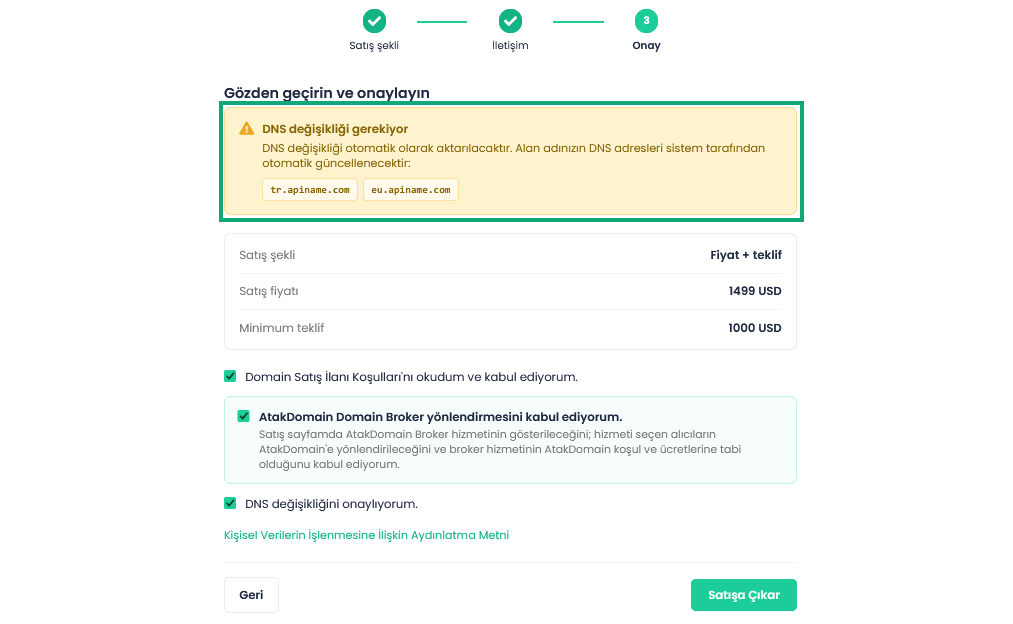
Figure 4: The confirm step: nameserver change notice, sale summary and three checkboxes. - Once the listing is live, the Sale tab shows a Listing active (İlan aktif) label along with the sale type, listing date, notification email, response time and price summary. You can take it down at any time with Cancel listing (İlanı İptal Et); the domain comes off the for-sale page and its previous nameservers are restored.
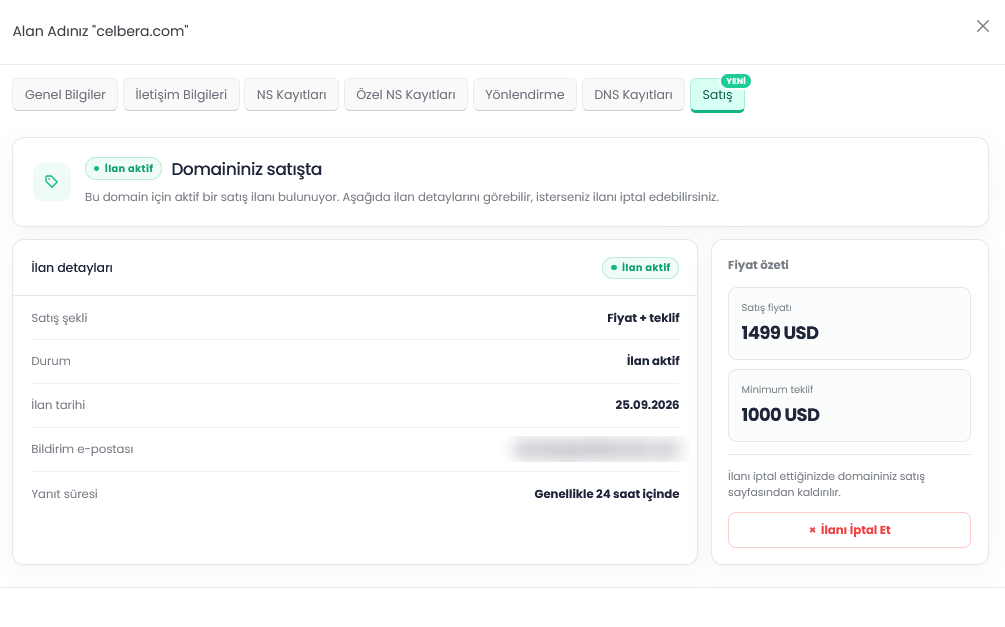
Figure 5: Listing active: listing details, price summary and Cancel listing.
Got a domain gathering dust in your portfolio?
Log in and list itHow do the for-sale page and buyer requests work?
When the listing goes live, an APIName-branded for-sale page opens at the domain’s address. There’s no fee, no design work and no website to build. Anyone who types the domain into a browser sees it.
The top of the page says the domain is listed through Domain Name API and marks it as a verified domain listing. Buyers can see that ownership is verified against the seller’s account and that the seller’s details are kept private. The offer form takes three steps, shows your minimum offer and notes that sending an offer is free. Visitors can switch the page language from the language menu at the top of the page.
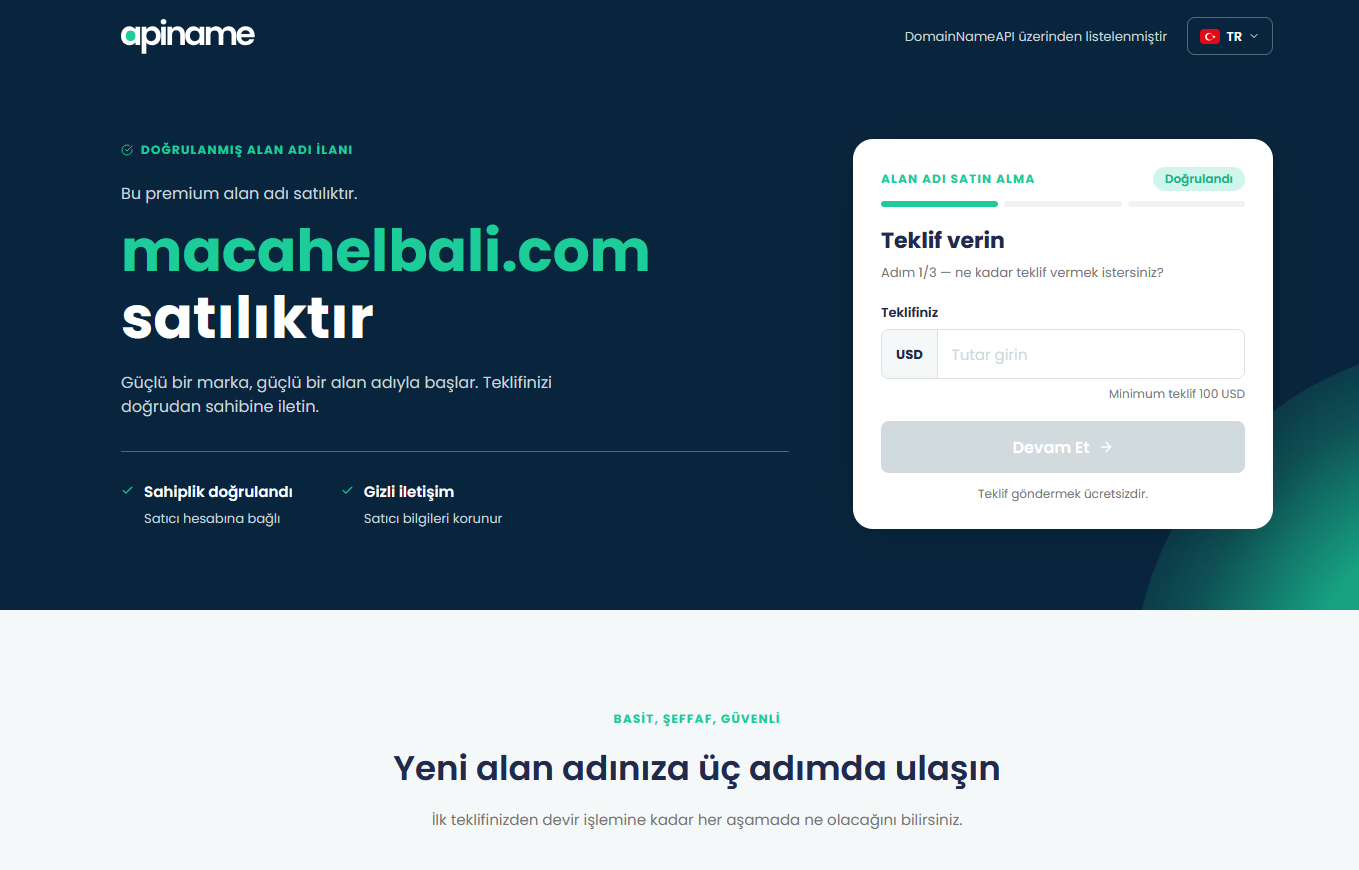
The page carries APIName branding, not yours. If you’re listing a customer’s domain, tell them in advance; buyers won’t see your company name on the page.
When a buyer sends a purchase request or an offer, it’s verified and forwarded to the email address on your reseller account. No payment is taken automatically at this point; the price, payment and handover are settled between you and the buyer. A live page doesn’t mean the domain is sold. It just makes it easier for buyers to reach you.
Every for-sale page also shows the AtakDomain Domain Broker option by default. Buyers who want secure payment, professional brokerage or a managed transfer are directed to AtakDomain.
What should you do while the listing is live?
- Keep auto-renew on so the domain doesn’t expire mid-negotiation.
- Reply within the response time shown on your listing. If you’re selling a customer’s domain, pass requests on to them just as quickly.
- Share the page with businesses that might want the name, in industry groups or on social media.
- If nothing happens for a few months, look at comparable sales again and adjust the price or sale type.
- If the domain is listed elsewhere too, keep the price the same everywhere. Once it sells, remove the other listings right away so you don’t end up in conflicting deals with two buyers.
Is there a commission? Direct sale vs. AtakDomain Domain Broker
Not on a direct sale. There are two separate routes: a direct sale through your for-sale page, and the paid AtakDomain Domain Broker service, which buyers can choose if they want. The broker link appears on every for-sale page, but using it is up to the buyer.
| Criteria | Direct sale | AtakDomain Domain Broker (buyer’s choice) |
|---|---|---|
| Who runs the process? | The reseller (or the domain owner) and the buyer. | AtakDomain’s broker team handles negotiation, payment and transfer together. |
| Who starts it? | The reseller lists the domain; the buyer sends a request or offer from the page. | The buyer, via the broker link on the for-sale page. |
| Payment protection | None. The buyer pays the seller directly. | Yes. The sale price isn’t released to the seller until the domain is under the buyer’s control. |
| Seller pays | Nothing | Nothing |
| Buyer pays | The sale price only | $69.90 upfront (non-refundable) + 10% of the final price if the deal closes |
For comparison, many marketplaces take a cut of the sale price. Afternic charges 15% to 30% on Buy it Now sales and Spaceship SellerHub charges 10% (as of September 25, 2026). On a $2,000 sale, that leaves the seller with $1,400 to $1,800. On a direct sale, the seller keeps the full $2,000; bank or payment provider fees are separate.
The broker’s 10% isn’t deducted from the seller’s share. It’s what the buyer pays for brokerage and payment protection, and only if the deal goes through. If there’s no deal, the buyer pays just the upfront fee. Details are on the AtakDomain Domain Broker page.
From deal to transfer: how do you get paid and hand over safely?
A sale isn’t a single step
- Listing: The page is live, but nothing has been agreed yet.
- Agreement: Price, payment method and transfer method are settled.
- Payment: The money reaches the seller, who confirms it in their own bank account.
- Transfer: The domain moves to the buyer’s account or to the buyer’s registrar.
Put the deal in writing
A short email thread is enough. It should cover the price and currency, how and to whom payment is made, the transfer method, rough dates and who covers transaction fees. If a website, logo or social media accounts are part of the deal, list them one by one. For a customer’s domain, also agree in writing whether the buyer pays your customer directly or pays you.
Who pays first?
In a direct sale, nobody sits between the payment and the transfer; the two parties decide the order. If the seller transfers first, they may never get paid. If the buyer pays first, they may never get the domain. The seller’s rule is simple: don’t transfer until the money is in your own account.
That rule doesn’t protect the buyer. A buyer who pays a seller who then doesn’t transfer has to sort it out with the seller, through legal channels if necessary. That’s why the AtakDomain Domain Broker option on the page matters: there, the sale price isn’t released until the domain is under the buyer’s control. If a stranger makes an unexpectedly high offer, you can suggest the broker yourself.
How is the domain transferred to the buyer?
There are two ways:
- If the buyer has a Domain Name API account: Move the domain from your account to theirs in the panel. The registrar doesn’t change, so it’s quick.
- If the buyer uses another registrar: Once payment is confirmed, unlock the domain and send its EPP (authorization) code to the agreed buyer only. The buyer then transfers the domain to their registrar.
Transfers to another registrar can come with extra rules. For extensions such as .com and .net, ICANN’s Transfer Policy blocks a transfer to another registrar within 60 days of registration or a previous registrar transfer. A change of registrant also triggers a 60-day transfer lock, though registrars may let the registrant opt out in advance. Country-code extensions have their own rules, so check the domain’s status with a Whois lookup before promising a date. If you get stuck, the knowledge base and support team can help.
How do you spot a scam?
Almost every attempt relies on the same two things: urgency and fake proof.
- A receipt isn’t proof. Screenshots, PDFs and “payment confirmed” emails don’t count. The only proof is money in the account.
- “Transfer it now” pressure. “The payment is on its way” or “it’s today or never” are the most common red flags.
- Overpayment. If a buyer says they sent too much and asks for the difference back, stop. Their payment can be reversed later; the money you sent back won’t come back.
- Early requests for the EPP code. Don’t share the EPP code with anyone before payment is confirmed. It’s the key to the domain.
- Unfamiliar “escrow” sites. A buyer insisting on an escrow service you’ve never heard of may be steering you to a fake site.
- Fees demanded by a “buyer”. Don’t pay a prospective buyer who asks you for an appraisal, certificate or listing fee before they’ll buy.
- Suspicious links. If a link in an email asks for your panel login or a verification code, don’t enter it. Always type the panel address (
dm.apiname.com) yourself.
Should you sell directly or use the broker?
The choice usually depends less on the domain’s value and more on how well the two sides know each other.
| Situation | Best route |
|---|---|
| You’re selling a domain that’s sat in your portfolio for years, at a fair price, and agreeing by email is fine with you. | Direct sale. The page is free and there’s no commission. |
| Someone you don’t know has made a higher offer than you expected. | Suggest the broker to the buyer. It costs you nothing, and the payment is protected. |
| You’re selling a customer’s domain and don’t want to take responsibility for payment and transfer. | Point the buyer to the broker; AtakDomain manages the process. |
| You want to control the price and the process entirely yourself. | Direct sale. |
Frequently asked questions
Does it cost anything to list a domain?
No. Listing from the Sale tab and the for-sale page are both free.
Is there a commission on the sale?
Not from Domain Name API. On a direct sale, Domain Name API charges neither the reseller nor the buyer a commission. Bank transaction fees are separate.
Can I sell my customer’s domain?
Yes, but only with the registrant’s written consent. It should cover the price, the nameserver change, how requests are forwarded and who gets paid.
Is the for-sale page white-labeled with my brand?
No. The page is created automatically with APIName branding.
What happens to the website and email when I list a domain?
The nameservers switch to tr.apiname.com and eu.apiname.com, so any website or email on the domain stops working while the listing is live. When you cancel the listing, the previous nameservers are restored automatically.
Which domains can I list?
Domains registered in your reseller account. .tr domains can’t be listed for now.
Where do buyer requests go?
They’re verified and forwarded to the notification email on your reseller account.
Why is the broker option always shown?
To give buyers who want secure payment or brokerage a clear option. Using it is the buyer’s choice; if they do, they pay for it, not you.
Who pays the broker fee?
The buyer: $69.90 upfront, plus 10% of the final price if the deal closes. If there’s no deal, only the upfront fee is paid.
Does a live for-sale page mean the domain is sold?
No. The page helps buyers reach you. A sale is complete only after the agreement, payment and transfer.
How do I transfer the domain after the sale?
Once payment is confirmed, move it to the buyer’s Domain Name API account in the panel, or send the EPP code if the buyer uses another registrar.
How do I remove a listing?
Click Cancel listing in the Sale tab. The domain comes off the for-sale page and its previous nameservers are restored.
The bottom line
Selling a domain as a reseller comes down to five things: be clear about who owns it, set a realistic price, plan for the website and email impact, put the deal in writing and don’t transfer before you’re paid. Listing through the Sale tab and the for-sale page are free, and Domain Name API charges neither the reseller nor the buyer a commission on a direct sale. Buyers who want payment protection can always use AtakDomain Domain Broker from the page.
Have a domain you no longer use? List it in a few minutes.
Log in and list your domain for sale →Not a Domain Name API reseller yet? Explore the reseller program. Buying and want payment protection? See AtakDomain Domain Broker.
Sources
- ICANN Transfer Policy: 60-day rules after registration, transfer and change of registrant
- ICANN UDRP: dispute policy for generic domains
- Verisign, Domain Name Industry Brief, Q2 2026: 401.6 million domain name registrations
- WIPO Global Brand Database and national trademark offices: trademark search
- Afternic and Spaceship SellerHub: commission rates (as of September 25, 2026)
- AtakDomain Domain Broker: broker service scope and fees
- Domain Name API Reseller Program
- Domain Name API Knowledge Base