Fixing Currency and Price Sync Issues on WHMCS
1. Introduction
The hosting and domain industry is, by nature, tied to global markets and dynamic cost structures. Whether you run a web hosting company or operate as a domain reseller, your automation software is the backbone of your operations. WHMCS, the most widely used hosting automation platform in the world, is highly capable at handling complex pricing and multi-currency setups — but it can still run into technical sync issues from time to time.
If a domain pulled at a USD cost ends up displaying the wrong TRY or EUR equivalent to your end customer, it can quietly eat into your margins and damage customer trust. In this guide, we break down the technical reasons behind WHMCS currency sync and price update failures, and walk through exactly how to get your setup running flawlessly — starting with your DomainNameAPI WHMCS module integration.
DomainNameAPI Technical Team Insight
Over the past 12 months, roughly 35% of technical support requests reaching the DomainNameAPI support team have been related to currency and price synchronization. Most of these tickets were opened before the three checks covered in this guide — cron, exchange rate, currency code — were ever performed.
2. How Does the WHMCS Currency System Work?
To configure pricing correctly in WHMCS, you need to understand how the platform handles currencies behind the scenes and what hierarchy it follows. The WHMCS multi-currency architecture rests on three pillars: Base Currency, Additional Currency, and Exchange Rates.
Base Currency
This is the currency your system uses as its foundation — the one all accounting and cost calculations are centered around. Companies typically choose either the currency of the country they're legally based in (e.g., TRY), or the currency they pay their global domain costs in (typically USD).
In this example, USD is the base currency. A domain's cost or sale price is first calculated in USD, then converted into other currencies. This means a misconfiguration at the base-currency level can cascade into pricing errors across the entire system.
Additional Currency
These are the alternate currencies shown to customers on your storefront — for example Turkish Lira, Euro, or British Pound. Their exchange rates need to be kept up to date on an ongoing basis.
Exchange Rates and Auto Update Rates
WHMCS calculates the ratio between each additional currency and the base currency using the Exchange Rate value. If Auto Update Rates is enabled in your system settings, WHMCS automatically pulls and updates these rates daily from its exchange-rate providers. However, these updates can stop due to a non-running cron, lost API access, firewall restrictions, or manual changes — and once they stop, prices start being calculated incorrectly.
3. Where Do Domain Prices Come From, and How Are They Converted?
Many users assume prices are updated directly by the registrar. In reality, the process is a bit more layered. The following components determine a domain's final price:
Registrar Module
the bridge software that connects a provider like DomainNameAPI to WHMCS via API, pulling in current costs and the TLD list.
Domain Pricing
the register, renew, and transfer price matrix defined for each TLD.
Currency Conversion
if your provider's prices are in USD but you sell the domain in TRY, WHMCS takes the currently defined Exchange Rate and multiplies it against the pricing table to calculate the end-customer price.
Markup
the percentage or fixed amount you define in the admin panel.
The final price shown to the customer.
Note: This should be a crop of WHMCS Admin > Setup > Products/Services > Domain Pricing, showing the multi-currency (USD, TRY, EUR) breakdown that appears when you click "Open Pricing" for a TLD.
4. The DomainNameAPI Module and How Sync Logic Works
DomainNameAPI runs an advanced API system that delivers hundreds of TLDs worldwide to resellers at competitive cost. The module built specifically for WHMCS follows this logic:
Pulling Cost via API
the module queries the special, discounted pricing tied to your reseller account through the API.
Applying Markup
it adds the percentage or fixed markup you've defined in the admin panel on top of the net cost.
Currency Matching
the currency returned by the API is compared against your WHMCS currencies; if there's no match, WHMCS's exchange-rate mechanism kicks in to convert it, and the result is written to the tblpricing table.
DomainNameAPI Technical Team Insight
Based on our field experience, the single most common issue we see is a cron job that isn't running, or isn't scheduled correctly. A large share of support tickets turn out to have nothing wrong with the module configuration — the cron simply hasn't fired in days.
5. The Most Common Currency and Price Sync Errors (By Error Message)
The headings below match the exact error phrases people search for on Google and raise in support tickets. Find the message you're seeing and jump straight to that section.
"Currency Update Failed"
This message means WHMCS triggered the exchange-rate update task but couldn't retrieve data from the external rate service. The most common cause is the server's outbound connections being blocked by a firewall, or PHP's curl/allow_url_fopen settings being disabled.
"Exchange Rates Not Updated"
The update task may have run, but the write to the database failed. Check whether the relevant row in tblcurrencies is locked, and verify your database user's write permissions.
"Cron Has Not Run in the Last 24 Hours"
This is one of WHMCS's most critical system warnings. Make sure your server's cron job definition points to the correct PHP path and that the last-run timestamp is current. While this warning is active, both currency and domain price synchronization are completely stopped.
"Module Not Found"
WHMCS throws this error when it can't find the DomainNameAPI module files under /modules/registrars/domainnameapi/. Confirm the files were uploaded in full, that directory/file permissions are correct (644/755), and that the module is activated in the admin panel.
"API Authentication Failed"
This means the API credentials sent couldn't be verified on the DomainNameAPI side. The most common causes are an incorrect or outdated API key, the server IP not being on the authorization whitelist, or an account balance/status issue blocking the request.
"Invalid Currency Code"
WHMCS throws this when a currency code outside the ISO 4217 standard is sent (for example, TL instead of TRY). Make sure the currency code is always entered as the 3-letter international standard (USD, EUR, TRY); the symbol (₺, $, etc.) is a separate field and has no effect on the code.
Other Common Scenarios
Exchange Rate Not Updating (General Scenario)
WHMCS pulls rates from central-bank-style sources by default. If server connectivity issues, firewall restrictions, or upstream API changes prevent the update, the system stays stuck on the old rate.
Prices Look Wrong / TLD Prices Don't Match
This is when a customer sees a domain priced far higher or lower than expected when adding it to the cart. It's usually caused by decimal-place errors or a misconfigured currency code/symbol.
Manual Prices Get Overwritten
As an admin, you may have manually locked in prices for certain strategic TLDs (e.g., .com.tr or .istanbul). But when cron or auto-sync runs, those manual settings can be reset and overwritten with the module's standard pricing.
USD Is Correct, TRY Is Wrong (Cross-Rate Error)
USD pricing works fine, but switching to TRY produces nonsensical prices. This usually comes from an outdated exchange rate for TRY, or the currency code being entered incorrectly instead of the international standard TRY.
6. Decision Tree: When a Domain Price Looks Wrong
Work through this decision tree in order to narrow down the source of the problem within minutes:
If a domain price looks wrong, work through this in order:
1) Is the USD (Base Currency) price correct?
• No -> Check the registrar (DomainNameAPI) cost and module sync.
• Yes -> Go to step 2.
2) Is only TRY wrong, or are all currencies wrong?
• Only TRY is wrong -> Check the Exchange Rate defined for TRY and the currency code (TRY vs. TL confusion).
• All currencies are wrong -> Check the cron status and the records in the tblpricing table.
3) Still unresolved? -> Review the latest request/response to DomainNameAPI in the Module Log.
7. Step-by-Step Diagnosis and Fix Matrix
Use the matrix below to quickly diagnose and resolve the sync issues you're likely to encounter in your WHMCS setup:
8. WHMCS Cron Infrastructure and Log Checks
The unsung hero behind automatic price and currency updates in WHMCS is the cron system. Make log analysis a habit so you can understand what's going wrong instead of guessing.
Checking Cron Status
Go to System Status or Automation Status in your admin panel to review cron behavior. If the system shows "Cron has not run in the last 24 hours," both your exchange-rate updates and domain price sync have completely stopped. Verify from your server control panel that the cron command is being triggered with the correct PHP version.
Where to Check Logs
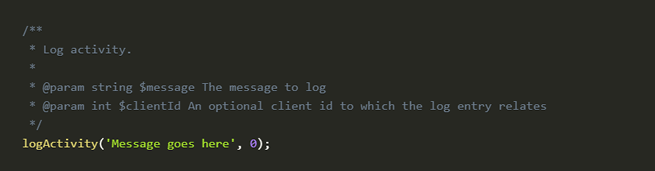
Activity Log
go to Utilities > Logs > Activity Log and look for a "Currency Exchange Rates Updated" entry.
Module Log
go to Utilities > Logs > Module Log; if it's disabled, turn it on via "Enable Debug Logging." Here you can see the raw request sent to DomainNameAPI and the raw pricing response. An "Auth Error" or "IP Not Allowed" response means the issue is in API authorization.
9. What to Check on the Database Side
If you're dealing with a chronic pricing mess that the interface alone can't resolve, the issue may be sync debris accumulated in WHMCS's database tables.
tblcurrencies
stores every currency defined in your system along with its current rate (the "rate" column). If a currency's rate is stuck at 0.00000, every price in that currency will appear invalid.
tblpricing
the central table for all WHMCS pricing. The "type" column holds values like domainregister, domaintransfer, domainrenew; the "currency" column shows which currency ID the price belongs to.
If a module sync error has created duplicate records in the database, WHMCS may keep reading the old/incorrect row even after you update prices from the admin panel. If you're not confident editing the database directly, it's far safer to remove and reinstall the module (clearing its data) than to intervene manually.
10. WHMCS vs. Blesta vs. HostBill: Currency Management Compared
DomainNameAPI integrates fully with all three platforms. Before deciding which automation panel's currency/rate management suits you best, take a look at the comparison below:
You can find module installation and sync guides for all three platforms on our WHMCS, Blesta, and HostBill pages.
11. Optimization Tips for DomainNameAPI Users
Match your Base Currency
keeping your WHMCS Base Currency the same as the main currency on your DomainNameAPI reseller account (ideally USD) reduces conversion steps and eliminates the small rounding losses caused by cross-rate calculations.
Stagger your cron schedule
don't run WHMCS's general currency-update cron at the same time as the DomainNameAPI price-sync cron. Let the base rates update first (e.g., 3:00 AM), then run your domain price sync afterward (e.g., 4:00 AM), so domain prices are calculated using the freshest rate data.
Use a markup strategy
if you don't want domain prices reset on every sync, use the module's percentage-based markup feature instead of hardcoding fixed prices. That way, even when the upstream provider's cost changes, your system automatically reapplies your margin and keeps prices current.
DomainNameAPI Technical Team Insight
Most of our resellers selling in multiple currencies prefer to lock the Base Currency to USD and only auto-update the Additional Currency rates. In the vast majority of the cross-rate calculation issues we've observed, this approach eliminates the problem entirely.
To expand your automation stack, you can also explore DomainNameAPI's HostBill module, Blesta integration, and ClientExec resources to find the setup that best fits your infrastructure. For general reseller program details, visit our Domain Reseller program page.
12. Frequently Asked Questions
1. Auto Update Rates is enabled in WHMCS, so why aren't rates updating?
The most common cause is that your server can't reach the external services WHMCS pulls rate data from. A firewall may be blocking outbound connections, or PHP's allow_url_fopen function may be disabled. A malfunctioning cron system can also block the update. Confirm cron is running without errors under Automation Status, and ask your server admin to allow access to external rate services.
2. Domain prices look correct in the admin panel but wrong on the live site — why?
This is usually a browser or system caching issue. WHMCS caches certain database queries to speed up front-end pricing. After updating prices, clear the cache via Utilities > System > Clear Templates Cache. Also check which currency the visitor is viewing the site in — if the conversion rate is wrong, a correct admin-panel price can display with the wrong multiplier on the front end.
3. Will my manually-entered promotional prices get wiped out when the DomainNameAPI module syncs?
Yes — if you have the module's automatic price sync broadly enabled and haven't excluded specific TLDs, cron will update those rows on every run and overwrite your manual prices. For TLDs you want to run a promotion on or lock pricing for, exclude them from the auto-sync list, or fine-tune the markup settings specifically for that extension.
4. Why does the currency code matter so much in WHMCS currency settings?
WHMCS uses ISO 4217 three-letter codes when pulling data from rate providers. If you enter a non-standard code, the system won't recognize it and the rate-update service will return an error. The code must always be entered as a 3-letter standard (TRY, USD, EUR); the currency symbol is purely cosmetic and can be set however you like.
5. I'm getting "Module Not Found" or an API error during domain price sync — what should I do?
This error means WHMCS couldn't establish a secure connection to DomainNameAPI's servers. First, log into your reseller panel and check whether your server's IP address is on the API access whitelist. Then confirm the module files were uploaded to the correct directory with the correct permissions.
6. I only have USD and TRY in my system. Domain costs are in USD — how is the TRY price determined?
If you leave the TRY field blank in the domain pricing matrix or instruct WHMCS to auto-calculate it, WHMCS takes the USD price and multiplies it by the current TRY rate stored in tblcurrencies. This is exactly why keeping that rate up to date is critical.
7. Can the Base Currency in WHMCS be changed later on?
Technically it can be changed at the database level, but this is extremely risky and strongly discouraged. Once Base Currency changes, all historical invoices, payments, reports, and existing product pricing remain tied to the old currency factor, and your financial data ends up mixed and inconsistent. This choice should be made correctly at the very start of your setup and rarely revisited.
8. How do decimal places affect price synchronization?
WHMCS's Decimal Places setting is usually set to 2, while domain providers' APIs may work with 4 or more decimal places. If your rounding settings or decimal separators are misconfigured, you can end up with cent-level losses during conversion, or prices being misread as far too large or too small.
9. I'm seeing "Cron Job: Currency Update Failed" in the Activity Log — how do I fix it?
This confirms that cron triggered the currency-update function but couldn't retrieve data from the external source. First, make sure you're running a current version of WHMCS — older versions may rely on rate-service endpoints that are no longer valid. If your version is current, check with your hosting provider that curl and SSL/HTTPS connections to external servers are working correctly.
10. How can I use price sync to grow my reseller network through DomainNameAPI?
If you manage your own sub-resellers, you can pass the flexible pricing structure you get from DomainNameAPI directly down to them. By defining different customer groups, you can apply different markups on top of the auto-pulled DomainNameAPI prices for each group, and automate price synchronization across your entire reseller network from one central place.
11. Is the currency menu different between the WHMCS Twenty-One/Alphanumeric and Blend themes?
The function is the same, but the path differs by theme. In the newer Twenty-One/Alphanumeric interface, it's under Configuration (Setup) > System Settings > Currencies; the older Blend theme used Setup > Payments > Currencies. When writing documentation with screenshots, note which theme/version you're using to avoid confusion.
12. If I run DomainNameAPI alongside another registrar module for the same TLD, will prices conflict?
Yes — if two registrar modules are active for the same TLD, WHMCS pulls pricing based on which one is set as primary. If both modules sync pricing for that TLD, whichever cron task ran most recently determines the price. To avoid conflicts, keep each TLD tied to a single registrar module.
13. Does sandbox/test-environment price sync affect the live environment?
No — DomainNameAPI's test and live environments are completely separate, with independent API keys and balances. However, if a live API key is accidentally replaced with a test key in your module settings, domain operations and pricing will fail in the live environment. This is a common cause of "API Authentication Failed" errors.
14. Why are some TLDs missing entirely from the price sync?
The most common reason is that the TLD isn't yet active/for sale on your DomainNameAPI reseller account. Check that extension's status in your reseller panel — if it isn't active, WHMCS sync won't include it in the list.
15. Why do renewal prices sometimes sync differently from registration prices?
The pricing feed from DomainNameAPI carries separate cost data for registration, renewal, and transfer; these three transaction types can carry different wholesale pricing. WHMCS stores these as separate columns on the Domain Pricing screen, so one syncing while another doesn't is usually related to which transaction types are enabled in the module settings.
16. If I update exchange rates, does it change the price on already-pending orders?
No. The price and rate at the moment an order is created is locked to that order record. Subsequent rate updates only affect newly created orders and the displayed price of items not yet added to a cart.
17. Is it possible to monitor currency sync issues automatically?
Yes. You can forward WHMCS's Activity Log and Module Log entries to an external log-monitoring tool and set up alerts for phrases like "Currency Update Failed" or "Cron Has Not Run." This lets you catch issues before they grow into bigger problems.
18. If I also use an external accounting/ERP system, can currency mismatches occur?
If the external system uses its own rate source and it isn't synced with WHMCS's rate, you may see small inconsistencies in reporting. Making sure both systems pull from the same rate source (e.g., the same central-bank API) eliminates this discrepancy.
19. Can I show domain prices at a different rate for specific customer groups only?
In WHMCS's standard setup, the exchange rate is the same for all customers — group-specific rates aren't a built-in feature. This typically requires custom pricing rules or third-party add-ons; the DomainNameAPI module's markup setting is the most practical built-in way to differentiate pricing between groups.
20. What's a recommended check schedule to prevent price sync issues?
On top of your daily cron run, reviewing the Module Log weekly and test-ordering across your full TLD price matrix once a month catches problems before they grow. For high-volume resellers, tying this check into an automated alert system (see Question 17) is more efficient.
13. Conclusion
Currency and price synchronization issues in hosting automation may look complicated at first glance, but they're technical glitches that a systematic checklist can resolve quickly. As covered in this guide, the foundations of a stable setup are: understanding WHMCS's currency hierarchy correctly, using ISO-standard currency codes, keeping the cron infrastructure running without interruption, reading error messages accurately, and knowing how to analyze the logs.
With the strong module optimization DomainNameAPI provides, you can fully automate how exchange-rate fluctuations and provider-side price updates flow into your system. That means fewer financial losses and a smoother, error-free purchase experience for your customers — and a meaningful boost to your overall operational efficiency.
Manage Your Domain Sales With Full Automation
Stop losing time to price sync errors. Manage up-to-date pricing, exchange rates, and reseller markups across hundreds of TLDs worldwide — fully automatically — with the DomainNameAPI WHMCS module.
Join our free Domain Reseller program to start sourcing domains at the most competitive cost, backed by in-depth technical documentation and uninterrupted API support.