Getting Started: Creating Your Domain Name API Account
Domain Name API gives registrars, resellers, and developers direct access to a powerful domain management infrastructure. Whether you are building a reseller business or integrating domain operations into your platform, everything begins with a single step: creating your account.
Registration is completely free and does not commit you to any purchase. Once your account is ready, you can log in instantly and start exploring the platform’s full range of features.
📌 Important: A working email address is essential. Domain Name API uses email as the primary channel for account notifications, order confirmations, and security alerts. Please use an address you check regularly.
Step-by-Step Registration Guide
Follow the steps below to complete your registration at Domain Name API.
Step 1 — Visit the Sign-Up Page
Open your browser and navigate to dm.apiname.com. You will be presented with the registration form where you can fill in your details.
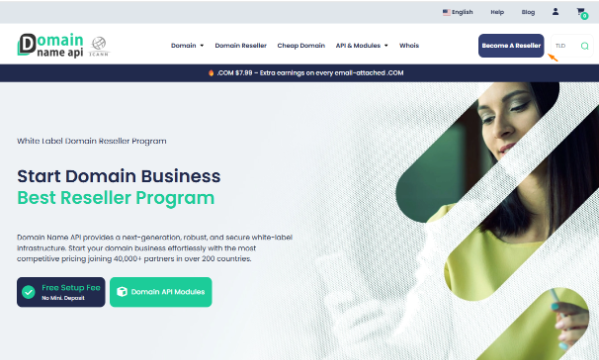
Step 2 — Enter Your Personal Information
Fill in the following required fields:
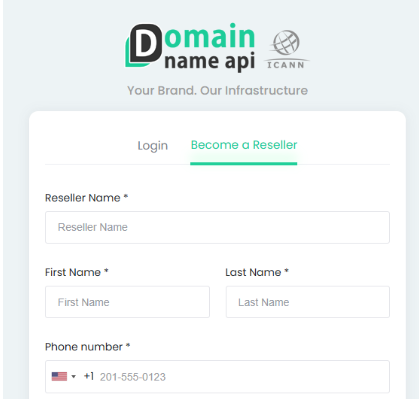
- Reseller Name — Enter the name of your reseller business or brand. This will represent your identity on the platform.
- First Name Enter your given name as it appears on official documents.
- Last Name Enter your family name.
- Phone Number Provide a valid phone number including your country code. This may be used for account verification and support purposes.
- Username Choose a unique username. This will be used to log in to your account, so pick something you can easily remember.
- E-mail Use a valid, actively monitored email address. This will be your primary communication channel for account notifications and order updates.
- Password Choose a strong password. You can use the visibility toggle to verify what you have typed.
- Confirm Password — Re-enter your password to confirm it matches. Both fields must be identical before you can proceed.
Step 3 — Configure Your Account Set Your Preferences During registration, two key account settings are configured:
Kayıt sırasında iki önemli hesap ayarı yapılandırılır:
- 2FA configuration (Two-Factor Authentication)
- Entry of personal and corporate billing information
Step 4 — Review and Accept the Terms
Before completing your registration, please review the following:
- You may opt in to receive promotional communications, including offers and platform updates. This is optional and you may unsubscribe at any time.
- You are required to accept Domain Name API’s Terms and Conditions to proceed. We encourage you to read these carefully.
Step 5 — Submit Your Registration
Click the Sign Up button to finalise your account creation. A confirmation email will be sent to the address you provided. You can log in immediately and begin using the platform right away at domainnameapi.com
What Comes Next?
Once your account is active, you are ready to start using the full Domain Name API platform. Here are some recommended next steps:
- Explore the control panel and familiarise yourself with the interface.
- Top up your account balance to begin placing orders.
- Review the API documentation if you plan to integrate domain operations into your own systems.
- Register your first domain and experience the platform first-hand.
Welcome to Domain Name API. If you have any questions along the way, our support team is available to help. Visit domainnameapi.com to get started.