Reseller Pricing Tiers

This guide explains how reseller pricing tiers work, how to qualify for better wholesale domain pricing, and how upgrades affect your reseller business.
What you'll learn in this guide
- → The four pricing tiers and what each one offers
- → How to upgrade by domain volume or one-time deposit
- → A real-world example of how upgrade pricing works
- → What happens to your sub-reseller pricing when you upgrade
- → Frequently asked questions about tier upgrades
How the Tier System Works
Your pricing tier determines the wholesale rates you pay for domain registrations, renewals, and transfers. The system rewards growth: as your portfolio scales, your per-domain costs come down — automatically.
There are two ways to move into a higher tier — grow your managed domain count to the next threshold, or make a single qualifying deposit. Either path gives you a permanent upgrade; there's no annual review and no risk of being moved back down.
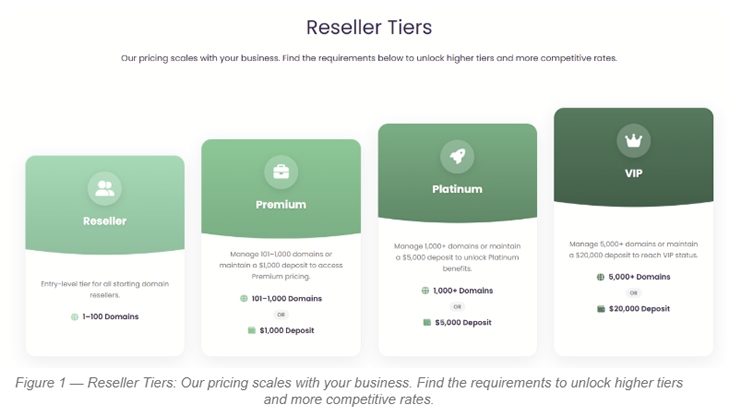
The Four Reseller Tiers
Here's a side-by-side view of all four tiers, what qualifies you for each, and what you get:
Reseller — The Starting Tier
Every new account begins here. No deposit is required, and there's no minimum number of domains. The Reseller tier gives you everything you need to register, renew, and transfer domains right away.
Domain range: 1 to 100 active domains
Deposit required: None
Best for: New resellers getting started in the domain business
Premium — Better Rates, Two Ways to Qualify
Once you cross 101 managed domains — or make a single $1,000 deposit — your account automatically switches to Premium. From that point, you pay more competitive per-domain rates across popular TLDs.
Domain range: 101 to 1,000 active domains
One-time deposit path: $1,000 USD (or equivalent in your local currency)
Best for: Growing resellers who want better margins without waiting
Platinum — Wholesale Pricing for Serious Resellers
Platinum is where pricing gets seriously competitive. A meaningful saving when you're processing thousands of registrations. Qualify by reaching 1,000+ managed domains or depositing $5,000 in a single transaction.
Domain range: 1,000 or more active domains
One-time deposit path: $5,000 USD (or equivalent in your local currency)
Best for: Established resellers managing large portfolios or hosting providers
VIP — The Best Rates in the House
VIP is the top tier, built for domain investors, hosting providers, and enterprise reseller operations managing 5,000+ domains. Make a single $20,000 deposit to qualify instantly and gain access to the lowest wholesale prices across all TLDs.
Domain range: 5,000+ active domains
One-time deposit path: $20,000 USD (or equivalent in your local currency)
Best for: High-volume resellers and domain investors looking for maximum margin
How to Upgrade Your Account
There's no application process and no waiting period. Upgrades happen automatically the moment you hit the qualifying threshold — either by domain volume or by a single qualifying deposit.
A Real-World Example
Scenario: You currently have 50 domains under management (Reseller tier). You load a one-time deposit of $5,000. Your account is upgraded directly to Platinum — skipping Premium entirely.
Another scenario: You grow your portfolio organically and cross 1,000 managed domains without any special deposit. Your account is automatically upgraded to Platinum at that milestone.
What Happens to Your Sub-Reseller Pricing?
When your account tier changes, your sub-resellers' pricing does not update automatically. You're responsible for reviewing and updating the pricing groups assigned to each sub-reseller to reflect your new rates.
This is actually an opportunity: when you move up a tier, your own costs drop while your sub-resellers' prices stay the same until you update them. That's a direct improvement to your margins.
Related Resources
Learn more about pricing, sub-resellers, and account management:
- Full Domain Price List — Compare prices across all TLDs at every tier
- Sub-Reseller Management Guide — Create accounts, assign pricing, and load deposits
- Sub-Reseller Pricing Groups — Set custom pricing for each sub-reseller
- Deposit & Balance Guide — How deposits work and how to top up your account
- REST API Documentation — Manage domains and reseller accounts programmatically
Frequently Asked Questions
Q: How do I upgrade my reseller account?
A: Two ways: either grow your managed domain count to the next tier's threshold, or make a single qualifying deposit. The upgrade is automatic and takes effect immediately — no support request needed.
Q: Does the deposit have to be made all at once?
A: Yes. The deposit must be a single transaction. Multiple smaller deposits do not combine toward a tier upgrade. For example, five $200 deposits do not qualify for Premium — you need one deposit of $1,000 or more.
Q: What does .COM cost at each tier?
A: For prices at all other tiers and TLDs, see the full price list at domainnameapi.com/price-list.
Q: Can I deposit in local currency instead of USD?
A: Yes. You can deposit the equivalent amount in your local currency (e.g. Turkish Lira). The exchange rate at the time of the deposit is used to determine eligibility.
Q: Can I skip a tier — for example, go straight from Reseller to Platinum?
A: Yes. If you deposit $5,000 in a single transaction, your account upgrades directly to Platinum regardless of your current tier or domain count.
Q: Will my tier change if my domain count drops?
A: No. Once you reach a tier — through either deposit or domain volume — that tier is permanent. Your pricing does not go back down if your domain count decreases.
Q: Do my sub-resellers' domains count toward my tier?
A: Yes. Domains managed by your sub-resellers count toward your total domain volume for tier qualification purposes.
Q: Do I need to manually update my sub-resellers' pricing after an upgrade?
A: Yes. Sub-reseller pricing does not update automatically when you upgrade. You need to review and update their pricing groups from Reseller Management > Sub-Reseller Pricing.
Q: Is there an annual review that could downgrade my account?
A: No. Unlike some other platforms, there is no annual review process here. Once you qualify for a tier, you keep it.
Ready to unlock better pricing?
Log in to your reseller panel and add a qualifying deposit to upgrade your tier instantly. No application required.
dm.domainnameapi.com • See full price list at domainnameapi.com/price-list