What is a Default Contact, How to Create and Edit It?
In our systems, you will frequently encounter the term "customer handles". These handles allow you to reuse information for customers you work with regularly. This way, you don't have to refill all the details every time you register a domain.
Format: A customer handle appears in the following format: D-012013829823.
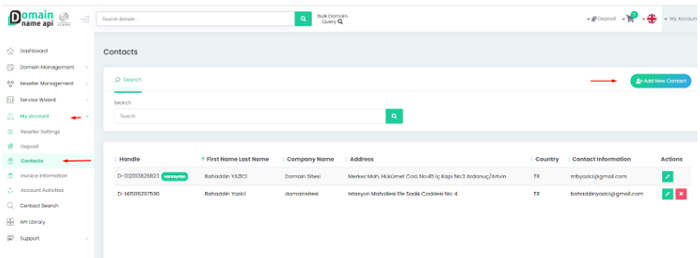
Creation: To create a new customer handle, follow this path: My Account> Default Information> Add New Contact Information.
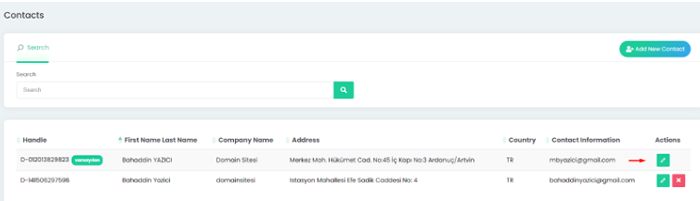
Management: To manage existing handles, navigate to the My Account> Default Information section.
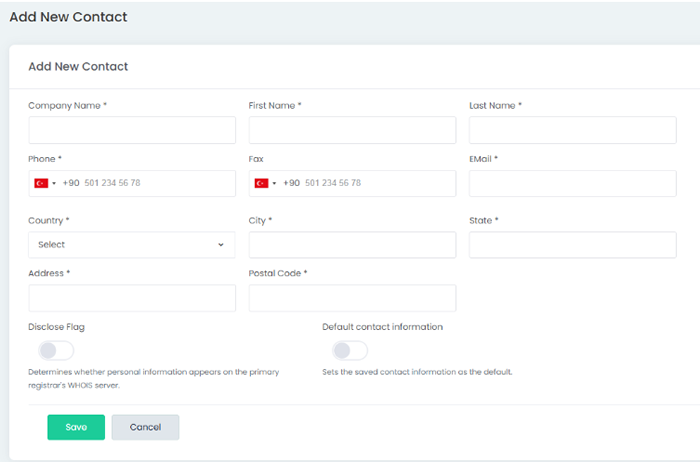
Mandatory Fields and Entry Rules
When filling out the form, you must follow the table below:
Important Notes
- Phone Format: The phone number must include the country code, area code, and subscriber number. Otherwise, the system will return an error.
- Registrar Requirements: Certain fields may only be mandatory for specific domain extensions (e.g., .ru, .eu, .dk).
- Compliance: To ensure full compatibility, it is recommended to provide as much detail as possible.
How to Edit Default Contact Information?
To update your information, go to the Default Information screen and use the "Edit Contact Information" icon (pencil icon) located under the Actions column for the relevant handle.