How to Suspend, Reactivate and Delete a Hosting Account in Plesk
Quick answer
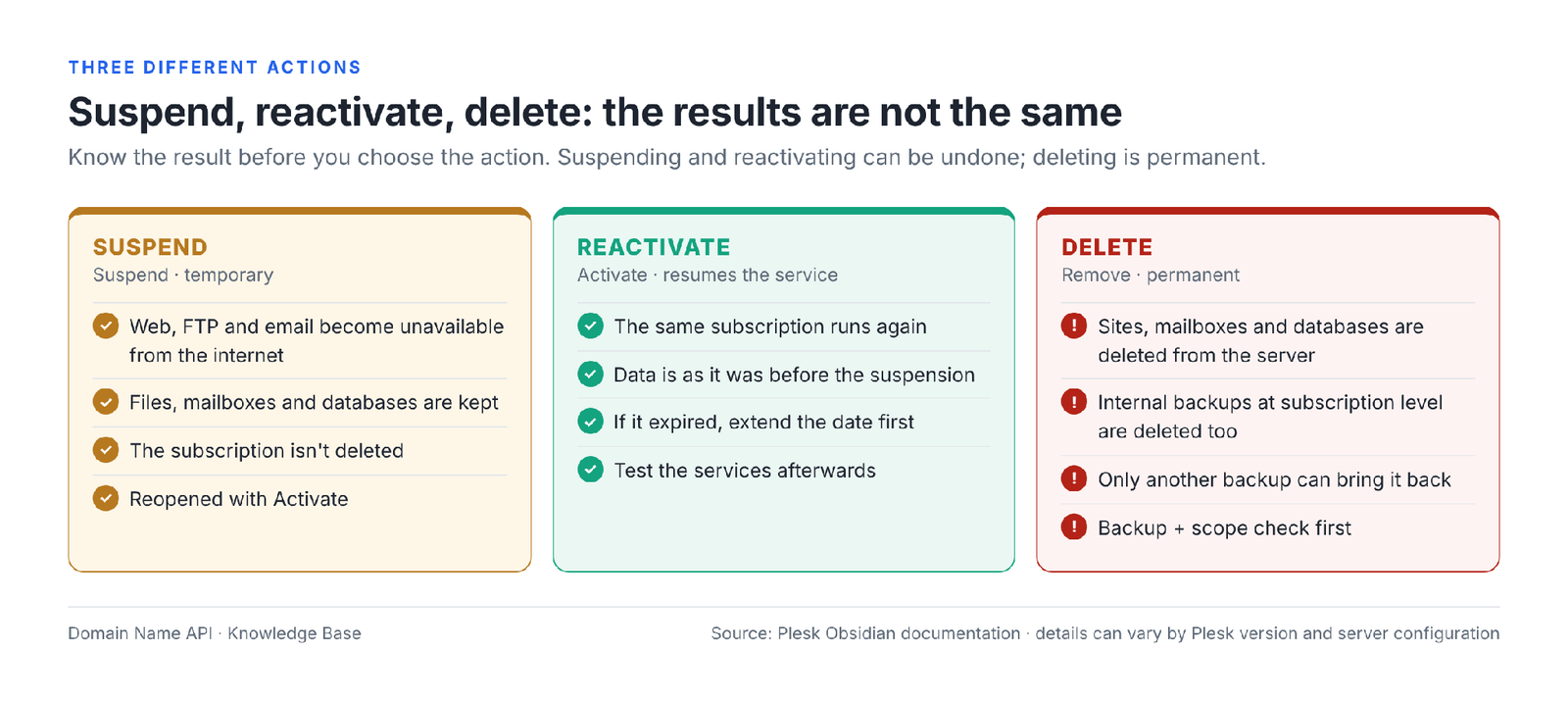
To stop a customer's hosting temporarily in Plesk, you suspend the relevant Subscription (Suspend); to bring it back, you reopen it with Activate. While suspended, the website, FTP and email become unavailable from the internet, but files, mailboxes and databases stay on the server. Deleting (Remove) is permanent: the subscription's sites, email, databases and internal subscription-level backups are removed from the server. Before deleting, confirm you're on the right subscription and take a verified backup that's stored outside Plesk.
Written by: Domain Name API Hosting Support Team · Technical review: Domain Name API Hosting / Systems Operations Team · Last updated: 5 October 2026 · Source: official Plesk Obsidian documentation
Screens are representative Plesk Obsidian views with sample data; the menu position can differ slightly depending on your version and reseller permissions. Examples use example.com, Example Customer and exampleuser.
Which should I do: suspend, reactivate or delete?
If the service needs to stop temporarily, suspend it; if the issue is resolved, reactivate it; if the service has definitely ended, take a backup, check the scope, and only then delete. Deleting is not an alternative to suspending.
Quick decision
The customer won't receive the service for a while (payment pending, abuse review, customer request) → Suspend
Payment received or the issue is resolved → Activate, then test the site and email
The service is ending for good and this has been confirmed in writing → backup + scope check first, then Remove
| Action | Is data kept? | Site access | Customer's Plesk access | Can it be undone? | When? | |
|---|---|---|---|---|---|---|
| Suspend | Yes; files, mailboxes and databases stay on the server | Stops; visitors usually see "503 Service Temporarily Unavailable" | Unavailable from the internet | If only the subscription is suspended, the customer account stays open; if the customer is suspended, they can't log in | Yes, with Activate | Temporary stop |
| Activate | Pre-suspension data is used as it was | Reopens | Works again | Normal | – | When the cause is resolved |
| Remove | No; subscription data and internal subscription-level backups are deleted | Closed permanently | Mailboxes and messages are deleted | The customer account remains; if the customer is deleted, it goes too | Only by restoring a valid backup stored outside Plesk | When the service has definitely ended |
Key terms
What is a customer?
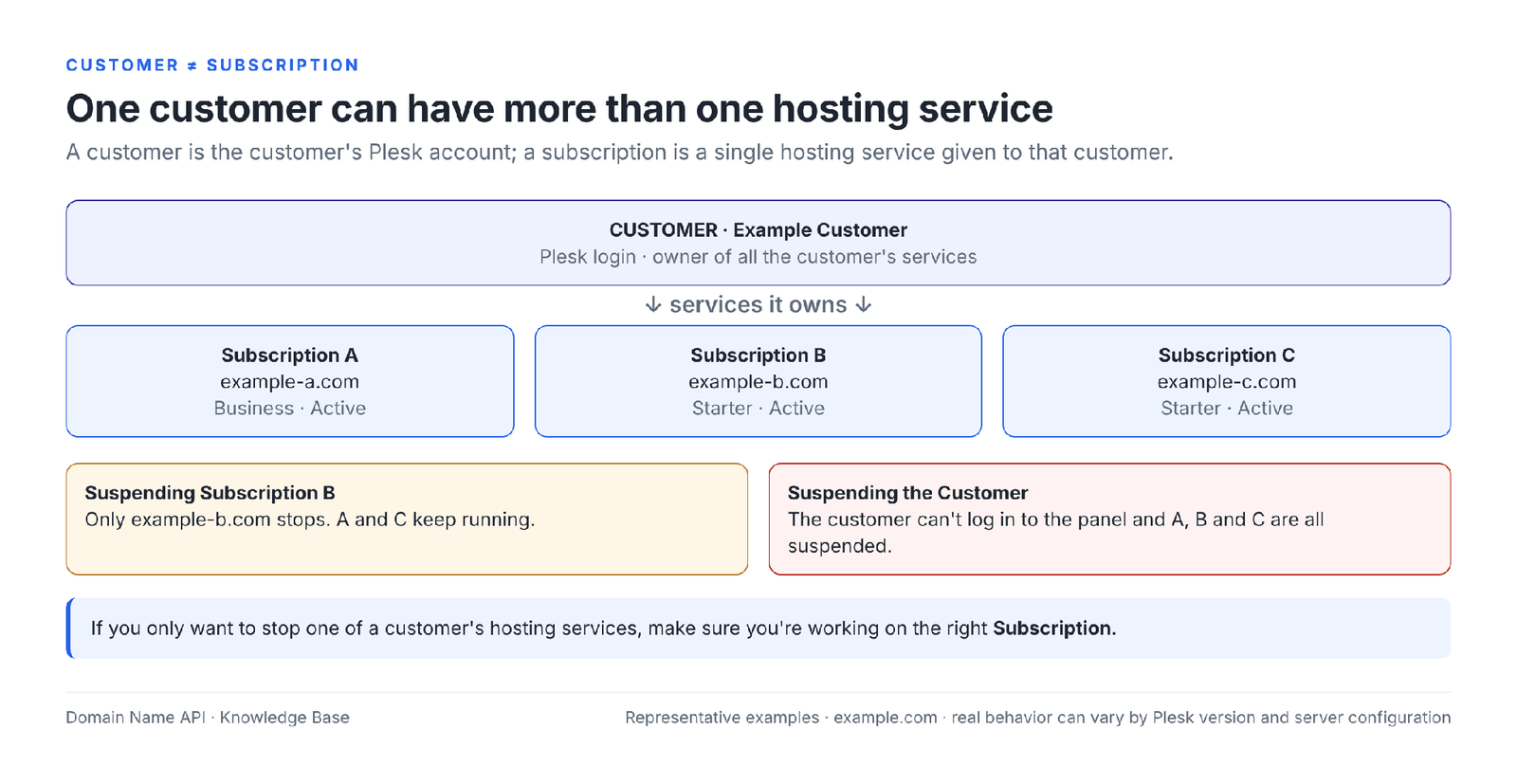
A customer is the account the customer uses to log in to Plesk with their own username, and it owns all of the customer's services. A customer can have one or more subscriptions. Suspending or deleting a customer affects every subscription linked to it.
What is a subscription?
A subscription is a Service Plan assigned to a specific customer, in other words a single hosting service given to that customer. Domains, websites, mailboxes and databases sit inside the subscription. Suspending, reactivating and deleting should usually be done at this level.
What does Suspended mean?
Suspended is the state in which a subscription is temporarily stopped. According to Plesk's documentation, the website, FTP and email services of a suspended subscription aren't available to internet users; content isn't deleted from the server. A suspension can be applied manually or happen automatically because of expiry or a resource limit.
What does Active mean?
Active is the state in which a subscription runs normally. When a suspended subscription is reactivated with Activate, its services start working again. However, seeing Active doesn't on its own prove that the site, email and application work correctly.
What is Remove (delete)?
Remove is the action that permanently removes a subscription or customer from Plesk. When a subscription is deleted, its websites, mailboxes, databases and internal backups created at subscription level are removed from the server. Plesk has no undo button for this.
What is a backup?
A backup is a copy of the subscription's data at a given moment. To count as safe before a deletion it must be complete, belong to the right subscription, contain the needed data and be accessible outside the Plesk server, because deleting a subscription also deletes its internal subscription-level backups.
Don't confuse a customer with a subscription
A customer is the customer's Plesk account; a subscription is a single hosting service given to that customer. Because one customer can have several subscriptions, suspending a subscription isn't the same as suspending the customer, and deleting a subscription isn't the same as deleting the customer.
| Action | What is affected? | Can the customer log in to the panel? |
|---|---|---|
| Suspending a subscription | Only that subscription's sites, FTP and email | Yes, if the customer account is active |
| Suspending a customer | All of the customer's subscriptions and sites | No; not while suspended |
| Deleting a subscription | Only that subscription and its data | Yes; the customer and other subscriptions remain |
| Deleting a customer | Every subscription and domain linked to the customer, plus the customer's internal backups | No; the account is removed |
If you only want to stop one of a customer's sites temporarily, look at the relevant subscription, not the customer account.
What does suspending a subscription in Plesk mean?
Suspending a subscription means stopping the hosting service temporarily without deleting it. The subscription stays in Plesk, its status becomes Suspended, and the same subscription can be reopened with Activate whenever needed. According to Plesk's documentation, a status change doesn't remove content on the server such as website files, email, databases and backups.
The effect of a suspension can't be summed up as "everything shuts down": it differs by service, and some effects depend on server and plan configuration. The table below shows the differences.
What happens when a subscription is suspended?
According to Plesk's documentation, the website, FTP and email services of a suspended subscription aren't available to internet users; visitors usually see a "503 Service Temporarily Unavailable" page. Files, mailboxes and databases are kept on the server. The behavior of some services can depend on the Plesk version and server configuration.
| Component | When suspended | Note |
|---|---|---|
| Website | Unavailable to visitors; usually a "503 Service Temporarily Unavailable" page | The plan's website status setting can change this behavior |
| Files | Not deleted; stay on the server | File content doesn't change during the suspension |
| FTP | Unavailable to internet users | Connection attempts fail |
| Sending and receiving email | Unavailable to internet users | Whether messages sent during the suspension bounce back depends on the mail server configuration |
| Mailbox data | Not deleted; existing messages are kept | The same mailboxes are used after Activate |
| Databases and their data | Not deleted; stay on the server | Not used through the application while sites are down |
| DNS | The DNS zone isn't deleted | The domain usually keeps resolving to the same server; visitors see the suspension page |
| SSL certificate | Not deleted | If automatic renewal falls during the suspension, it may fail; check HTTPS after Activate |
| Scheduled tasks (cron) | Tasks aren't deleted | Whether they run during the suspension depends on configuration; keep this in mind for long suspensions |
| Existing backups | Not deleted | Suspending doesn't remove backup files |
| Customer's Plesk login | If only the subscription is suspended, the customer account stays open | If the customer is suspended, they can't log in to the panel |
In short
Suspending can be undone and doesn't delete data, but the customer's website and email become unreachable from outside. If the customer's email is on this server, tell the customer in advance that the suspension will also stop email traffic.
How do you suspend a subscription in Plesk?
In the reseller panel, select the subscription in the Subscriptions list and choose Change Status › Suspend. The same action is available from the Suspend link on the subscription's own page. Do the short check below before you start.
- Is it the right customer?
- Is it the right subscription?
- Is it the right domain? (Domains column)
- Does the customer have other subscriptions that shouldn't be affected?
- Is the reason for the suspension correct and recorded?
- Is there critical email or web service?
- Has the customer been notified?
- Is the condition for reopening clear?
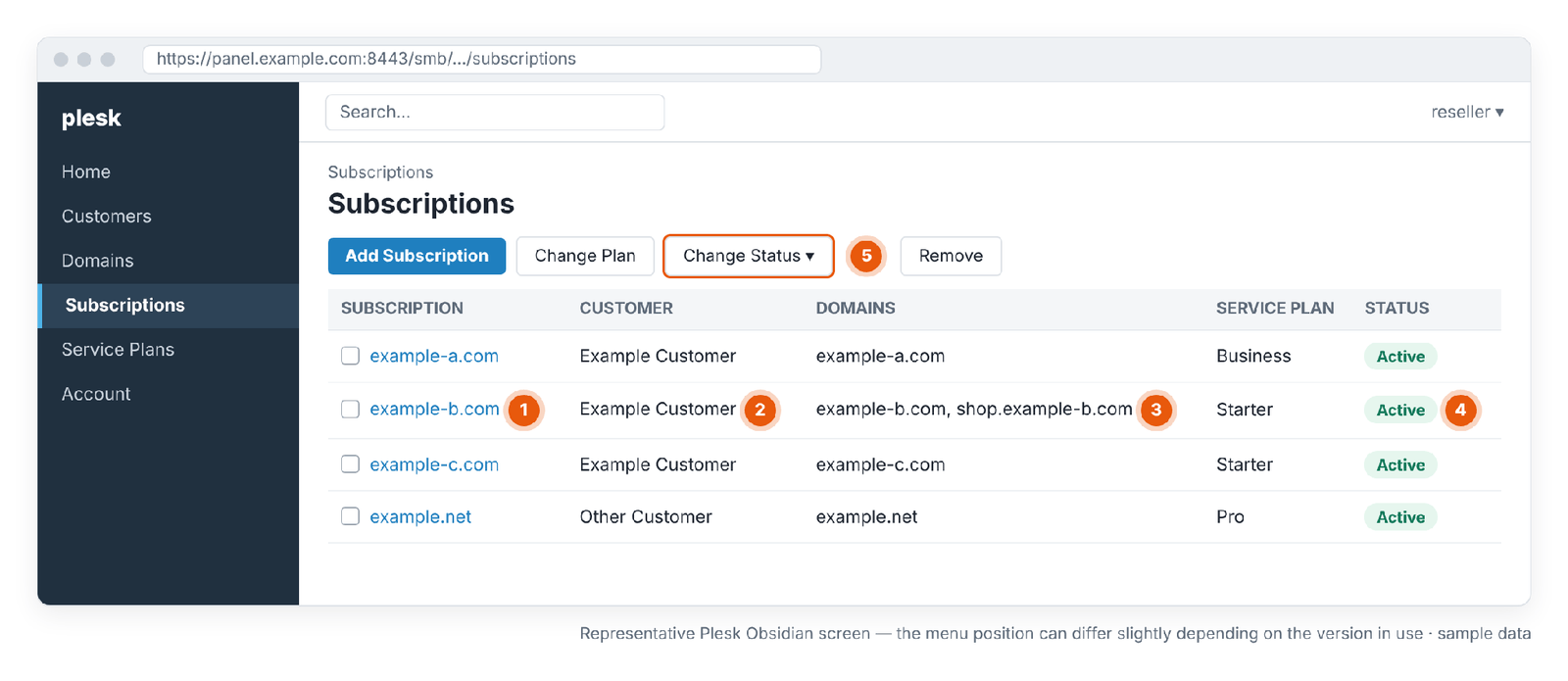
- 1 · Subscription: the hosting service you'll act on.
- 2 · Customer: the subscription's owner. The same customer can have other rows.
- 3 · Domains: the domains in the subscription. A suspension affects all of them.
- 4 · Status: Active or Suspended.
- 5 · Change Status: the Suspend and Activate actions.
| Step | What am I doing? | Why? | Expected result | Watch out |
|---|---|---|---|---|
| 1 | Logging in to the reseller panel | The action is done with reseller permissions | The reseller panel opens | Use the reseller panel, not the customer panel |
| 2 | Opening Subscriptions | Suspension is done at subscription level | The list of subscriptions appears | Don't act under Customers |
| 3 | Confirming the customer in the Customer column | There may be similar or identically named customers | The right customer's row is found | Note the customer's other subscriptions too |
| 4 | Confirming the domain in the Domains column | Every domain in the subscription will be suspended | The right domain and any extra domains appear | Remember the extra domains will go offline too |
| 5 | Selecting the row and choosing Change Status › Suspend | To stop the service without deleting it | The action is applied | Don't click Remove |
| 6 | Seeing Suspended in the Status column | To confirm the action was applied | Status becomes Suspended | If it doesn't change, refresh the page |
| 7 | Opening the site in a browser | To confirm what visitors see | The suspension page (usually 503) appears | A cache or CDN may still show the old page |
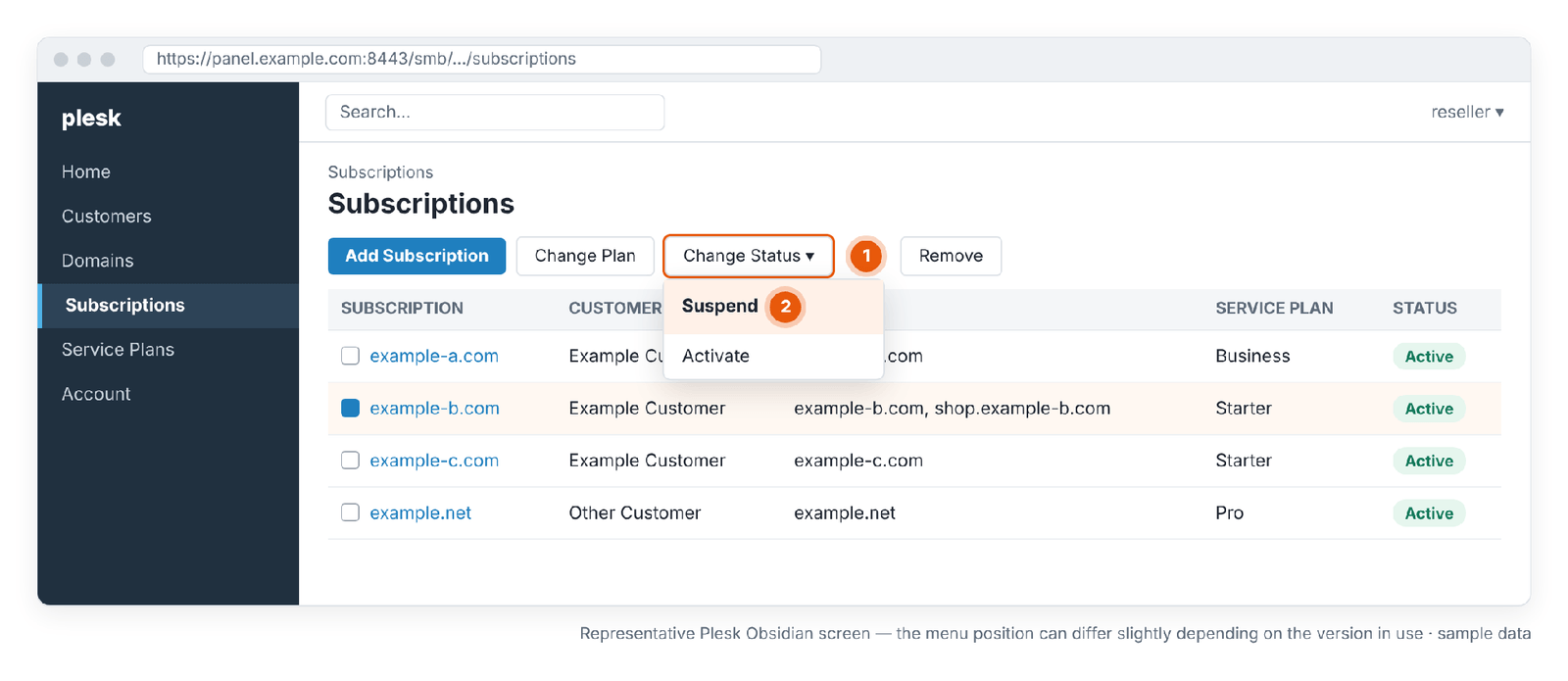
- 1 · Change Status: changes the selected subscription's status.
- 2 · Suspend: suspends the subscription without deleting it.
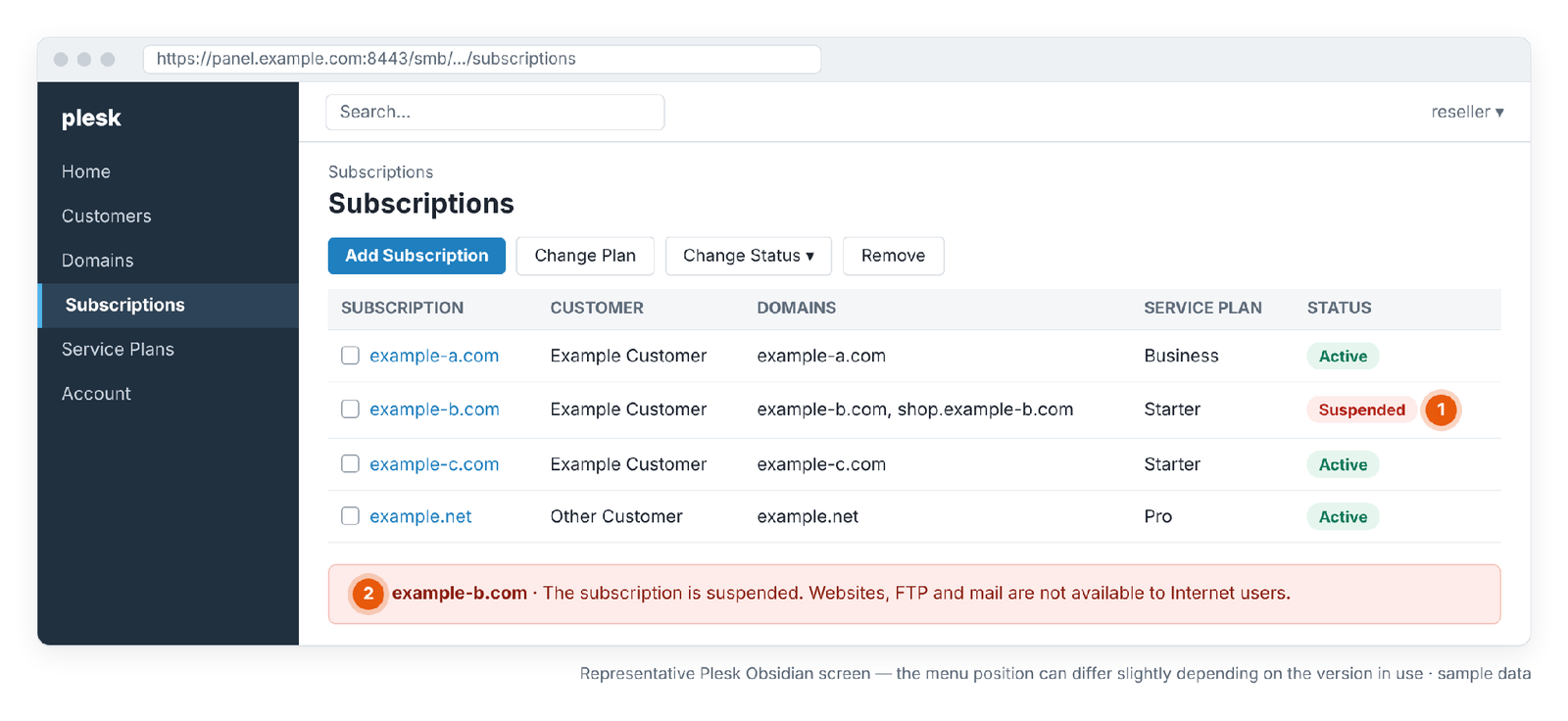
- 1 · Suspended: the subscription is suspended; other rows stay Active.
- 2 · Notice: web, FTP and email are unavailable to internet users.
How do I suspend only one of a customer's sites?
If the site is a separate subscription, suspend only that subscription. If the site is an extra domain inside the same subscription as other sites, suspending the subscription stops all of them; in that case it may be better to change only that domain's website status.
| Website status | What visitors see | When? | |
|---|---|---|---|
| Active | The site works | Works | Normal state |
| Suspended | "503 Service Temporarily Unavailable" | According to Plesk's documentation, keeps working | To stop only the site and keep email running |
| Disabled | The Plesk login page | Doesn't work | When both the site and email need to stop |
This domain-level status change doesn't delete files, email, databases or backups on the server either. The setting is in the domain's hosting settings; if you don't see it in the menu, check your reseller permissions.
Why can a subscription appear suspended on its own?
Plesk suspends subscriptions not only manually but also automatically under certain conditions. Plesk's own documentation names two main causes: expiry (expiration date) and exceeding a resource limit (on plans that don't allow overuse). A suspension at a higher level also affects the subscription.
| Cause | How to tell | What to do |
|---|---|---|
| Expiry | The subscription's or plan's expiration date has passed | Extend the expiration date first, then Activate. An Activate without extending the date can lead to a new suspension the next day |
| Resource limit exceeded | The plan has "Overuse is not allowed" and the disk or traffic limit was exceeded | Reduce usage or raise the limit/plan, then Activate |
| Customer suspended | All of the customer's subscriptions are suspended; the customer can't log in | Check the customer's status |
| Reseller account or service status | Every customer under your reseller account is affected | Check the product status in your Domain Name API service panel or contact the support team |
| Billing automation | Your own billing system may suspend automatically on late payment | Check your billing system's records |
For resource limits and the overuse policy, see the Plesk Reseller Hosting Resource Usage and Package Limits Guide.
How do you reopen a suspended subscription in Plesk?
Select the suspended subscription in the Subscriptions list and choose Change Status › Activate; the Activate link on the subscription's page does the same. The term in the Plesk interface is "Activate". The subscription's data continues to be used as it was before the suspension.
- In the Subscriptions list, find the subscription whose Status is Suspended.
- Check the cause of the suspension: manual, expiry or a resource limit? If it's expiry or a limit, fix that first.
- Select the row and choose Change Status › Activate.
- Confirm that the Status column shows Active.
- Run the post-activation checks below.
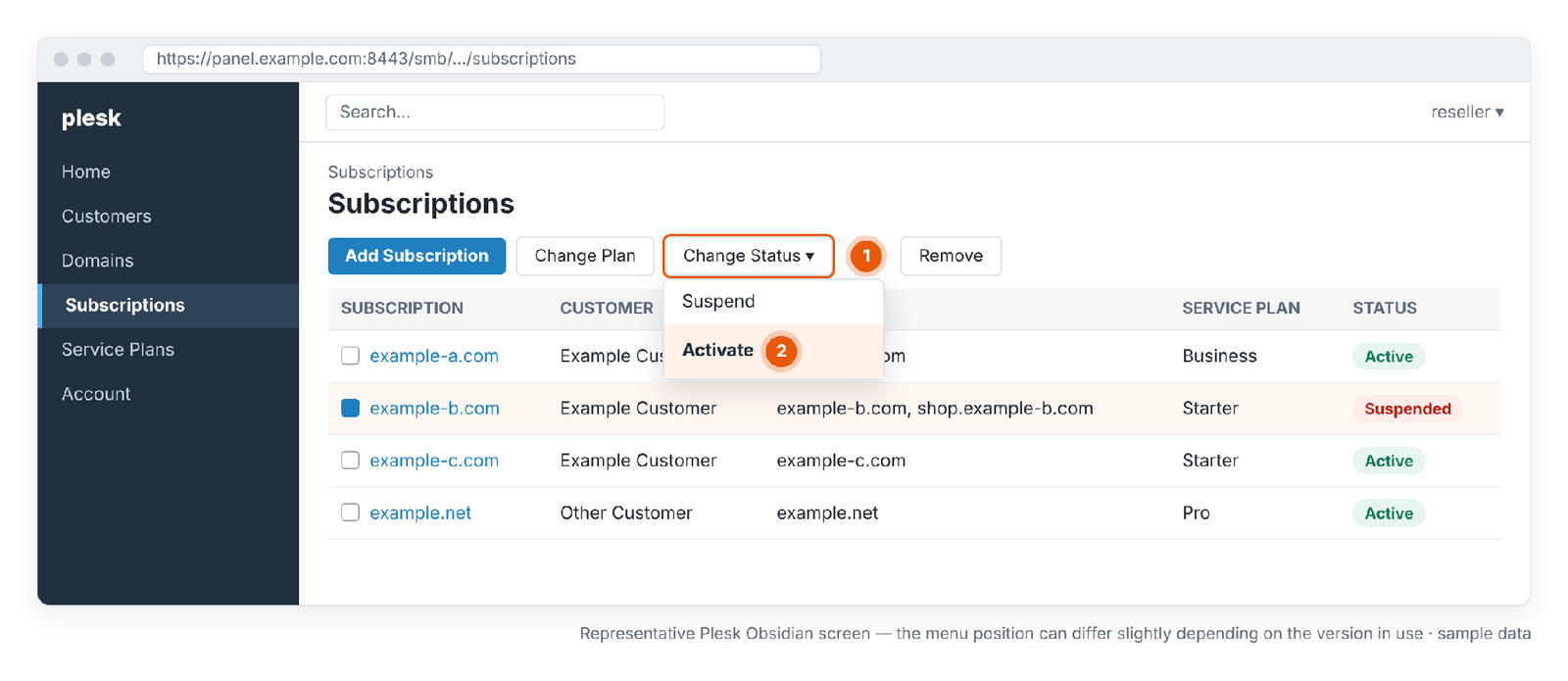
- 1 · Change Status: the status menu.
- 2 · Activate: reopens the subscription.
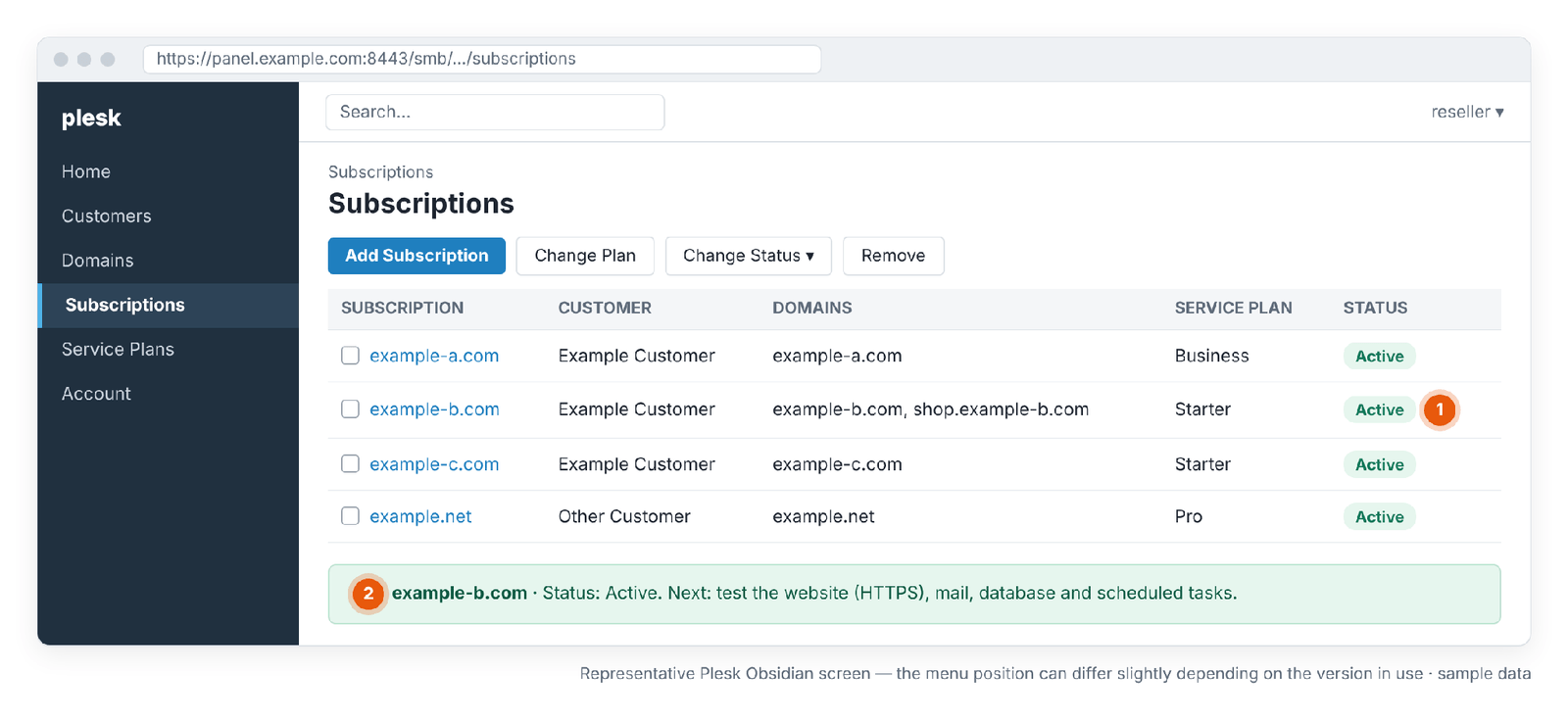
- 1 · Active: the subscription is active again.
- 2 · Next step: test the website, HTTPS, email, database and scheduled tasks.
| Activate | Restore | |
|---|---|---|
| What does it do? | Runs a suspended subscription again | Brings deleted or damaged data back from a backup |
| Is data needed? | No; the data is already on the server | Yes; a valid backup is needed |
| Does it work on a deleted subscription? | No | Yes, if a backup exists |
Active doesn't mean everything works
Even when a subscription shows Active again, test the website and email services separately. Active shows that Plesk has turned the service on; it doesn't prove that the site, application and email work correctly.
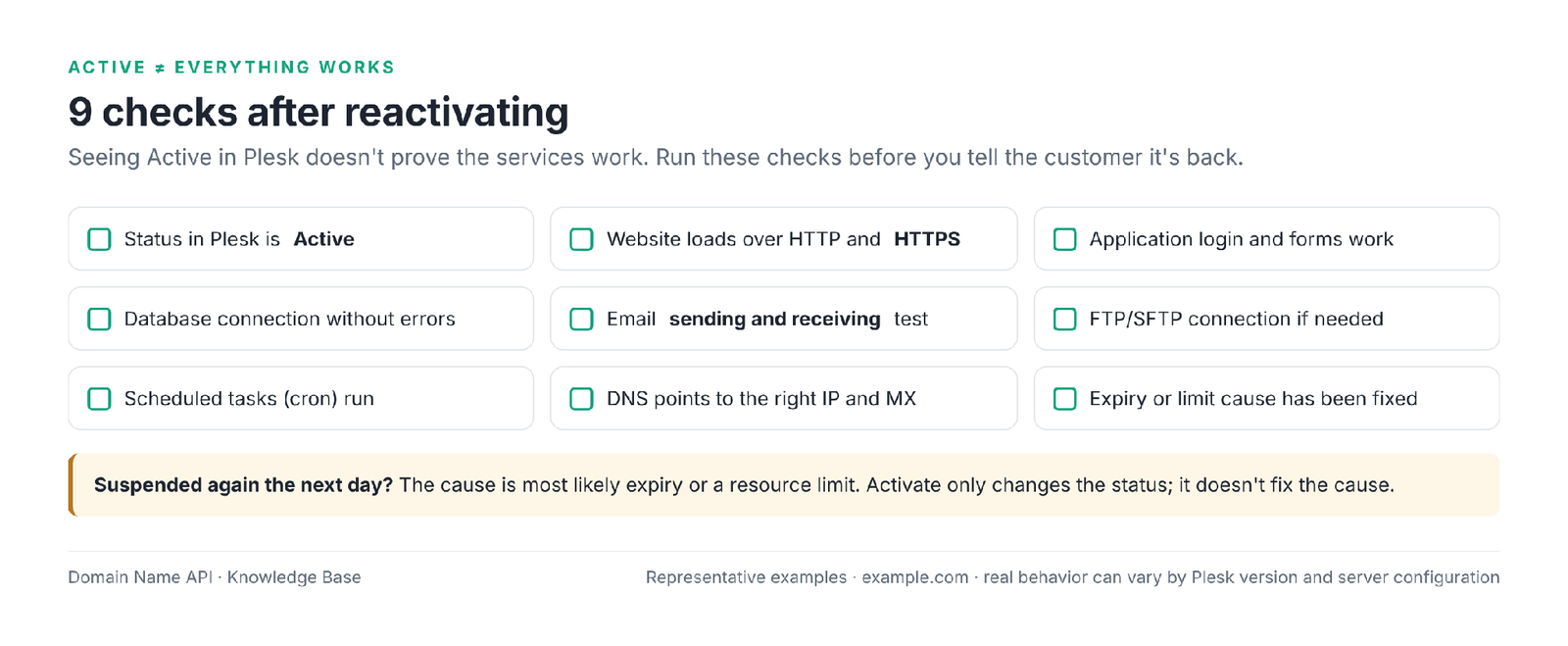
- Status in Plesk is Active
- The website loads
- HTTPS works and the certificate is valid
- The application (login, forms, payments) works
- Database connection without errors
- Email sending and receiving test passes
- FTP/SFTP connects if needed
- Scheduled tasks run if needed
- DNS points to the right IP and MX record
Why won't the site load after the subscription is activated?
If the site still doesn't load after Activate, the problem is usually not the suspension but DNS, SSL, the application, the database or resource limits. The table below lists the most common causes of "I activated it and it's still not working".
| Symptom | Likely cause | Check | Action |
|---|---|---|---|
| Still shows 503 | Browser, CDN or proxy cache; the subscription was suspended again | Status column; try from another network | Clear caches; if the status is Suspended again, find the cause |
| Suspended again the next day | Expiry or overuse | Expiration date; resource usage | Extend the date or fix the limit, then Activate |
| The site points to another server | DNS has an old record or the domain uses other nameservers | DNS lookup, nameserver details | Fix the DNS records, wait for propagation |
| Certificate error | SSL couldn't renew during the suspension | Certificate expiry date | Renew or reissue the certificate |
| 500 error | PHP version, application error | Site error logs | Fix the error; check the PHP version |
| Database connection error | Database user/password, service | Application configuration file, Databases | Verify the connection details |
| The application half-works | Cron tasks didn't run during the suspension | Scheduled tasks | Trigger pending tasks manually |
| Files can't be written | Disk quota is full | Disk usage and limit | Free up space or enlarge the plan |
| Site slow or erroring | Resource limit | Resource usage screens | Find the cause; change the plan if needed |
| The domain doesn't resolve at all | The domain has expired or its registration is suspended | Domain Name API domain management | Renew the domain registration |
| Site won't load on Windows | The IIS application pool has stopped | Application pool status | Start the pool; check application logs |
| Files missing or access denied | File permissions, wrong folder | File Manager, permissions | Fix permissions; check the document root |
| Error behind a CDN | External DNS/CDN origin wrong or an error cached | Origin setting in the CDN panel | Fix the origin, purge the CDN cache |
What does deleting a subscription in Plesk mean?
Deleting a subscription (Remove) means removing the hosting service from Plesk permanently. The subscription's websites, mailboxes and databases are deleted from the server. According to Plesk's documentation, every backup created at subscription level is also deleted from the internal Plesk storage. Plesk has no undo button for this.
WARNING: Deleting a subscription causes data loss
Don't use deletion as an alternative to suspension. Before deleting, check:
1. The right subscription · 2. The right customer · 3. A backup was taken · 4. The backup is verified and stored outside Plesk · 5. The end of the service is confirmed in writing
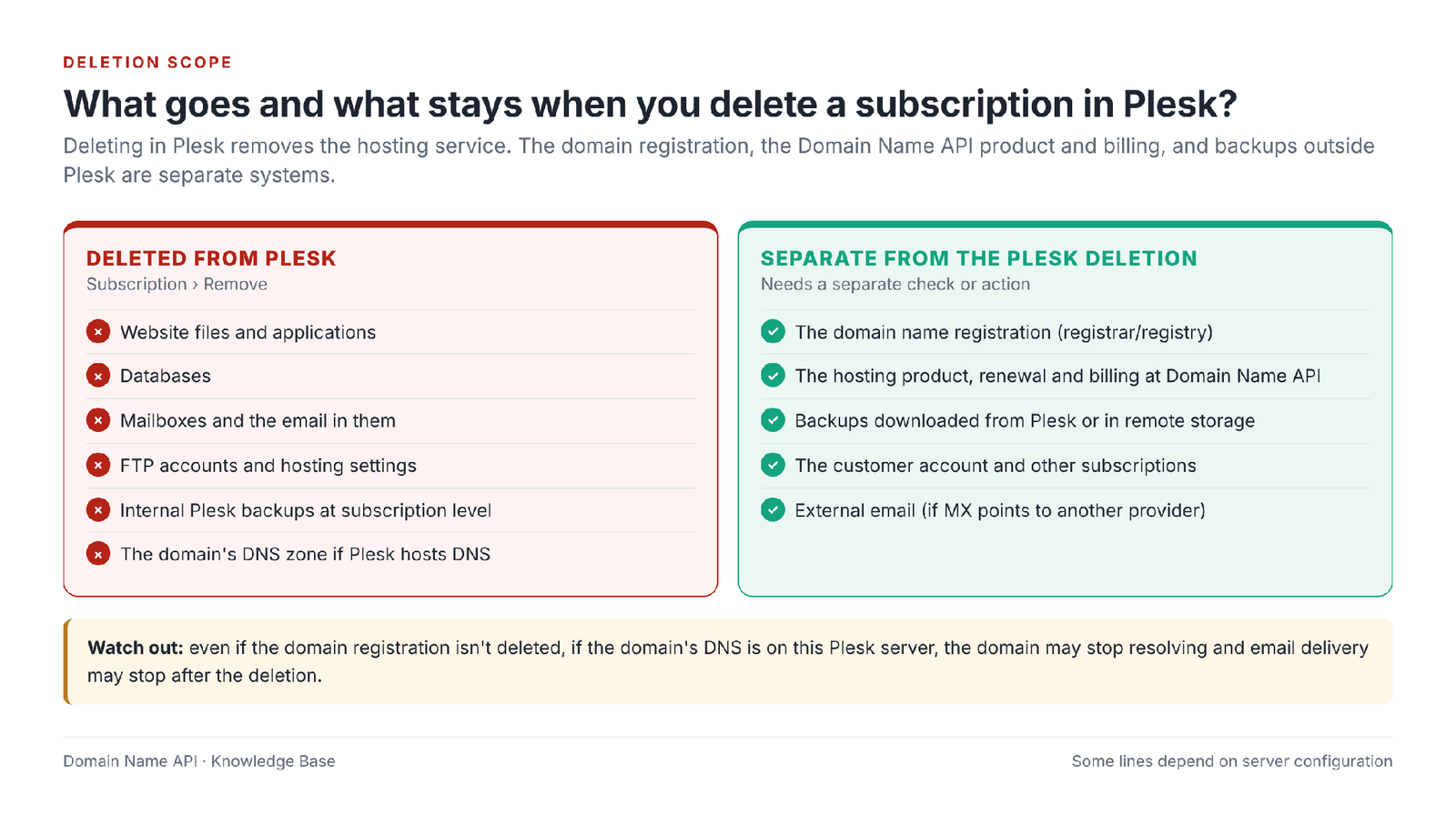
What exactly is deleted when a subscription is removed?
When a subscription is deleted, its hosting data is removed from the Plesk server. The domain registration, the Domain Name API product and billing, backups stored outside Plesk and the customer's other subscriptions are outside the scope of this action. The result of some rows depends on server configuration; we've noted these below.
| Component | When the subscription is deleted | Note |
|---|---|---|
| Website files | Deleted | Including extra domains and subdomains |
| Application data | Deleted | Together with files and databases |
| Databases | Deleted | The subscription's databases |
| Database users | Deleted | Together with the databases |
| Mailboxes and email messages | Deleted | If mail is hosted in Plesk; if MX points to another provider, email is there and isn't affected |
| FTP users | Deleted | The subscription's additional FTP accounts |
| DNS zone | Deleted if Plesk DNS is used | If the domain uses this server's DNS, resolution stops |
| SSL certificates | Removed with the subscription | An externally purchased certificate stays valid with its provider |
| Scheduled tasks | Deleted | Tasks tied to the subscription |
| Logs | Deleted | Download them before deleting if you need them |
| Internal subscription-level backups | Deleted | Stated explicitly in Plesk's documentation |
| Backups outside Plesk (downloaded or in remote storage) | Not deleted | The only reliable source for recovery |
| Server-level backups | Not deleted by the Plesk action | Resellers may not have access to them; retention depends on the hosting infrastructure |
| Customer account | Not deleted | The customer's panel account remains |
| The customer's other subscriptions | Not affected | Only the selected subscription is deleted |
| Domain registration | Not deleted | The domain registration is managed separately at the registrar |
| Domain Name API product and billing | Not changed by the Plesk action | Check separately in your service panel |
What's the difference between deleting a subscription and deleting a customer?
Deleting a subscription removes one hosting service; deleting a customer removes the customer and every service linked to them. For example, if Customer A has three subscriptions, deleting Subscription 2 removes only that service and its data; deleting Customer A removes all three subscriptions, their domains and the internal backups the customer created.
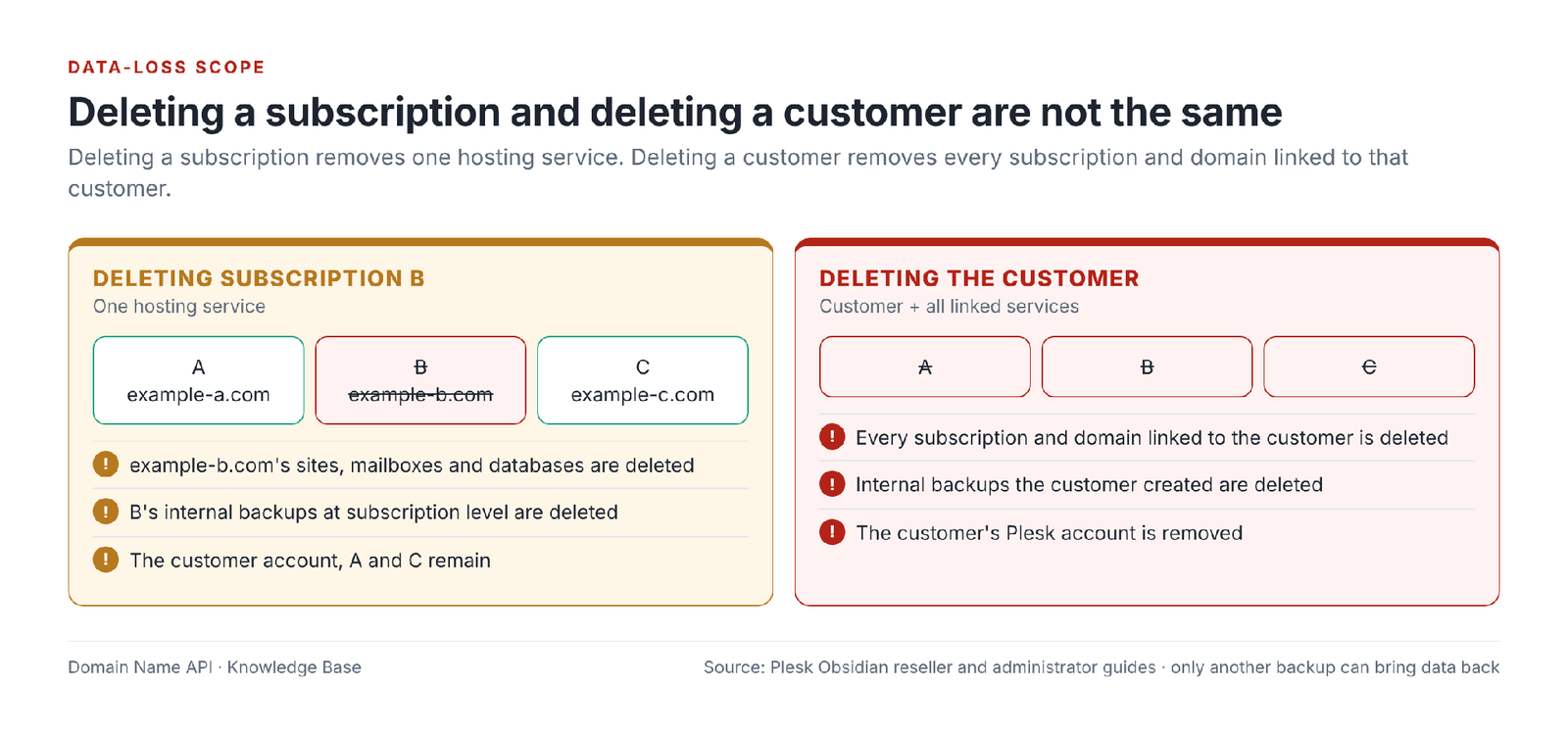
What does deleting a customer in Plesk mean?
Deleting a customer means removing the customer's Plesk account and every service linked to it. According to the Plesk reseller guide, when a customer account is removed, all subscriptions and domains associated with it are removed as well, and all backups created by the customer are removed from the internal Plesk storage. This is the widest-reaching deletion.
- When? Only when all of the customer's services have ended and each subscription has been backed up and verified separately.
- When not? When only one of the customer's services is ending. In that case, delete only that subscription.
- Path: select the customer in the Customers list and click Remove. To suspend, use Change Status › Suspend; while the customer is suspended, they can't log in to the panel and all their sites are suspended.
How do you take a safe backup before deleting?
Before deleting, take a full backup of the subscription, confirm it has completed and covers the right content, and keep a copy outside the Plesk server. This last step is essential, because deleting a subscription also deletes its internal subscription-level backups.
- Open the subscription's Backup Manager and start a full backup.
- Wait for the backup to complete; check its date and status in the list.
- Check the scope: are web files, databases and email included?
- Download the backup to your computer or confirm it's in remote storage.
- If the backup is encrypted, make sure the password is recorded.
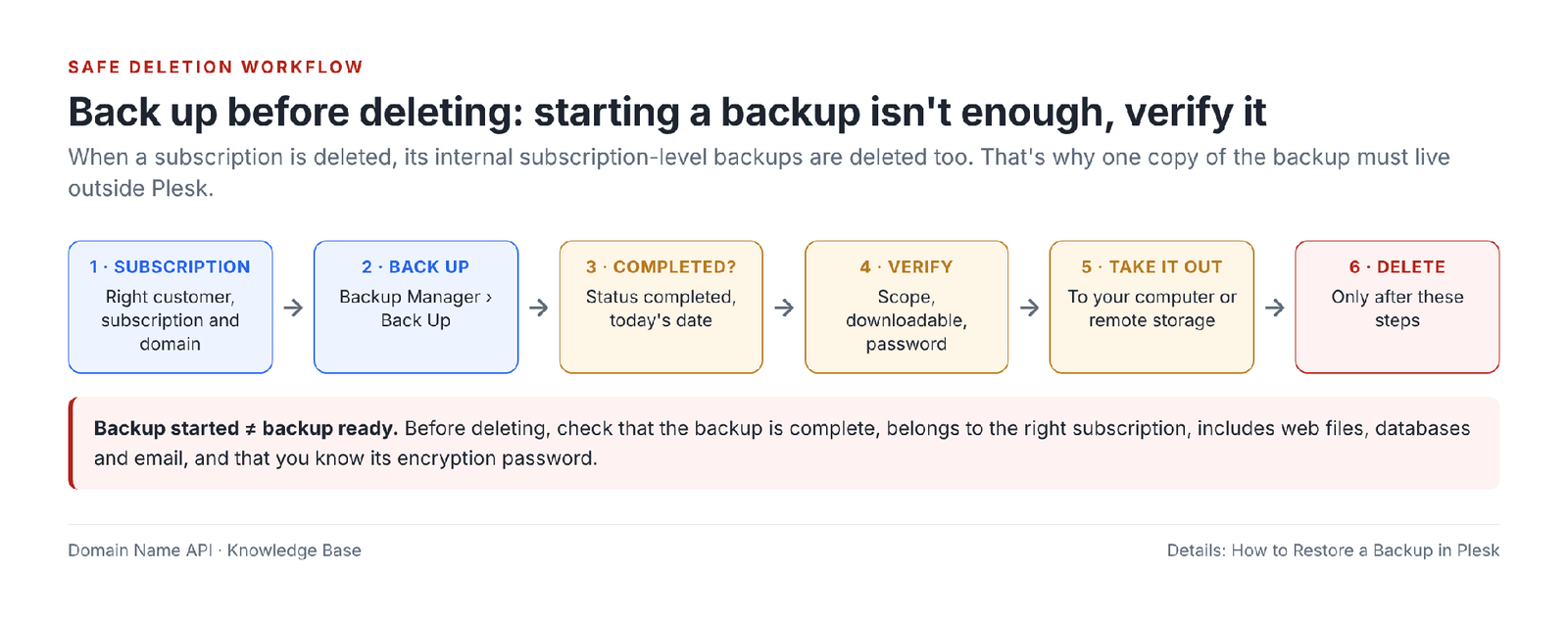
For the backup and restore steps in detail, see How to Restore a Backup in Plesk.
Having a backup doesn't mean you're safe
Starting a backup isn't enough. Before deleting, check that the backup really can be restored by asking these questions:
- Has the backup completed, with no errors or warnings?
- Is its date today's date?
- Does it belong to the right subscription?
- Are web files, databases and email included?
- Can the backup be downloaded or accessed in remote storage?
- Is the encryption password known?
- If needed, is it clear where and how it will be restored?
How do you delete a subscription in Plesk?
Select the subscription in the Subscriptions list and click Remove; Plesk asks for confirmation. Before you click Remove, tick every item in the checklist below. If even one item is unclear, don't delete; suspend the subscription and wait if needed.
PRE-DELETION CHECKLIST
☐ Right domain · ☐ Right customer · ☐ Right subscription
☐ Backup completed · ☐ Backup verified and stored outside Plesk
☐ The end of the service confirmed with the customer in writing
☐ Checked whether the domain's email is on this server · ☐ External dependencies checked (CDN, application integrations, DNS)
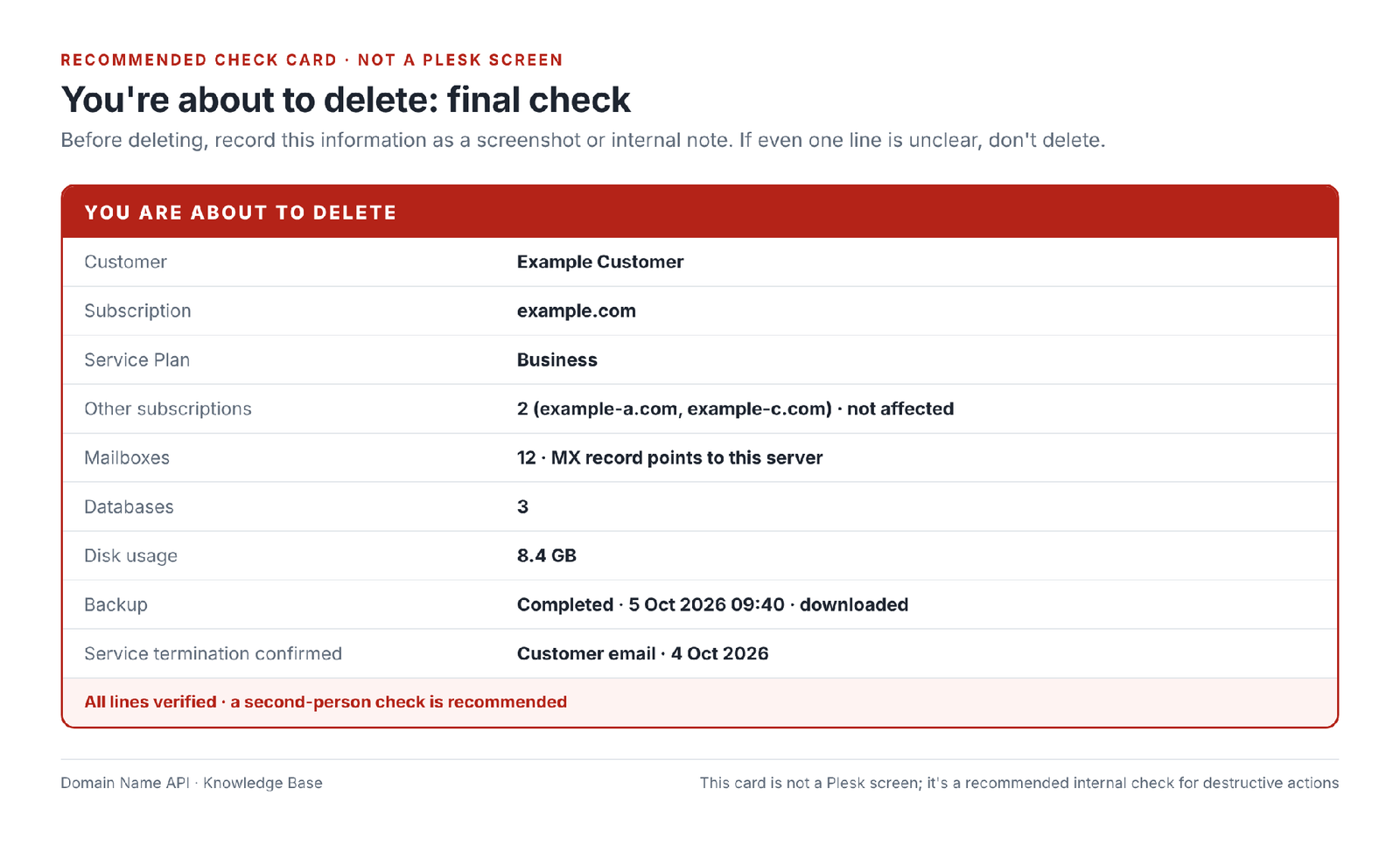
- Fill in the information on the check card above and save it as an internal note.
- In the Subscriptions list, select only the subscription to delete; make sure no other row is selected.
- Click Remove.
- In the confirmation window, read the subscription name and customer once more.
- Confirm.
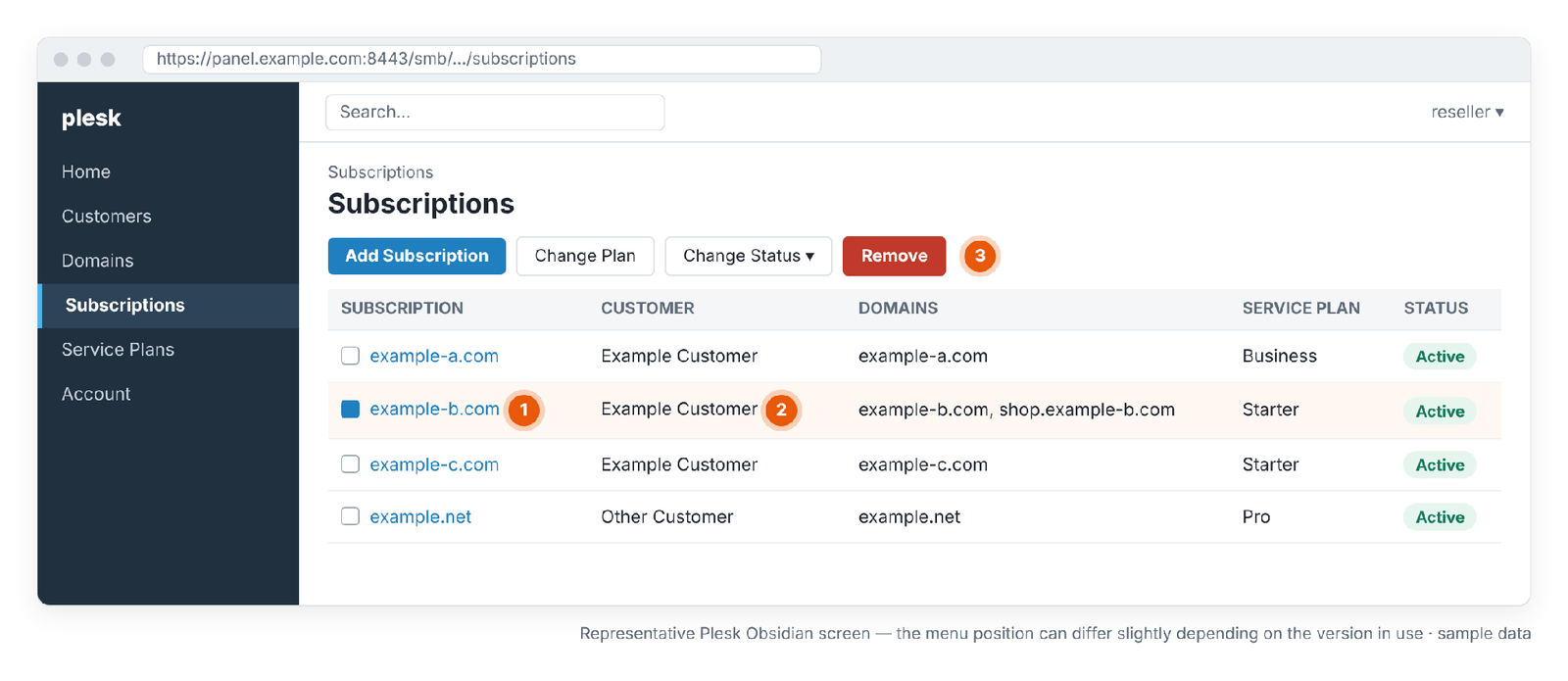
- 1 · Selected subscription: only the row to delete should be selected.
- 2 · Customer: confirm the customer once more.
- 3 · Remove: starts the permanent deletion.
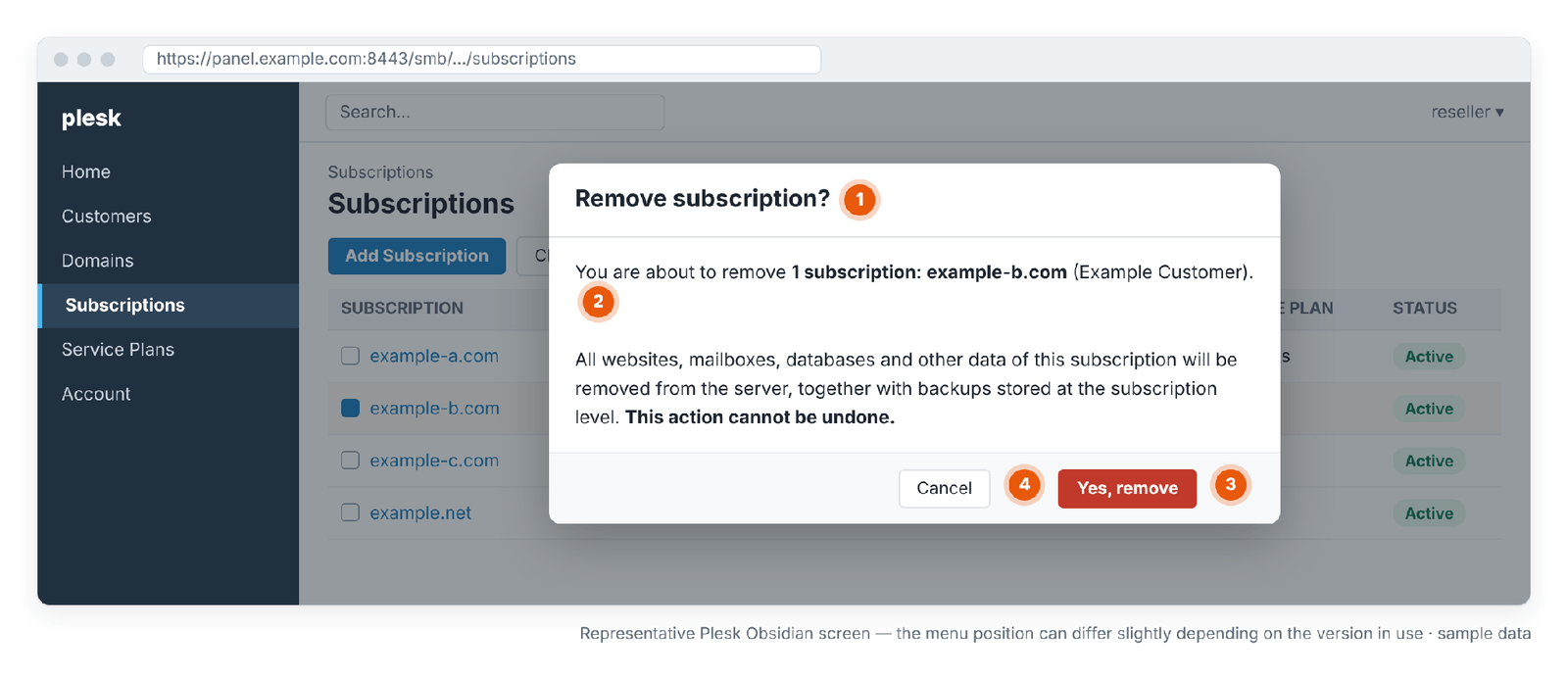
- 1 · Confirmation window: the last step before a permanent action.
- 2 · Subscription and customer to delete: confirm the names.
- 3 · Confirm button: the data is deleted permanently.
- 4 · Cancel: back out at the slightest doubt.
What should I check after deleting?
Deleting removes the hosting service in Plesk, but your work doesn't end there. Check the domain, DNS, billing and backups separately.
- Has the subscription disappeared from the list?
- Are the customer's other subscriptions Active and intact?
- Is there any unexpected domain or email impact? (if the domain's DNS was on this server, resolution may have stopped)
- Has the customer's service been closed in your own billing system?
- What will happen to the related product and its renewal in the Domain Name API service panel?
- Is the backup you took outside Plesk stored, and is its retention period clear?
Does deleting a hosting subscription in Plesk delete the domain name?
No, deleting the hosting service from Plesk and deleting the domain name's registration at the registrar are different actions. A Plesk subscription represents hosting; the domain registration is held at the registrar and registry, in Domain Name API's domain management. Deleting a subscription in Plesk doesn't automatically delete the domain registration.
But the domain can be affected
Even if the domain registration isn't deleted, if the domain's DNS is on this Plesk server, the DNS zone is removed along with the subscription; the domain stops resolving and email delivery stops. If the domain will stay in use, move its DNS to the new server or DNS provider before deleting.
| Deleting a Plesk subscription | Deleting / releasing a domain registration | |
|---|---|---|
| What does it affect? | Hosting: sites, email, databases | Ownership and registration of the domain name |
| Where is it done? | Plesk reseller panel | Domain Name API domain management |
| Does one trigger the other? | Doesn't delete the domain registration | Doesn't delete hosting data |
Does deleting hosting in Plesk stop billing automatically?
Don't assume that a deletion in Plesk cancels billing. Plesk manages the technical hosting service; the product, order, renewal and billing are managed separately in the Domain Name API service panel and in your own customer billing system. If you're ending a service, check these three places separately.
| System | What it manages | What to do when ending a service |
|---|---|---|
| Plesk reseller panel | The technical hosting service (subscription) | Delete the subscription after the backup |
| Your own billing system | The invoices and renewals you charge your customer | Close the customer's service and renewal |
| Domain Name API service panel | Your reseller product, renewal and billing | If you aren't changing your reseller plan, no action may be needed; if the product is ending, handle renewal and cancellation separately |
| Delete (Remove) in Plesk | Service cancellation (Cancel) | |
|---|---|---|
| What does it do? | Removes the technical hosting data | Ends the product's renewal or billing |
| Where? | Plesk | Billing or service panel |
| Does one cover the other? | Don't assume it stops billing by itself | May not delete the data in Plesk by itself |
Suspend or delete?
If the customer isn't leaving the service for good, or it's unclear, suspend. If the service has been ended in writing, determine the right level (subscription or customer), take and verify a backup, and only then delete.
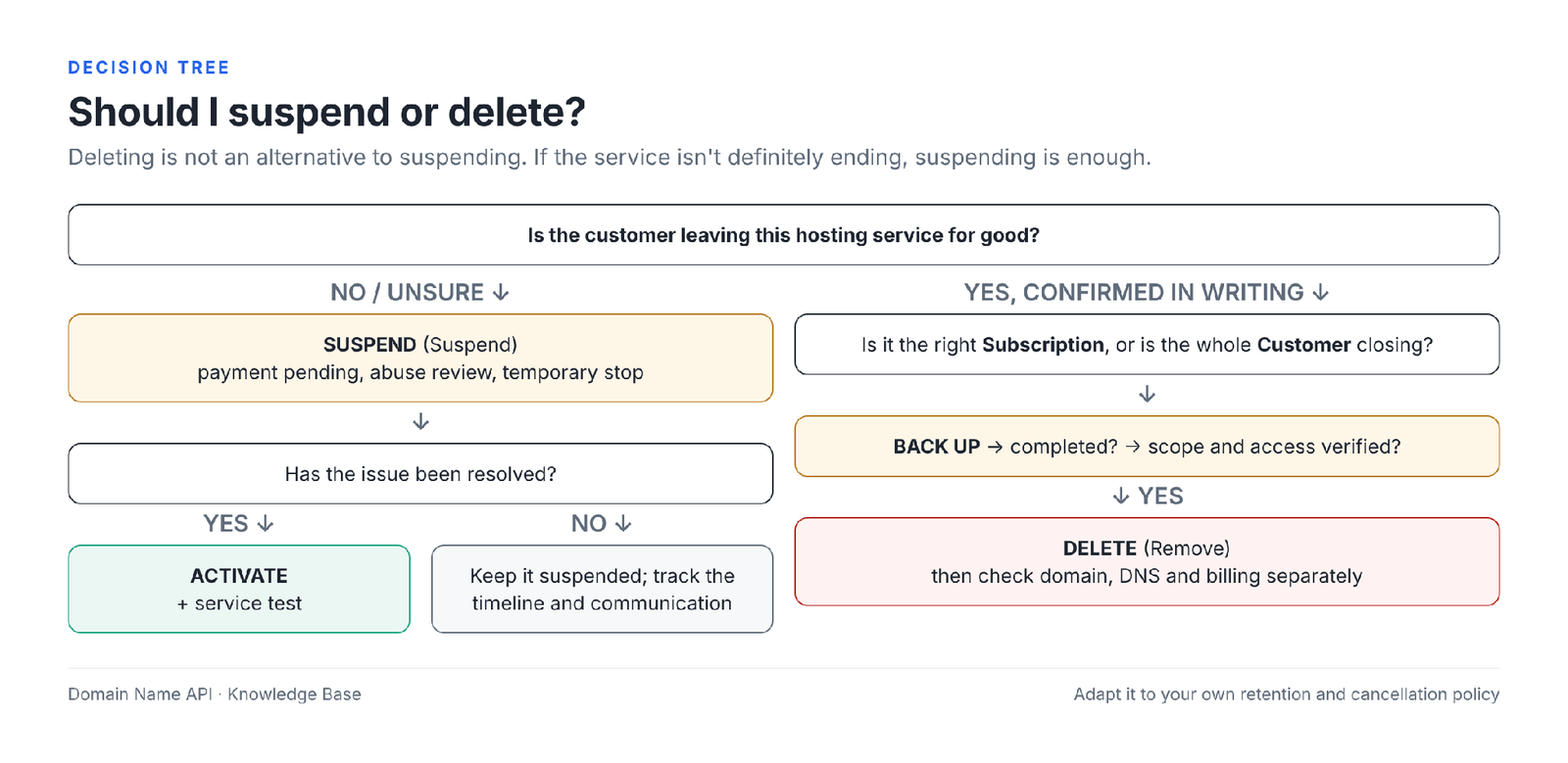
| Comparison | Difference |
|---|---|
| Suspend vs Delete | Suspend is temporary and can be undone; Delete is permanent and removes data |
| Subscription suspend vs Customer suspend | A subscription suspension stops one service; a customer suspension stops all the customer's services and panel login |
| Customer vs Subscription | A customer is the customer's account; a subscription is one hosting service given to them |
| Activate vs Restore | Activate reopens a suspended service; Restore brings deleted or damaged data back from a backup |
| Delete vs Cancel | Delete removes data in Plesk; Cancel ends the product's renewal or billing |
| Hosting deletion vs domain deletion | Deleting hosting doesn't delete the domain registration; but if DNS is on this server, resolution stops |
| Hosting deletion vs billing cancellation | Separate systems; check both separately |
Real-world scenarios
Scenario 1 — The customer hasn't paid
Symptom: The customer's invoice is overdue.
Risk: Deleting causes data loss; doing nothing keeps an unpaid service running.
Right action: After notifying the customer, suspend only the relevant subscription.
Check: The right subscription is Suspended; the customer's other services are Active.
Result: The service stops, data is kept; it can be reopened the same day once payment arrives.
Scenario 2 — Payment received
Symptom: The customer has paid and expects the site back.
Risk: Without testing after Activate, SSL, DNS or cron problems go unnoticed.
Right action: If the suspension was due to expiry, extend the date first, then Activate.
Check: The 9 post-activation checks.
Result: The site and email reopen, verified.
Scenario 3 — The customer is cancelling hosting completely
Symptom: The customer asked in writing to end the service.
Risk: Deleting without a backup is irreversible data loss.
Right action: Back up → see it complete → verify → take it out → delete. Close billing and the domain side separately.
Check: The check card is filled in; the backup is outside Plesk.
Result: The service closes; if data is requested, it can be provided from the backup.
Scenario 4 — The customer has 3 subscriptions and is cancelling one
Symptom: The customer is leaving only the example-b.com service.
Risk: If the customer is deleted, all three services are deleted.
Right action: Manage only the example-b.com subscription, not the customer.
Check: After deletion, example-a.com and example-c.com are Active.
Result: Only the requested service closes.
Scenario 5 — The subscription was activated but the site won't load
Symptom: Status is Active, the site still errors.
Risk: Needlessly suspending/reactivating again or upgrading the package.
Right action: Check DNS, SSL, the application, database and resource limits using the diagnosis table.
Check: Error logs, DNS lookup, certificate date.
Result: The real cause is found and fixed.
Scenario 6 — The subscription was suspended automatically
Symptom: Status is Suspended though nobody suspended it.
Risk: An Activate without finding the cause may lead to a new suspension the next day.
Right action: Check the expiration date, overuse setting and resource usage; look at the customer and reseller account status.
Check: Monitor for 24 hours after the cause is fixed.
Result: The suspension doesn't recur.
Scenario 7 — The wrong subscription is about to be deleted
Symptom: Two similarly named domains sit next to each other in the list.
Risk: The wrong customer's data is deleted permanently.
Right action: Fill in the check card before Remove; read the customer and domain columns; check the name again in the confirmation window.
Check: Only one row selected; name and customer correct.
Result: The mistake is caught before deletion.
Scenario 8 — Hosting will be deleted but the domain stays registered at Domain Name API
Symptom: The customer moved the site elsewhere but keeps the domain with you.
Risk: If the domain's DNS is on this server, the site and email become unreachable after deletion.
Right action: Point DNS to the new server or DNS provider first, wait for propagation, then delete the subscription.
Check: The domain resolves to the new server; MX is correct.
Result: Hosting is removed; the domain and email continue without interruption.
I deleted a Plesk subscription by mistake. What should I do?
Whether a deleted subscription can be recovered depends on the available backups and the retention policy of the hosting infrastructure. Before doing anything else, check your existing backups and, if needed, contact our support team.
- Don't create a new subscription with the same name and don't make other changes.
- Check the backups you downloaded outside Plesk or keep in remote storage. These aren't affected by the deletion.
- If you have a backup, restore it following How to Restore a Backup in Plesk.
- If you have no backup, open a support ticket without delay: the deleted subscription's name, the customer, and the date and time of the deletion.
Because internal subscription-level backups are removed together with the deletion, recovery can't be guaranteed if you don't have a backup you can access.
The most common mistakes
| Mistake | Why it's risky | The right approach |
|---|---|---|
| Confusing a customer with a subscription | All of the customer's services are affected | Act at subscription level |
| Using Delete for a temporary problem | Permanent data loss | Use Suspend |
| Deleting without a backup | No way back | Back up, verify, take it out |
| Assuming a started backup has completed | A partial or failed backup | Check the status and scope |
| Suspending the wrong subscription | Another customer's service stops | Read the customer and domain columns |
| Suspending the customer to stop one site | All the customer's sites and panel login stop | Change the subscription or the domain's site status |
| Not testing the site after Activate | SSL, DNS and cron problems go unnoticed | The 9-item check |
| Thinking deleting hosting deletes the domain | The domain renewal may be missed or DNS forgotten | Manage the domain and DNS separately |
| Assuming deleting in Plesk stops billing | Unnecessary renewals or invoices | Check the billing systems separately |
| Deleting without checking email use | The customer's email is lost | Check where MX points |
| Confusing external email with Plesk email | Needless worry or a wrong deletion | If MX points to another provider, a Plesk deletion doesn't affect email |
| Assuming a deletion can be undone | Plesk has no undo button | Treat deletion as permanent |
Troubleshooting table
| Problem | Likely cause | Where to check | First action |
|---|---|---|---|
| Suspend isn't visible | No permission or the wrong screen | Change Status menu; reseller permissions | Try from the Subscriptions list; talk to support |
| Activate isn't visible | The subscription is already Active or suspended at a higher level | Status column; customer status | Check whether the customer is suspended |
| Remove isn't visible | No deletion permission | Reseller permissions | Talk to support |
| The subscription is already Suspended | An earlier manual action or automatic suspension | Status; expiration date; overuse | Determine the cause |
| The subscription was suspended on its own | Expiry or a resource limit | Expiration date; resource usage | Fix the cause, then Activate |
| The site doesn't load after Activate | DNS, SSL, application, cache | Diagnosis table | Follow the steps in that section |
| Email isn't working | MX/DNS, mail settings | MX record; mail logs | Verify MX and DNS |
| FTP isn't working | Still suspended or wrong credentials | Status; FTP accounts | Check the status and credentials |
| Database connection error | Connection details, service | Application configuration; Databases | Verify the details |
| SSL error | Certificate couldn't renew during the suspension | Certificate expiry date | Renew the certificate |
| DNS goes to the old server | Cache or a wrong record | DNS lookup | Fix the record; wait for the TTL |
| The subscription can't be deleted | Permission, an operation in progress or a lock | Error message | Open a ticket with the error message |
| The customer can't be deleted | Permission or linked objects | Error message | Open a ticket with the error message |
| The backup doesn't complete | Disk space, large data, timeout | Backup Manager status and log | Check space; try again |
| The subscription doesn't appear in the list | A filter, another customer or deleted | Search; Customers | Clear the filter; search under the customer |
| The subscription is under the wrong customer | Wrong assignment | Customer column | Fix the owner with Change Subscriber |
| Suspended due to plan/resources | Overuse is not allowed | Plan Resources; usage | Reduce usage or raise the limit |
| Insufficient Plesk permission | Scope of reseller permissions | Reseller permissions overview | Talk to support |
| The billing panel and Plesk show different status | Separate systems; automation delay or a manual action | Both panels | Decide which is correct and align the other |
When should I open a support ticket?
Open a support ticket if suspending, reactivating or deleting didn't turn out as expected, if a button isn't visible, if a subscription keeps getting suspended with no cause you can find, or if you deleted something by mistake. Don't lose time after an accidental deletion.
Include in the ticket: the domain, customer, subscription, the action you took (Suspend, Activate, Remove), the date and time, the current status, the full error message and a screenshot.
Frequently asked questions
How do I suspend hosting in Plesk?
In the reseller panel, open the Subscriptions list, select the relevant subscription and choose Change Status › Suspend. Once the status is Suspended, the website, FTP and email become unavailable from the internet while the data stays on the server. Confirm the customer, subscription and domain before you act.
How do I suspend a subscription?
Select the subscription in the Subscriptions list and choose Change Status › Suspend, or use the Suspend link on the subscription's page. The action affects only that subscription; the customer's other subscriptions and customer account keep working.
Is a suspended site deleted?
No. Suspending is a status change and, according to Plesk's documentation, doesn't delete website files, email, databases or backups. The site becomes unavailable to visitors; when the subscription is reopened with Activate, it continues with the same content.
Are a suspended hosting account's files kept?
Yes. During a suspension, files, mailboxes and databases stay on the server. Suspending doesn't delete data; the action that removes data is Remove (delete). For long suspensions it's still good practice to keep a current backup.
Does a suspended hosting account keep receiving email?
When a subscription is suspended, according to Plesk's documentation the email service isn't available to internet users; existing messages are kept. Whether messages sent during the suspension bounce back depends on the mail server configuration. If email needs to keep working, consider changing only the website status instead of the subscription.
Can I connect to a suspended hosting account over FTP?
No, while the subscription is suspended the FTP service isn't available to internet users. Files aren't deleted; FTP access returns when the subscription is reactivated. If only the domain's website status is set to Suspended, FTP access to the files continues.
How do I reopen a suspended subscription?
Select the subscription in the Subscriptions list and use Change Status › Activate. If the suspension was caused by expiry, extend the expiration date first; otherwise the subscription may be suspended again the next day. Then test the site, HTTPS, email and database.
I activated it, so why won't the site load?
The most common causes are a browser or CDN cache, an SSL certificate that couldn't renew during the suspension, a wrong DNS record, an application or database error, and expiry or a resource limit that causes a new suspension. Check the Status column, DNS, the certificate date and the error logs.
What's the difference between a customer and a subscription?
A customer is the customer's Plesk account and owns all of the customer's services. A subscription is one hosting service given to that customer. A customer can have several subscriptions, so actions should usually be taken at subscription level rather than customer level.
What's the difference between suspending a customer and suspending a subscription?
Suspending a subscription stops only that service's web, FTP and email. Suspending a customer suspends all of the customer's sites and prevents the customer from logging in to Plesk. To stop one service, use the subscription level.
What happens if a subscription is deleted?
The subscription's websites, mailboxes, databases, FTP users, scheduled tasks and internal subscription-level Plesk backups are deleted from the server. The customer account and the customer's other subscriptions remain. The domain registration and billing are separate from this action.
What happens if a customer is deleted?
According to the Plesk reseller guide, deleting a customer also deletes all subscriptions and domains linked to it, and removes the backups the customer created from the internal Plesk storage. This is the widest-reaching deletion; do it only when all of the customer's services have ended and each one is backed up.
Are emails deleted when a subscription is deleted?
If email is hosted on this Plesk server, yes: the subscription's mailboxes and the messages in them are deleted. If the domain's MX record points to another email provider, email is kept there and isn't affected by the Plesk deletion. Check the MX record before deleting.
Is the database deleted when a subscription is deleted?
Yes. The subscription's databases and database users are deleted with the subscription. If the database is needed, take a full backup of the subscription or export the database separately before deleting, and keep it outside Plesk.
Is the domain name deleted when hosting is deleted?
No. Deleting a subscription in Plesk removes the hosting service; the domain registration is held separately at the registrar, in Domain Name API's domain management. However, if the domain's DNS is on this Plesk server, the DNS zone is deleted too, so the domain stops resolving and email delivery stops.
Does billing stop when hosting is deleted?
Don't assume so. Plesk manages the technical hosting service; the product, renewal and billing are managed separately in the Domain Name API service panel and in your own billing system. When ending a service, check renewal and cancellation in each of these systems separately.
Do I need a backup before deleting?
Yes. When a subscription is deleted, its internal subscription-level backups are deleted too. So before deleting, take a full backup, confirm it has completed and covers the right content, and keep a copy on your computer or in remote storage.
Do Plesk backups remain after deletion?
Internal Plesk backups created at subscription level are deleted when the subscription is deleted; when a customer is deleted, the customer's backups are removed too. Backups downloaded to your computer or kept in remote storage aren't affected. Retention of server-level backups depends on the hosting infrastructure's policy.
Can hosting deleted by mistake be brought back?
Recovery depends on the available backups and the hosting infrastructure's retention policy. If you have a backup stored outside Plesk, it can be restored. If you don't, open a support ticket right away without making other changes; recovery can't be guaranteed.
Why is a subscription suspended automatically?
In Plesk, the two main causes are expiry and exceeding a resource limit on plans that don't allow overuse. Suspending a customer also suspends all their subscriptions. Your own billing system may also suspend automatically on late payment; check its records.
What's the difference between Suspend and Delete?
Suspend is temporary: the service becomes unavailable from outside but the data is kept, and it reopens with Activate. Delete (Remove) is permanent: the subscription's data and internal subscription-level backups are deleted; only another valid backup can bring them back.
How do I suspend only one of a customer's sites?
If the site is a separate subscription, suspend only that subscription. If the site is an extra domain in the same subscription, set only that domain's website status to Suspended; according to Plesk's documentation, the site then goes offline but email keeps working.
What's the difference between suspending and disabling a website?
At domain level, with Suspended, visitors see a 503 page and email keeps working. With Disabled, visitors see the Plesk login page and the email service doesn't work. Neither deletes files, email or databases on the server.
I activated an expired subscription, so why was it suspended again?
Activate only changes the status; it doesn't fix the expiry. A subscription activated without extending its expiration date may be suspended again the next day. Update the subscription's or plan's expiration date first, then use Activate.
Related guides
- Creating Your First Customer and Subscription in Plesk
- How to Create a Service Plan in Plesk
- Plesk Reseller Hosting Resource Usage and Package Limits
- How to Restore a Backup in Plesk
- How to Migrate a Website to Plesk
Did suspending, reactivating or deleting a subscription not turn out as expected?
Open a ticket with our support team. Include the domain, customer, subscription, the action you took, date and time, status, error message and a screenshot.
Open a Support TicketSell hosting under your own brand
Explore Plesk Reseller Hosting packages to sell hosting under your own brand.
Explore Plesk Reseller Hosting